New AM5 BIOS updates now available
Printed From: ASRock.com
Category: Technical Support
Forum Name: AMD Motherboards
Forum Description: Question about ASRock AMD motherboards
URL: https://forum.asrock.com/forum_posts.asp?TID=113447
Printed Date: 28 Sep 2026 at 5:51pm
Software Version: Web Wiz Forums 12.08 - https://www.webwizforums.com
Topic: New AM5 BIOS updates now available
Posted By: Xaltar
Subject: New AM5 BIOS updates now available
Date Posted: 09 Feb 2026 at 11:07pm

Official Article https://www.asrock.com.tw/news/index.asp?iD=5744" rel="nofollow - here . We can use this thread to gather information on 4.07 and 4.10 BIOS versions. Please feel free to share your experiences here. I have been following the r/ASRock redit and keeping an eye out for mentions of issues with the new BIOS versions. I prefer to keep discussions on the subject here on the forums without all the clutter that tends to happen on redit. With that said I would like those reporting issues here to keep the following thread rules in mind. 1. Report your BIOS version, CPU approximate age and if you are using EXPO/XMP. Additionally please list your complete system specs including PSU, RAM, GPU, CPU cooling solution and storage devices. 2. Please try to keep your replies on topic, any completely off topic replies will be deleted. 3. Any post that contributes nothing other than complaints or rage will also be deleted. 4. Any posts mocking other users for any reason will be removed and additionally result in a ban depending on severity. This thread is meant to provide information to our forum community as well as give ASRock a valuable localized resource regarding this issue. For those looking to vent frustrations please make a post in the https://forum.asrock.com/forum_posts.asp?TID=113253&PID=198333ð°š½" rel="nofollow - AMD Motherboards thread and request a thread for your specific case. I never deny forum members the right to express their frustration/anger when something has gone wrong for them but this thread is not the place for it. ------------- 
|
 ASRock Official wrote:
Replies:
Posted By: Tikimotel
Date Posted: 17 Feb 2026 at 1:26am
|
No X670E, yet ? Does the BIOS also update the Secure boot "Windows UEFI CA 2023" ? "Windows UEFI CA 2010" , this will end this year 2026!! |
Posted By: eccential
Date Posted: 17 Feb 2026 at 5:07am
|
Most, if not all, AM5 boards should already have the newer Secure Boot Key stuff. Most ASRock AM4 boards got the updates late last year. X300M-STX (also known as DeskMini) got it early this year. |
Posted By: QMarc
Date Posted: 18 Feb 2026 at 4:19pm
|
What about DeskMini X600? It is still at AGESA ComboAM5 1.2.0.3g and isn't even listed at https://www.asrock.com/support/index.asp?cat=BIOS" rel="nofollow - https://www.asrock.com/support/index.asp?cat=BIOS while the old X300 is??? |
Posted By: Xaltar
Date Posted: 18 Feb 2026 at 6:35pm
|
I suspect we will see a lot more boards supported after celebrations for the Lunar New Year are concluded in Taiwan. This is why I made this thread, so we can track which boards are still waiting then ASRock can see them listed here based on demand rather than just a list of models in house. Maybe it will help with prioritizing which boards work on next. -------------
|
Posted By: Dr_KrillE
Date Posted: 19 Feb 2026 at 2:48am
|
Hi! Tried the 4.07.AS01[Beta] on Taichi X870E and my rtx5090 could no longer display 240Hz in 5120x1440p. It switched to 120Hz and when I changed it back to 240Hz the resolution changed to 3840x1440p. Flashed bios 4.04 and I'm back to 240Hz 5120x1440p, so something is not kosher with the 4.07 beta. |
Posted By: Xaltar
Date Posted: 19 Feb 2026 at 2:59am
|
Thanks for the info Dr_KrillE, could you share your GPU model and brand so I can ask ASRock to check out this thread. They will need your full system specs. That said, you may want to wait for 4.10 for your board, it may be resolved there. I will pass the info along anyway incase they don't already know about it but that will have to wait till next week when they all get back from their Lunar New Year holiday period. -------------
|
Posted By: Dr_KrillE
Date Posted: 19 Feb 2026 at 4:07am
|
Hello Xaltar! The GPU is an ASUS ROG Astral LC GeForce RTX??5090 32GB GDDR7 OC Edition. I'm more than happy to help with more info if needed. |
Posted By: Koolpi
Date Posted: 21 Feb 2026 at 10:48pm
|
Hi everyone! I?™m currently setting up a system with a Ryzen 7 9800X3D on the ASRock B650 PG Lightning (the ATX model). ?‹I?™ve noticed that the Micro-ATX version (B650M PG Lightning) received the v4.10 update with AGESA 1.3.0.0a on February 12th to address the recent boot failures and stability issues with Zen 5 X3D chips. However, the support page for the full ATX board is still only showing v4.03 from December. ?‹Does anyone here have any info on when the stable 4.10 or a Beta (like 4.07.AS01) will be released for the ATX version? ?‹I want to make sure I have the safety fixes for the 9800X3D ready before I mount the CPU. Thanks in advance! |
Posted By: Xaltar
Date Posted: 22 Feb 2026 at 3:08am
|
As far as I am aware all AM5 boards will receive the 4.10 update. Last I heard from my contacts at ASRock, they are hard at work getting them all ready for release. I suspect over the next few weeks we will see the remainder go up on ASRock's website. -------------
|
Posted By: Xaltar
Date Posted: 24 Feb 2026 at 4:28pm
I have passed along your bug report, I will let you know if ASRock requests any further info  -------------
|
Posted By: Xaltar
Date Posted: 26 Feb 2026 at 2:25am
|
I have been following the r/ASRock redit and keeping an eye out for mentions of issues with the new BIOS versions. I prefer to keep discussions on the subject here on the forums without all the clutter that tends to happen on redit. With that said I would like those reporting issues here to keep the following thread rules in mind. 1. Report your BIOS version, CPU approximate age and if you are using EXPO/XMP. Additionally please list your complete system specs including PSU, RAM, GPU, CPU cooling solution and storage devices. 2. Please try to keep your replies on topic, any completely off topic replies will be deleted. 3. Any post that contributes nothing other than complaints or rage will also be deleted. 4. Any posts mocking other users for any reason will be removed and additionally result in a ban depending on severity. This thread is meant to provide information to our forum community as well as give ASRock a valuable localized resource regarding this issue. For those looking to vent frustrations please make a post in the https://forum.asrock.com/forum_posts.asp?TID=113253&PID=198333ð°š½" rel="nofollow - AMD Motherboards thread and request a thread for your specific case. I never deny forum members the right to express their frustration/anger when something has gone wrong for them but this thread is not the place for it. -------------
|
Posted By: Xaltar
Date Posted: 26 Feb 2026 at 6:00pm
|
Yesterday 25/2/2026 new BIOS were added in version 4.10: 1. B650 PG Lightning 2. B650 PG Lightning WiFi 3. B650 Steel Legend WiFi 4. B850 LiveMixer WiFi 5. B850I Lightning WiFi 6. B850M Riptide WiFi 7. B850M Steel Legend WiFi 8. X870 LiveMixer WiFi 9. X870 Nova WiFi 10. X870 Taichi Creator 11. X870E Nova WiFi 12. X870E Taichi 13. X870E Taichi Lite Also today new bios 17.0.1 was added: 1. Z790 Pro RS WiFi https://www.reddit.com/r/ASRock/comments/1rf655k/new_bios_batch_4101701/" rel="nofollow - Source from user Miserable-Offer-399 on redit. -------------
|
Posted By: pp-tol
Date Posted: 28 Feb 2026 at 12:49am
| today (27 Feb 2026) there is still no working link for new BIOS (at least for X870E Taichi Lite). No matter what country/language you have selected, you only get the BETA. |
Posted By: Xaltar
Date Posted: 28 Feb 2026 at 12:55am
|
Hi pp-tol, check the top of this page: https://www.asrock.com.tw/support/index.asp?cat=ComboAM5" rel="nofollow - https://www.asrock.com.tw/support/index.asp?cat=ComboAM5 It's the first one on the list as of the time of posting this. Let me know how you fare with the update. -------------
|
Posted By: pp-tol
Date Posted: 28 Feb 2026 at 1:03am
|
There I have been ??and thats why I have posted?? If you click on ?œdownload??in your link, you will get to to the ?œstandard support page??of the selected board, localized by the language/country you came from. And here you only find the BETA, tried even Chinese Taiwan... |
Posted By: pp-tol
Date Posted: 28 Feb 2026 at 1:08am
| If you take the short via https://asrock.com/support/index.us.asp?cat=BIOS" rel="nofollow - https://asrock.com/support/index.us.asp?cat=BIOS you wont find the new versions you have listed in post #3 |
Posted By: Xaltar
Date Posted: 28 Feb 2026 at 1:28am
|
Yeah, probably because they are trying to get them out quick. They haven't been added to all the relevant product pages yet. It will happen once the pressure is off to get them all out I am sure. The page I linked is where they will all be put up first, after that they will be updated where necessary on the rest of the website I think. Thanks for the heads up -------------
|
Posted By: Xaltar
Date Posted: 03 Mar 2026 at 9:25pm
|
New round of updates. The latest are now at the top of the page to make searching easier for those still waiting. X670E Taichi Carrara X670E Taichi X670E Steel Legend X670E Pro RS X670E PG Lightning B850M-X B650I Lightning WiFi B650E Taichi Lite B650E Taichi A620I Lightning WiFi X870E Taichi OCF https://www.asrock.com.tw/support/index.asp?cat=ComboAM5" rel="nofollow - https://www.asrock.com.tw/support/index.asp?cat=ComboAM5 -------------
|
Posted By: Xaltar
Date Posted: 04 Mar 2026 at 4:04pm
Hi Techguy32, thanks for your report. I have made a thread for you https://forum.asrock.com/forum_posts.asp?TID=113463" rel="nofollow - here so we can look at what could be causing it. -------------
|
Posted By: Dr_KrillE
Date Posted: 04 Mar 2026 at 8:13pm
|
Hi Y'all! Just a little feedback on BIOS v.4.10 I can report that the problem with GPU and res/update freq is gone, and it works as it should again. After a bit of testing it seems stable with both PBO/CO and EXPO enabled. In the act of testing some mem overclocking and that as well seems to work fine. So no issues as of yet ;-) BR ------------- //Dr.K ASROCK X870E Taichi AMD 9950X / Arctic LF3 420mm AIO G.Skill Trident Z5 Neo DDR5-6400-64GB-CL30 ASUS ROG Astral LC RTX5090 OC Corsair MP700 Pro 1TB BE QUIET! Dark Power Pro 13 Streacom BC1 V2 |
Posted By: Xaltar
Date Posted: 04 Mar 2026 at 8:17pm
|
Awesome, thanks for the update Dr_KrillE -------------
|
Posted By: Xaltar
Date Posted: 06 Mar 2026 at 12:02am
|
Latest round of updates: B650M-HDV/M.2 White B650M PG Riptide WiFi White B650M PG Riptide WiFi B650M PG Riptide A620M-HDV/M.2 A620M Pro RS WiFi A620M Pro RS B650E Steel Legend WiFi B650E PG-ITX WiFi B650E PG Riptide WiFi B650 LiveMixer https://www.asrock.com.tw/support/index.asp?cat=ComboAM5" rel="nofollow - https://www.asrock.com.tw/support/index.asp?cat=ComboAM5 -------------
|
Posted By: Xaltar
Date Posted: 17 Mar 2026 at 12:45am
|
Just the one update on Thursday the 12th of March B850M-X R2.0 Is anyone still waiting for an update for their board? -------------
|
Posted By: NDRE28
Date Posted: 17 Mar 2026 at 10:23pm
|
Hi! BIOS v4.10 (AGESA 1.3.0.0a) increases the UEFI/BIOS menu resolution from 1024x768 to 1920x1080 (Full HD) on the X670E Taichi. |
Posted By: QMarc
Date Posted: 18 Mar 2026 at 4:22pm
|
> Is anyone still waiting for an update for their board? DeskMini X600 is still at BIOS 4.14 / AGESA ComboAM5 1.2.0.3g. Well I suppose the X600 chipset-less design is different, hence the different version numbering scheme. But they already skipped the AGESA ComboAM5 1.2.7.1 update, I wonder if they already dropped it off their support list... |
Posted By: Xaltar
Date Posted: 18 Mar 2026 at 6:08pm
|
Interesting, I don't think I have seen a single report of boot issues (00 code or DRAM/CPU LEDs lit) on x600 based systems. Given they were designed for thermal management not outright performance it could be that the update isn't needed. I will see what I can find out. -------------
|
Posted By: Xaltar
Date Posted: 19 Mar 2026 at 3:27pm
|
The X600 ITX contained in the DeskMeet has already received the AGESA 1.3.0.0a update so the X600 STX in the DeskMini should receive an update too. -------------
|
Posted By: JamesL
Date Posted: 21 Mar 2026 at 12:32am
|
I?™m encountering critical overclocking stability issues with my ASRock X870E Taichi OCF (BIOS 4.10) paired with an AMD Ryzen 9 9700X and Biwin Origin Code 48GB?2 DDR5 memory. Here?™s a detailed breakdown: Memory Overclocking (8000+ MT/s): ??A2 Channel (2 DIMMs): Boots and tests stable at 8400 MT/s without issues. ??B2 Channel (2 DIMMs): Fails to boot even at 8000 MT/s (no POST). ??Dual Channel (A2+B2): Cannot boot at 8400 MT/s; struggles heavily to pass stability tests even at 8000 MT/s. ??Memory Refresh Mode: The option to set Normal mode is locked/unavailable in BIOS. CPU BCLK Overclocking: ??CPU base clock (BCLK) can only be stable at 105 MHz or lower. Any value above 105 MHz triggers error code 22 on POST. Memory Divider Overclocking: ??Attempting to reach 8400 MT/s via memory divider results in an immediate error code C5. Has anyone else experienced similar issues with this CPU/motherboard/BIOS/memory combination? Any suggestions for troubleshooting or BIOS settings to resolve these stability problems? Optional Short Version |
Posted By: Xaltar
Date Posted: 21 Mar 2026 at 2:23am
|
I am afraid I haven't been active in the overclocking scene for quite some time. I don't have much to offer suggestion wise. What you describe does make sense from an overclocking perspective however. It's always easier to overclock a single RAM module than a pair. The fact that your B2 channel isn't able to match the A2 channel tells me that your IMC's A channel is more capable than channel B. If this is the case then it's highly likely that you won't be able to push it any further in dual channel regardless of settings. You would need another CPU with a stronger IMC. Back when I used to chase overclocking records I would often go through over 20 CPUs to find one that could handle the settings needed to achieve my goal. From what I have seen of DDR5 clocks on AM5, 8000 MT/s is pretty decent but I am guessing by the fact you picked up an OCF board that you are not looking to settle for decent. If you have access to more CPUs to try that would be my first stop. If not I have a feeling you have hit the limit of the IMC on that CPU. My guess would be that you will find stability probably at around 7600 MT/s in dual channel. Combining both channels never yields the same clocks as the weakest channel due to the added load and heat going through the IMC. Typically you can expect between 80% to 90% of the maximum stable clock of the weakest channel when using dual channel. I am sure this isn't what you wanted to hear but it's all I have to offer. There may be other forum members that have more recent experience and possibly some tricks I am unaware of. You can additionally ask ASRock themselves by opening a support ticket: https://tw.asrock.com/events/tsd.asp Though I suspect they won't be able to help much if at all. Good luck -------------
|
Posted By: JamesL
Date Posted: 21 Mar 2026 at 10:10am
|
Thanks brother! I?™ve already tried two Ryzen 9 9700X CPUs, and both ended up with the exact same result. The current CPU I?™m using can run DDR5 16G?2 at 8400 C34 with tight timings and pass all stability tests on another motherboard, and it can even boot at 8600 MT/s (maybe 8800 too). So right now I?™m not sure if it?™s still an IMC limitation of the CPU, a motherboard compatibility issue, or just some BIOS settings/ODT configurations that I haven?™t nailed down yet. I?™ll keep experimenting further. Appreciate the help! |
Posted By: Xaltar
Date Posted: 22 Mar 2026 at 1:53am
|
Good luck, the battle is half the fun -------------
|
Posted By: VVi3ard
Date Posted: 22 Mar 2026 at 3:16am
|
Video and photo: https://drive.google.com/drive/folders/16Z132HFweaXrygJH4KnkHwe78OsvymyM?usp=sharing" rel="nofollow - https://drive.google.com/drive/folders/16Z132HFweaXrygJH4KnkHwe78OsvymyM?usp=sharing CPU: 9700X AMD64 Family 26 Model 68 Stepping 0 RAM: FPM5GM9505 (KingBank Dark Star Blade DDR5 UDIMM 6800MHz Dark Heatsink (Hynix M-die C32) 2x24 ?? (@6000, manual timings ZenTimings_Screenshot.png) MB: ASRock B850 Pro RS Video: Nvidia 4070 Power: Be Quiet! Pure Power 12 850W Atx 3.1 80Plus Gold (Bp004Eu) Age: 9600X - ~7 month. 9700x ~4 month. First, my 9600X stopped working. I put the PC into sleep mode before bed, and in the morning it wouldn't turn on again, with a CPU post code. I tried a lot of things, including FlashBack and clearing the CMOS, but nothing helped. I bought a 9700X, installed it, and everything worked right away. Later, BIOS 4.03 came out, and I updated it via FLASH INSTANT, but the PC wouldn't boot; it had a black screen and froze on the CPU. I spent three hours trying to get it to work (swapping memory, clearing CMOS, and trying to flash version 4.03 via FlashBack. Sometimes, after clearing CMOS, an image would randomly appear. I could even enter the BIOS or even start the system booting. But then everything would freeze, display random errors, or just freeze). I was very upset because I thought the 9700X was broken too. But then I decided to try reverting BIOS back to 3.40 via FlashBack, and lo and behold, everything worked correctly right away. The first boot was slow (about 40 seconds), but then everything worked fine. Then version 4.07.AS01 was released, and I didn't install it. Today I saw that version 4.10 was released and decided I should try installing it. And I ended up having exactly the same problems as before, only the system booted intermittently. Immediately after the update, the system froze on DRAM. I powered it off and back on. Same thing. I powered it off, cleared the CMOS, powered it on, and the image appeared. I was even able to enter the BIOS, clicked "Load EFI Defaults," and when I exited, I clicked "Save," after which the system froze. Powering it on again results in a black screen and CPU (it's completely unclear where it is, because the first two lights are on at the same time). I've tried many options. Immediately after clearing the CMOS, the system boots, passes all POST codes, but then randomly it either freezes on the boot screen, or sometimes it starts loading but immediately crashes with the ACPI_BIOS_ERROR 0xA5 error. After the freeze and a second reboot (with a power outage), everything freezes on the white VGA LED. This continues until I clear the CMOS. I also tried re-flashing 4.10 using FlashBack, with the same result. Sometimes I can enter the BIOS after flashing, but sometimes I get a black screen. As soon as I flash 3.40 via FlashBack, everything starts working correctly. I tried flashing 3.40, resetting the settings, saving, and then entering the BIOS again to flash 4.10. It still freezes on boot after flashing 4.10 (or it enters the BIOS but freezes when trying to save the BIOS settings). I don't know what to do anymore; I have no warranty :( And there are no service centers in my country. Video and photo: https://drive.google.com/drive/folders/16Z132HFweaXrygJH4KnkHwe78OsvymyM?usp=sharing" rel="nofollow - https://drive.google.com/drive/folders/16Z132HFweaXrygJH4KnkHwe78OsvymyM?usp=sharing |
Posted By: Xaltar
Date Posted: 22 Mar 2026 at 4:21am
|
This is likely caused by a known issue with KingBank RAM. KingBank has an error in it's firmware that causes an issue with 4.xx BIOS versions. The issue is that "Mixed Mode" in previous versions was set to normal by default but on the newer 4.xx BIOS the default is "auto/default" which = enabled. Check under: OC Tweaker-> DRAM-> Change Refresh Mode = set to Normal See if that resolved your POST issue. It also explains your previous issues after updating. You can open a support ticket with KingBank if you like, they may be able to help resolve the issue at the firmware level. That said, flashing RAM firmware can result in bricking the RAM and needing to replace it so the workaround may be the safer bet. Mixed mode is the superior setting but owing to the issue in KingBank RAM's firmware it won't work as intended and causes the issue you described. -------------
|
Posted By: chanel303
Date Posted: 23 Mar 2026 at 5:55am
| you are misleading the user. In firmware version 4.10, the usual asrock refresh mode does not turn on under any circumstances, this is a bios problem. |
Posted By: Xaltar
Date Posted: 23 Mar 2026 at 8:53am
|
AGESA 1.3.0.0a introduced bank refresh modes and defaults to "fine granularity or mixed mode" when set to auto. This is not ASRock specific. I believe some brands have released updates to force the default to "normal" mode when auto is selected, as a workaround for the issue. The problem is caused by RAM manufacturers not board manufacturers or AMD. That said, a BIOS level tweak can be implemented as a workaround. I have no information as to whether ASRock will do so however. The default, as set by AMD in their AGESA, is intended to provide optimum performance by utilizing the best secondary timings the RAM supports (TRFC1/2 and TRFCSB). On some kits these timings are improperly inputted or are simply incorrect, KingBank being one of the manufacturers with the issue. In prior BIOS versions (3.xx and earlier) these incorrect timings were ignored. There is a much better explanation here: Sorry if I wasn't clear enough in my description but this is the issue I was referring to. -------------
|
Posted By: VVi3ard
Date Posted: 25 Mar 2026 at 10:53pm
Before updating to 4.10, I wanted to check where this setting was in 3.40 so I could quickly change it (since the PC could freeze at any moment). But I didn't find this setting in 3.40. Will it only appear in 4.10? And another question: after I manage to switch to Normal, will I be able to set the correct timings (TRFC1/2 and TRFCSB) in the timings settings and then switch back to Auto? Or are these timings not editable? And is there a way to find out which timings are "normal"? |
Posted By: Xaltar
Date Posted: 25 Mar 2026 at 11:38pm
|
AFAIK the function was added with AGESA 1.3.0.0a so the setting likely won't exist in 3.40. As for checking your timings, use a tool like CPUz or ZenTimings to see what your system is currently set to. ZenTimings will allow you to read the RAM's stored settings but bare in mind, some of these are incorrect (hence the POST issue). You will want to just look at what settings are currently being used by the system and are working under 3.40. I believe you should be able to input the correct timings and thus enable fine granularity once done (best performance and efficiency). If you are able to get the system to POST even with the issue then you can experiment a little until you find what works best for you. There are a lot of tutorials out there on getting things set up safely and with the best possible performance within that safe range. Unfortunately I am not overly familiar with fine tuning DDR5 as all my current systems use DDR4. You may also want to consider opening a support ticket with KingBank and see what they advise you to do. Good luck -------------
|
Posted By: VVi3ard
Date Posted: 26 Mar 2026 at 4:07am
|
That's the question. You're writing that Kingbank has incorrect RFC timings. But I'm looking at the SPD timings on 4800 (2400) and don't see anything out of the ordinary. I'm using roughly the same timings now on 3.40, only on 6000 (3000), and everything works perfectly. That's why I'm not entirely sure what specific bad timings you're talking about. 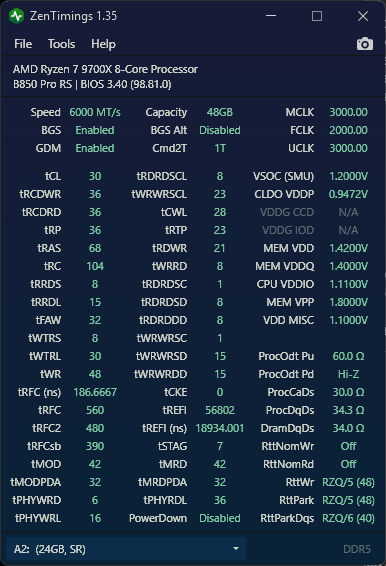 (now working) 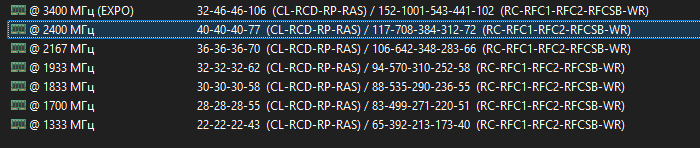 (SPD JDEC) |
Posted By: Xaltar
Date Posted: 26 Mar 2026 at 8:08am
|
I remember seeing someone report it being RFC2 that was out of spec in particular. RFCSB too I believe and it fits with what I am seeing in your screenshots. Comparing your actual working subtimings with the JDEC subtimings you can see RFC2 is significantly lower in the JDEC listing than the value shown in ZenTimings. tRFC2=480 in the ZenTimings screenshot vs RFC2=384 in the highlighted JDEC for 2400. RFCSB is also too tight in the JDEC listing, 312 vs 390 in the working timing list. RFC2 should be 480 or higher, I hear 550 is a good safe number. RFCSB should be 390 or higher, again 550 would be fine here too. You can always try to tighten things up to 480 and 390 to match your current working settings once you have the system working stably and reliably. -------------
|
Posted By: Xaltar
Date Posted: 26 Mar 2026 at 8:24am
|
Given that you are able to make the system POST at all with the subtimings set as they are in the JDEC I would guess that they are not too far off the mark, enough to be a problem though. -------------
|
Posted By: Xaltar
Date Posted: 01 Apr 2026 at 3:48pm
|
Hi m13ritmo, I made a https://forum.asrock.com/forum_posts.asp?TID=113483" rel="nofollow - thread for your issue as it doesn't really fit this thread. -------------
|
Posted By: NDRE28
Date Posted: 05 Apr 2026 at 8:38pm
|
Hi! Another consequence of updating the BIOS of the X670E Taichi to version 4.10 (AGESA 1.3.0.0a), was the fact that the default JEDEC profile of my Kingston Fury Beast KF564C32BBEK2-64 (2x32GB DDR5) RAM kit changed. Previous JEDEC profile: DDR5-4800 CL38-38-38-77 @1.1V New JEDEC profile: DDR5-4800 CL40-39-39-77 @1.1V (As on the official Kingston specs sheet). The EXPO & XMP profiles remained unchanged. |
Posted By: Xaltar
Date Posted: 05 Apr 2026 at 10:52pm
|
Thanks for the info NDRE28. Another bit of evidence leading me to believe that the issue being addressed is IMC related. -------------
|
Posted By: Techguy32
Date Posted: 24 Apr 2026 at 8:34pm
|
Re: BIOS V4.20 for the Steel Legend X870 Wi-Fi This BIOS was just released with almost zero info. other than an indicated AGESA update to ComboAM5 PI 1.3.0.1. The file size however has grown significantly from the previous ~17 MB to 18.76 MB. Is there any info. available from Asrock as to what exactly has changed in BIOS V4.20? The cryptic BIOS update info. is almost meaningless for Asrock customers. ------------- X870 Steel Legend WiFi |
Posted By: Xaltar
Date Posted: 24 Apr 2026 at 11:48pm
|
As far as I am aware AGESA 1.3.0.1 adds optimizations for the new Ryzen 9 9950X3D2 Dual Edition processors. There may be other tweaks and improvements added by manufacturers alongside the updated AGESA but I don't have any info as to what those may be. This is pretty standard in the industry though. I am just a moderator here so I don't have access to a full breakdown of changes. The info above came from some digging into what AGESA 1.3.0.1 is meant for. Hope this helps. -------------
|
Posted By: Techguy32
Date Posted: 25 Apr 2026 at 12:16am
|
Thanks Xaltar, I was hoping Asrock listed a "change log" or similar so user's had some exact understanding of the BIOS changes. ------------- X870 Steel Legend WiFi |
Posted By: Xaltar
Date Posted: 25 Apr 2026 at 1:49am
|
Yeah, I hear you. I wish we could get those too but most manufacturers don't do that anymore. These days we are lucky if we get "adds support for new CPUs". I suspect it's got something to do with the vendors (AMD/Intel). Listing changes could potentially point to bug fixes and such that they don't want attention drawn to. -------------
|
Posted By: Aetius
Date Posted: 08 May 2026 at 3:53am
| Hello everyone, I?™ve got Asrock b650e pg riptide wifi motherboard, with new bios v4.10 I?™ve got lots of problems with stability, turns out all problem in new ?œmixed??refresh mode, will there be a switch in the bios to change back to ?œnormal??memory refresh mode? |
Posted By: Xaltar
Date Posted: 08 May 2026 at 3:00pm
|
There should already be a setting for that you can change, probably under the "Advanced" tab in your UEFI. You will have to hunt for it though as I don't have any way to check myself. -------------
|
Posted By: ImbaDakula
Date Posted: 11 May 2026 at 6:25am
|
Greetings to all good people. After flashing the BIOS from 4.10 to 4.20, the computer worked for about 10 days. 2 days ago I was greeted by error cod 00. While I was thinking about what to do, which lasted for about 10 minutes, the board started spinning codes, 15 and so on, but stopped at code 94. I restarted the computer again, after the restart it did not want to boot, the error code remained 00. I reset the bios and turned it on, again at code 00 which was hidden for about 20 seconds, after that the PC worked normally and entered windows. I reset again and went into bios and put EXPO profile and 00 again. Restart again and the PC is stuck at 94 again. I tried several times, after that I went back to bios 4.10 and nothing was fixed, code 94. I restored the even older bios 3.5, but it didn't want to continue except for 00. I went back to 4.20 again and it works normally only with JEDEC, if I try EXPO it gets stuck on either 00 or 94. Does anyone have any idea what to do? x870e nova wi fi+ 2x32 gb kingston 6000 mt/ cl 36 + 4090. I use a riser and these days when I can I will test the system without a card. |
Posted By: Techguy32
Date Posted: 11 May 2026 at 7:40am
|
If you haven't read the thread in the AMD Mobo section titled: " AM5 + 9000 series code 00", I'd try those solutions. Clearing CMOS with every major change seems to also be quite important so the BIOS scans all of the hardware over again. ------------- X870 Steel Legend WiFi |
Posted By: ImbaDakula
Date Posted: 11 May 2026 at 2:43pm
| Of course I read it, but I can't remove the battery, because that would require removing the chipset cooler, so I'd probably lose the warranty because of that. |
Posted By: Xaltar
Date Posted: 11 May 2026 at 5:40pm
|
Hi ImbaDakula, you should open a support ticket with ASRock and include your full RAM model number: http://tw.asrock.com/events/tsd.asp" rel="nofollow - http://tw.asrock.com/events/tsd.asp -------------
|
Posted By: ImbaDakula
Date Posted: 11 May 2026 at 6:01pm
| I've already done that, so I'm waiting for an answer. |
Posted By: Xaltar
Date Posted: 11 May 2026 at 6:04pm
|
Great, thanks and thanks for reporting your issue here. It really helps to keep things centralized and look at what's common vs what is more specific to a particular hardware config. Let us know what they say when they reply. Good luck, hopefully they can help you resolve the issue. I suspect it may require a BIOS level fix (beta BIOS). -------------
|
Posted By: ImbaDakula
Date Posted: 12 May 2026 at 4:54pm
|
Hi Dxxxxxx Dxxxxxx, Thanks for your reply. Please try to enable "LN2 mode" in BIOS to check the result. Advanced\AMD Overclocking\AMD Overclocking\LN2 Mode If the problem persists, please cross-test with another CPU to verify if it can boot up properly if possbile. Here is my answer to Asrock. It's finally working, I'll test it again, because sometimes it works, but when it's turned off overnight, it won't boot. I already tried this solution and "LN2 mode" didn't work, maybe I did something wrong, in any case it works now. Considering that it was error 94, I suspected that it was not a dumbed-down graphics card. I reinstalled the MSI center and did a scan, the graphics logged out and logged in and through the MSI center I turned off the RGB on the card. Maybe that also helped the system to recover. In any case, thank you for your support. |
Posted By: Xaltar
Date Posted: 12 May 2026 at 5:35pm
|
Thanks for the update. Here's hoping the issue is gone for good. Good luck -------------
|
Posted By: Aetius
Date Posted: 18 May 2026 at 6:10pm
| i've checked today, in bios version 4.20 there is NO way to change ddr5 bank refresh mode back to normal |
Posted By: Xaltar
Date Posted: 18 May 2026 at 9:21pm
|
Hi again Aetius, is stability an issue for you on 4.20 like it was on 4.10? If it is then I would recommend opening a support ticket with ASRock and letting them know: http://tw.asrock.com/events/tsd.asp" rel="nofollow - http://tw.asrock.com/events/tsd.asp If it isn't then I wouldn't worry about it. It is not uncommon for board manufacturers to hide (remove) settings from the BIOS that have a chance of causing instability. I suspect that with all the issues users experienced in 4.10 regarding bank refresh that they have made some changes there. "Mixed mode" was meant to serve as an "Auto detect" setting from what I have read. If they have fixed it then great. If not, fire off a support ticket and let them know it isn't working for you. Include your RAM make and model number in your ticket. Good luck -------------
|
Posted By: LoneFighter1980
Date Posted: 19 May 2026 at 3:34pm
|
Hi all, i registered me today because i got stability Problems with the new Bios Update 4.20. I have a Asrock Taichi 670e with 64GB Corsair Dominator DDR5 6000MHZ "EXPO Profile". Everytime when i try to install a Game from my .ISO File i got an Error. So i testet everything. Only Solution was to go into the Bios and set the EXPO Profile to Auto. After that, my PC runs perfect. But with this Settings i loose Performance and for me that is not a deal. So i go back to Bios Verson 4.10 and all works good with EXPO Profiel. I will still stay on this Bios Version and hope when an Bios Update comes again. the Stability Issues where gone. But it is possible that you find another Solution for me taht i can update to 4.20 with my EXPO Profile or it is an Bios Problem? Anyway.. wish you all a nice Week.. and thanks for alle coming replays and help. |
Posted By: LoneFighter1980
Date Posted: 19 May 2026 at 4:04pm
|
Sorry, a little failure is in my post. The stable Version of the Bios is the Version 3.50. all over that the EXPO Profile is not supportet or instable. |
Posted By: ImbaDakula
Date Posted: 19 May 2026 at 4:18pm
| https://www.youtube.com/watch?v=RrB3dUUcdog&t=484s" rel="nofollow - https://www.youtube.com/watch?v=RrB3dUUcdog&t=484s |
Posted By: Xaltar
Date Posted: 19 May 2026 at 6:13pm
|
That is a pretty informative video ImbaDakula, I have linked it myself a few times. Thanks for posting it here. -------------
|
Posted By: ImbaDakula
Date Posted: 20 May 2026 at 11:25pm
|
Update: I replaced my 9950x3d with a 7600x that I bought 2 days ago, for now the PC works without problems with EXPO. Conclusion, 9950x3d is dead, not completely but partially and it cannot work with EXPO profile. I will send it to AMD for a replacement. |
Posted By: Xaltar
Date Posted: 20 May 2026 at 11:56pm
|
Sorry to hear it ImbaDakula, here's hoping AMD sort you out quickly and without issue. Let us know how it goes. -------------
|
Posted By: Aetius
Date Posted: 28 May 2026 at 1:25pm
|
hello folks, little update on memory refresh mode on any bios higher then 3.50(my current bios 4.20), i've upgraded my ryzen 7700 to 9700x and now it works with mixed mode stable (maybe better IMC in 9700x?) so i think its generally not big issue for ryzen 9000 series, hope this helps someone who is on 7000 series |
Posted By: Xaltar
Date Posted: 28 May 2026 at 2:09pm
|
Thanks for the info Aetius. -------------
|
Posted By: Pabblo77
Date Posted: 28 May 2026 at 10:39pm
| helo! Is it possible that after the last BIOS update 4.20 x670e PG Lighting someone reports a problem with the graphics card and loss of signal with the monitor? |
Posted By: Xaltar
Date Posted: 28 May 2026 at 10:50pm
|
Not that I have seen reported but you can try to clear CMOS on your board. That should resolve any CSM conflicts/issues and potentially fix your problem. -------------
|
Posted By: xyirox
Date Posted: 05 Jun 2026 at 10:43pm
|
xyirox hello. I'm not able to make a new topic so I have to ask question here. I've purchased Ryzen 7 5700x to replace my old Ryzen 7 2700x. My mobo is AsRock Phantom Gaming 4. I've got newest bios installed (used InstaFlash) the simple version of upgrade - upgraded it using the current CPU I have (2700x). I've read some years ago someone had problem running new CPU because you need to reupdate the bios using a different more complicated method. Does this still apply to 5.80 version of bios from 2026? Do I have to reupdate the bios in order to be able to run 5700x after swapping from 2700x? |
Posted By: Preytheon
Date Posted: 09 Jun 2026 at 8:03pm
I get the frustration with being unable to post a new topic, but you might be better off asking on a thread for the correct motherboard (AM4), this one is about AM5 BIOS updates. ------------- Main rig: Ryzen 7 7800X3D, RTX3080Ti FE, 32Gb Teamgroup Create-T DDR5-6000C30, AC Freezer3 280mm AIO, Asrock Steel Legend X670E, 2x 2Tb Samsung 990 Pro, 1Tb WDSN850, 8Tb SATA WD80EFAX, Corsair HX850. |
Posted By: Preytheon
Date Posted: 09 Jun 2026 at 8:15pm
|
Is there a known issue with BIOS 4.20 hard-locking the PCIe GPU? I only ask as this issue started as soon as I updated to BIOS 4.20. Not just a PC crash, purely a dGPU lock-up... when it happens, the PC has to be powered off, unplugged and then either power-flushed (hold down the power button to get the PSU to flush the residual power) and then then left for >24h or the GPU has to be removed, unplugged and then re-installed! When this happened the PC doesn't even crash - the APU continues to work perfectly and I have now plugged my 2nd and 3rd screens into the APU, so I don't lose any more work. If I do a regular power off and back on, the GPU lights stay off and I just get a red LED on the motherboard. This happens VERY repeatedly from my main OS (Nobara Linux 43) if I trigger stnadby, but also less consistently in Windows11 and even once from the BIOS! I'm interested to know if this is a known issue, can I safely roll back to a known good BIOS and if so, what is the recommended version? System spec: Ryzen 7 7800X3D, ASRock X670E Steel Legend, RTX3080Ti Founders Edition, 2x16Gb Teamgroup T-Create Expert, various M.2+SATA drives (2x 2Tb Samsung 990PRO, 1Tb WD SN850, 8Tb SATA WDRED, 2Tb SATA Seagate). ------------- Main rig: Ryzen 7 7800X3D, RTX3080Ti FE, 32Gb Teamgroup Create-T DDR5-6000C30, AC Freezer3 280mm AIO, Asrock Steel Legend X670E, 2x 2Tb Samsung 990 Pro, 1Tb WDSN850, 8Tb SATA WD80EFAX, Corsair HX850. |
Posted By: Xaltar
Date Posted: 09 Jun 2026 at 8:40pm
|
Thanks for the info and for sharing in this thread. I have created a thread for you https://forum.asrock.com/forum_posts.asp?TID=113535" rel="nofollow - here where other users can share their experiences with 4.20 with you. In the mean time, I suggest you open a tw.asrock.com/events/tsd.asp?kind=MB" rel="nofollow - support ticket with ASRock and ask them to assist you. They will almost certainly know if there is a known/common issue with your particular configuration and should be able to advise you. You shouldn't have any issues rolling back to older BIOS versions while you wait for a response. I would start with 4.10 and see if that resolves your issues. If not, go back to whichever version was working for you before so your system isn't unreliable while you wait. Good luck, hopefully ASRock tech support will get you sorted out quickly -------------
|
Posted By: lizardfrominternets
Date Posted: 16 Jun 2026 at 9:31pm
|
B650E Taichi Lite, before all issues I ran old BIOS from 2024 and it was fine. Finally thought to update and installed 4.20 Black screen both on dGPU and iGPU. Clear CMOS, reflash with flashback. Black screen. Remove GPU, run on iGPU. Black Screen. Checked cable, works with my work laptop. Checked "Dr Debug" post code, A6, I'm in BIOS, in theory? Reflashed 4.10, and you guessed it, black screen on both Display Port(dGPU) and HDMI(iGPU). 9950X and 9070XT, so what can I try to do again?? |
Posted By: Xaltar
Date Posted: 16 Jun 2026 at 10:31pm
|
Have you tried removing power from the system and pressing and holding the power button for 5 seconds or so with the CMOS battery removed? I saw another user report a similar issue, the only way they could get their system to POST was by doing what I suggested above. Also, what RAM brand/model are you running? I have seen some people have issues with RAM training on 4.xx because ASRock changed the defaults regarding "bank refresh mode". You can try rolling back to the latest 3.xx BIOS for your board and seeing if that gets you back to POSTing normally. If it does I would recommend firing a support ticket off to ASRock with your RAM model number included and a description of your issue. You can also give them a link to your comment in this thread. Good luck. -------------
|
Posted By: ImbaDakula
Date Posted: 17 Jun 2026 at 5:08am
|
Unmount all the HDDs you have, A6 indicates scanning one of the disks. Be sure to take the battery out for at least 15 minutes! |
Posted By: lizardfrominternets
Date Posted: 17 Jun 2026 at 5:12am
|
I don't have any SATA devices. Downgrade to 3.50 helped, I guess I'll just replace the mobo later. Thanks for advices. |
Posted By: Xaltar
Date Posted: 17 Jun 2026 at 12:37pm
|
It may be worth firing off a support ticket to ASRock: https://tw.asrock.com/events/tsd.asp?kind=MB" rel="nofollow - https://tw.asrock.com/events/tsd.asp?kind=MB Apparently the issue is related to RAM firmware bugs that weren't relevant before but have become so with AM5. Most RAM brands/models work just fine but some have buggy firmware that causes POST issues with 4.xx BIOS versions. -------------
|
Posted By: vedeneef
Date Posted: 23 Jun 2026 at 7:24pm
| I have the same problem, the A6 post code appears after updating the bios from version 3.50 to version 4.20, then I tried all other bios versions and the result is the same everywhere. asrok taichi 870e motherboard, 96GB kingbank RAM. Can you tell me what to do? maybe the next bios is being prepared where this problem will be fixed? |
Posted By: Xaltar
Date Posted: 23 Jun 2026 at 8:13pm
|
For the time being you will have to flash back to 3.50. I would open a support ticket with ASRock and ask them to help: https://tw.asrock.com/events/tsd.asp?kind=MB" rel="nofollow - https://tw.asrock.com/events/tsd.asp?kind=MB Because this is BIOS related it is unlikely anyone on the forums here will be able to assist. It requires a BIOS level fix. Kingbank is a known brand with issues on 4.xx BIOS versions. -------------
|
Posted By: ImbaDakula
Date Posted: 17 Aug 2026 at 6:06pm
|
My new 9950x3d arrived, the old one degraded and I sent it for RMA in the meantime I used the 7600x. What I want to emphasize is that I am on the latest bios 4.43, but unfortunately the old BUG is present and it is not clear to me how none of the Asrock designers or the people who implement the BIOS noticed this, and the BUG is present in all BIOS versions. The BUG appears when you apply your PBO settings in the bios, in case you change your mind and want to turn off PBO, more precisely in the settings where it is enabled, you click to disable it, but there is no change!! Although PBO is disabled, it continues to work, which you can check with the Ryzen Master application, and you can also test the CPU with various programs and you will see the same performance and the same behavior of the processor. If you want to turn off PBO to be totally inactive, you have to go to LOAD UEFI BIOS DEFAULTS option, or reset BIOS! A lot of people think that the disable PBO option actually turned off the PBO, but it didn't, I even recorded a profile with the PBO settings disabled, but when loading the profile with the PBO off, the board continues to behave retardedly. What I wrote is easy to implement for anyone who wants to test, except for Asrock engineers who don't think to test the options they implemented in the BIOS!!! |
Posted By: Xaltar
Date Posted: 17 Aug 2026 at 6:14pm
|
Thanks for the info ImbaDakula, I will point my contacts at ASRock to this thread. It would be helpful if you could list your full system specs including OS. -------------
|
Posted By: ImbaDakula
Date Posted: 18 Aug 2026 at 4:35am
|
Operating system: Microsoft Windows 11 Pro, Version 10.0.26200 DirectX runtime version: DirectX 12 Driver: Game Ready Driver - 610.88 - Tue Jul 28, 2026 CPU: AMD Ryzen 9 9950X3D 16-Core Processor RAM: 64.0 GB kingston kfc56c36-32 x2 Storage (6): SSD - 953.9 GB,SSD - 3.7 TB,+4 more Graphics card GPU: NVIDIA GeForce RTX 4090 Display (1): M27Q Resolution: 2560 x 1440 (recommended) Refresh rate: 165 Hz Desktop color depth: Highest (32-bit) Display technology: Variable Refresh Rate HDCP: Supported Display (2): PHL 273V7 Resolution: 1080p, 1920 x 1080 (native) Refresh rate: 60 Hz Desktop color depth: Highest (32-bit) HDCP: Supported |
Posted By: Xaltar
Date Posted: 18 Aug 2026 at 12:42pm
|
Great, thanks. -------------
|
Posted By: Xaltar
Date Posted: 18 Aug 2026 at 7:10pm
|
I just noticed you didn't list your motherboard. -------------
|
Posted By: IvanVamDam
Date Posted: 18 Aug 2026 at 8:34pm
| In the end, was the problem resolved by reinitializing the GPU via its software? |
Posted By: ImbaDakula
Date Posted: 19 Aug 2026 at 4:57am
| X870e nova wifi. |
Posted By: Xaltar
Date Posted: 19 Aug 2026 at 3:02pm
|
Thanks ImbaDakula. I have passed the info along, thanks for the bug report. -------------
|
Posted By: vedeneef
Date Posted: 04 Sep 2026 at 5:38am
| So, what?™s the situation? Asrock noticed a problem with KingBank memory on Hiynix M?‘Die chips? KingBank is already a huge brand that needs to be taken into account, and it?™s essential to ensure compatibility with these modules. |
Posted By: Xaltar
Date Posted: 04 Sep 2026 at 4:38pm
|
I know it's a known issue. I also know it is a KingBank issue. The info about what the problem is can be found with a quick google search. I am afraid I don't know if ASRock has resolved the issue with newer BIOS updates (4.10 was still effected). Unfortunately people tend not to bother reporting when an issue is fixed. Most people effected simply rolled back to BIOS version 3.50 and I suspect KingBank has since corrected the issue on newly produced modules. If you have tried the latest BIOS for your board and it still won't POST with an effected KingBank RAM kit then your only option may be to use BIOS 3.50 or look into getting an RMA from KingBank themselves. I know it's frustrating but this issue is 100% KingBank's mistake. ASRock's BIOS implementation is not broken or defective in this case, it simply exposed a mistake in the effected RAM module's firmware. -------------
|
Posted By: vedeneef
Date Posted: 06 Sep 2026 at 1:05am
| I tested the latest BIOS version, but the problem wasn?™t fixed ??I?™m still using version 3.50. New processors are going to be released, and I was planning to upgrade mine, but it seems I won?™t be able to because of the outdated BIOS version. Updating the BIOS on the memory isn?™t possible, so the only solution is to wait for ASRock to fix the issue. Even if KingBank is at fault here. It should be straightforward: the problem is known. The BIOS could detect that the memory is from KingBank and apply the appropriate settings, or they could create a separate BIOS for KingBank. |
Posted By: Xaltar
Date Posted: 06 Sep 2026 at 1:29am
|
It might be worth opening a support ticket with ASRock and asking them: https://tw.asrock.com/events/tsd.asp?kind=MB" rel="nofollow - https://tw.asrock.com/events/tsd.asp?kind=MB Their BIOS team may be able to help. Bare in mind that they have no obligation to help so asking as politely as possible and laying out your issue clearly is always a good idea. Other users have had success asking for custom BIOS versions this way in the past, even when the board was no longer supported or, like in this case, ASRock has no obligation to help. Good luck -------------
|
Posted By: crankz
Date Posted: 11 Sep 2026 at 8:50am
|
Not sure if its the right place but since i cant start a post... Ive always been able to update/downgrade my B850 LIVEMIXER BIOS but since i went from 4.43(latest) to 3.50 i can only flash bios versions olders than the one i have... Ive tried diferent USB Sticks, flashback, clear CMOS, using C:... nothing works unless its an older version... Using 3.26 atm Anyone else has been through this? |
Posted By: Xaltar
Date Posted: 11 Sep 2026 at 11:50am
|
Have you tried BIOS flashback? Page 53 of your user manual, page 57 in the https://download.asrock.com/Manual/B850%20LiveMixer%20WiFi.pdf" rel="nofollow - PDF version from your product page , explains the process. -------------
|
Posted By: crankz
Date Posted: 13 Sep 2026 at 5:10am
|
ye flashback worked after a few tries. i needed to convert the usb to mbr and format as fat 16k. just formating as fat no 16k or using as it was (gpt) was failing flashback thanks for the help tho |
Posted By: Xaltar
Date Posted: 13 Sep 2026 at 5:20am
|
Glad to hear it worked -------------
|