X870E Nova D4 on restart/cold boot
Printed From: ASRock.com
Category: Technical Support
Forum Name: AMD Motherboards
Forum Description: Question about ASRock AMD motherboards
URL: https://forum.asrock.com/forum_posts.asp?TID=113496
Printed Date: 23 Sep 2026 at 4:41am
Software Version: Web Wiz Forums 12.04 - http://www.webwizforums.com
Topic: X870E Nova D4 on restart/cold boot
Posted By: dom0xDee4
Subject: X870E Nova D4 on restart/cold boot
Date Posted: 23 Apr 2026 at 1:54am
|
Hello, i am troubleshooting freshly built PC, seeking advice and suggestions how to proceed with debugging the issue. AsRock X870E Nova Wifi occasionally throwing d4 error on powerup / restarts, without clear pattern. Waking from sleep/standby without error. |
Replies:
Posted By: Xaltar
Date Posted: 23 Apr 2026 at 4:35am
|
It sounds like RAM training issues. See if it still does it with EXPO disabled. If it doesn't then you can try using a lower RAM frequency by enabling EXPO then setting the manual setting one lower than it selects automatically. 5600 instead of say 6000 for example and see if that helps. ------------- 
|
Posted By: dom0xDee4
Date Posted: 23 Apr 2026 at 3:05pm
|
Hello, so i've been trying to figure it out about a week now - EXPO has been in use twice - just as a one more step towards making it work - tp be clear, BIOS is all at default settings, or in other words, no matter the settings, error creeps in occasioanlly. Let me list whole system spec first: Kingston 2x32GB RAM (using default Jedec profile, 4800 MHz) Asus Prime Radeon 9070XT 16GB OC Corsair HX1200i Samsung 9100 PRO NVME as system drive, in PCIE-gen5 slot. 3 more drives, unused, one of them formatted for backups first time today: - WD Green 2TB NVME (unintialized, unformatted) - Crucial C100 1TB NVME (unintialized, unformatted) - WD Blue 500 GB NVME (initialized and formatted on April 22nd '26). - Win 11 PRO (reinstalled once) All in a Phanteks Enthoo Primo, with bunch of fans for good airflow - ambient temp 24°C, CPU idling ~44°C-45°C. This is to be my new dev system (working on large codebase, requiring fast builds and sufficient amount of RAM). I have been using it very very lightly, as setting up local repo and tooling requires time - i have trusty old 5700x still in use, new one is on another desk. Once i noticed d4 error first time, figured it occurs on POST only and have restarted, turned it off, left it unplugged, left it in standby for many many times in order to see if there is a pattern - no obvious pattern, sometimes it fires up, sometimes no go. I do have useful info as i have gone over three different BIOS versions. I was always using AsRock driver updated and AppShop to pull correct drivers. Mainboard originally came with BIOS v3.40. (i have bought everything back in December 2025, but due to various circumstances only found the time last week to assemble everything). So i have tried following BIOS versions: - v3.40 (had it originally) - v4.10 (made d4 error popup MUCH worse) - v3.50 downgrade, and what i am using now - error creeps in way less often I'll list now what i have tried so far. BIOS settings are always assumed to be Default/Auto unless stated otherwise. I'll also note which BIOS versions where used for steps listed. - (BIOS v4.10) reseating RAM (always two sticks, have yet to try using single stick or A1 / B1 slots) - (BIOS v4.10) - tried to turn on EXPO, in order to see if that might actually solve issue, with manual SoC voltage (tested values: 1.05V, 1.1V, 1.15V, didn't change behavior, made d4 happen more often, with VCore Auto setting going wild in Windows (up to 1.35V) - (BIOS v3.40) Limit TDP to 105W setting - no observable difference to d4 occurence - Upgrade BIOS to v4.10 - first boot after upgrade, training phase (code 15) took quite a long time, but it booted - (BIOS v4.10) - Default/Auto settings - d4 error occurs quite often - (BIOS v4.10) Manual SoC voltage to 1.10V, limit TjMax to 85°, LLC 2 (default 3) - made d4 occurence worse, especially lower voltages, but decided manual SoC - (BIOS v4.10) Power Supply Idle Control set to Typical Current Idle - doesn't seem to have effect on d4 occurence - (BIOS v4.10) Memory Context Restore - disabled, Fast Boot - disabled - this made it occur less often, but still it occured. So all of the above, it would randomly occur on restart or cold boot, but often enough to be an obstacle - when noticed it first and informed myself about it - i started to restart or power it off / turn back on quite often during past days in order to try figure out if there is any pattern. ==================================================================== Now onto final thing, which made it occur way way less: - downgrade BIOS to v3.50 - first boot after upgrade, training phase (code 15) took much much less time, compared to first training v4.10 BIOS took) - (BIOS v3.50) - Default/Auto settings - d4 error occurrence rare, compared to v4.10 - (BIOS v3.50) - Memory Context Restore - disabled, Fast Boot - disabled - d4 error occurence rare. So net total is with BIOS v3.50 i have way less occurences of d4 error, almost to the point i thought it is resolved. When it first creeped in, i went into BIOS and disabled Memory Context Restore and Fast Boot - believing that would finally resolve the issue, but it did creep back in. Finally, when error occurs, what i have found is: system will boot almost always next time when pressing Reset key. Cycling power when error occurs, system usually won't boot. Both of these apply to BIOS v3.40 and especially to v4.10, because i had most errors happen on those two - with v4.10 being the one where i had by far a ton of them. |
Posted By: Xaltar
Date Posted: 23 Apr 2026 at 4:55pm
|
Thanks for the detailed info. Good call disabling context restore and fast boot. Those are both known to exacerbate RAM compatibility/training issues. The fact that the issue is more frequent on 4.10 tells me that it is definitely either your RAM not playing nice with the system occasionally or the IMC (memory controller) in the CPU. 4.10 introduced much more conservative voltages and sub timings, if the CPU/RAM/IMC need more voltage for stable operation then that would explain the increase in frequency of the D4 error. It may be worth testing a single stick in slot A2 and see if the issue persists. If not, then try using slots A1 and A2 (single channel) and see if the issue arises again. If it does then try the B channel in the same way. If the issue only occurs with 2 RAM modules installed then it could point to a marginal/weak IMC on your CPU. If the issue persists with a single module, try the other one and verify that you don't have a bad/intermittent RAM module. ASRock advise to use 4.10 or later with AM5 as it introduces numerous fixes and improvements with AGESA 1.3.0.0a from AMD. So ideally we would want to get things stable on that and identify what settings are causing the fault to occur more often. Does the issue only occur when powering on from the system being off or does it occur with restarts at all? A cold boot D4 error could also be caused by any number of things from a weak IMC to RAM to a power supply with marginal 12v power that takes a while to "warm up" and stabilize. For now I think let's focus on ruling out a faulty RAM module by testing them individually in slot A2. If the RAM is requiring more voltage on cold boot then it could have a marginal memory IC or controller. It's a pity RAM prices are so stupidly high right now, it would be very convenient to have an extra kit to test. Let me know how it goes. -------------
|
Posted By: dom0xDee4
Date Posted: 23 Apr 2026 at 8:32pm
Thanks alot for prompt replies, @Xaltar! I will get to memory swapping, probably not today, but will let you know how that goes.
That is good info and sheds light on why newer versions in this case yields more error occurrences. Today i've restarted it about 10 times, without issue. Most of the time it was just playing some music, connected via Toslink optical into receiver. ==== It's currently running Furmark GPU stress test, simulatanously running Furmark "CPU Burner", 24 treads, roughly 40 minutes in. CPU temperature is rock-solid stable at 76° PSU draws about 450W from outlet (using Corsair iCue tool, PSU has USB connection to mainboard) 12V (reading by HWInfo) - very stable, narrow regulation, min=12.038, max=12.096, avg=12.076 VCore is almost locked in at 1.112V SoC 1.085 I know this ain't good test for memory since it's not doing much, but had to do this too, this would be the first time it's somewhat loaded. ====
It did occur with restarts too - much less often then pure power-up. On BIOS v3.50 only once on restart so far, but sample is too low to draw conclusion with any sort of confidence, just compared to v4.10 less often. It never occured on waking up from standby in any BIOS version of setting combinations. It occurs on power-up, being unplugged before or not, makes no observable difference. Resolution is usually always the same, press "Reset" button and it gets thru after that. Sometimes when error would've pop-up, i would power it off, unplugging USB drives, after which it would go thru - but i'm certain this is just a coincidence. ====
I can also measure 12V rails externally - will see how i can approach this meaningfully. (Suppose given it's 1200W PSU it probably has several rails, somehow doubt it's designed with allowing full amperage thru single 12V rail.) Short disclaimer: testing i did i didn't do in "scientific" way, but can tell frequency of events going up or down without exact noting down of how many restarts or powerups it had gone thru. As a matter of fact, my current machine (old B450 MSI board, 5700X) is usually powered on, up and running for weeks, and connected to UPS - so in a way, i could live with PC that is not so easy to startup, but still everything being brand new and top-tier it's a bit unamusing to say the least, like an old car with carburettor on cold winter morning hehe. Anyway, once more cheers for the help |
 Xaltar wrote:
Posted By: dom0xDee4
Date Posted: 23 Apr 2026 at 10:04pm
|
Alright FWIW: restarted it couple times earlier today - no problems. Shut it down (had been running for few hours, including that Furmark session). Unplugged keyboard and removable USB 32GB drive Pressed power button after about 30 seconds - 4d error appeared. Pressed "Reset", booted to windows normally. |
Posted By: Xaltar
Date Posted: 23 Apr 2026 at 11:32pm
|
A bit of a random thought here, D4 is stated to be "PCIe initialization or RAM related issue" according to ASRock's debug code description. Have you tried without the GPU installed? I don't see your CPU listed but so long as it isn't an "F" variant it should have an iGPU. The D4 issue has been tickling at my brain since you posted about it, I was sure I had seen another report about it before. I finally remembered. Another user had a very similar issue, infrequent D4 codes on POST that, in their case escalated and got worse over time. Eventually after replacing every component in their system (every single component including PSU and GPU) the issue still persisted. In the end it turned out to be their PCIe riser cable that came with their case.... With the weight of modern GPUs similar issues could arise simply from the weight of the card causing it to make poor contact in the slot due to sagging. I have a feeling this isn't the issue in your case given the difference in behavior based on BIOS version but it's worth mentioning. -------------
|
Posted By: dom0xDee4
Date Posted: 24 Apr 2026 at 10:18pm
|
Hello and once again thanks for your suggestions. I have been playing a bit with settings - want to go slowly. So i do not have any sort of riser, but did notice GPU "sagged" after only a week! Despite marketing material mentioning reinforcment etc... Ordere GPU holder / support, in the meantime did some fudged support "bracket" to keep it straight. I have gone over many many settings in BIOS and tests. Have gotten to a point where it looks to behave like this: - reboot from windows - successful always - stress tests (y-cruncher Zen5-VT3, various OCCT test scenarios, Furmark GPU+CPU burner) - can run for hours in all sorts of combinations * (CPU TJ max i have limited to 85) - power off - power on (cold boot) - here is the catch! Not always, and "reset" does not bring it over reliably, at least with all the bios settings i got it to - reboot from BIOS - it does not always reboot reliably. - unpluggin it (power switch on PSU in fact) - turning on after some time - so far is what reliably boots it to windows(??). However, today i have new error appear few times - 4e. Pressing "reset" button, usually "4d" comes after it. What does "4e" error code suggest? BTW what made it more reliable - i restored Memory Context Restore (i can't really see much differene, other then having to wait a ton). Using XMP-2 (5200 MHz), VSoC 1.18V; PBO - manually plugged in default values (162 PPT, 120 TDC, 180 EDC, but -200 MHz overclock, -20 all core curve optimizer, TJMax 85°). Using XMP-2+higher VSoC (1.25V for my memory) made it much more reliable. PBO i used only to limit CPU max boost / drop VCore a bit. So given XMP gives it more voltage, does look like memory perhaps? I will slowly start to remove components, GPU being the first to remove. And silly me, forgot to write what CPU it is: Ryzen 9900X |
Posted By: Xaltar
Date Posted: 24 Apr 2026 at 11:41pm
|
VSoC is the voltage provided to the CPU for it's "system on chip" controller that handles the RAM channels, PCIe lanes and infinity fabric. A higher VSoC making things more stable definitely points more to the CPU having an issue than the RAM. You may want to remove the CPU, check for any dirt/debris on the contact pads and then clean it with a lens cleaning cloth and reinstall it. At this point I would also remove the GPU and test with just the iGPU on the CPU to rule out PCIe lane issues. 4x codes all have something to do with RAM. Lets try without the GPU installed and clean/reinstall the CPU. I would also open a support ticket with ASRock at this point and include a link to this thread so they can see the steps you have tried: http://tw.asrock.com/events/tsd.asp" rel="nofollow - http://tw.asrock.com/events/tsd.asp -------------
|
Posted By: dom0xDee4
Date Posted: 29 Apr 2026 at 12:33am
|
Hello, did already before i found this subforum. So far i have tried myriad of things. CPU i have "reseated", but socket was as clean as it gets - took great care during install process, it's not the first one i installed /removed... (going all the way back to slot1, socket 370, 462... Lga 775 of those that have pins on board.. So i adjsuted voltages, used PBO configured to drop voltage, boost clock -200... LLC for soc and cpu kept at 2. Reverted to barebone default BIOS settings (only wpump and aio pump fan set to "silent" (have ordinary fans plugged in). There is not a whole lot difference, or any whatsovere. 4d error appears occasionally. Sometimes it seems there is relation to having USB drive plugged in and 4d error appearing more often, but that may be red herring. I have removed GPU today to use internal only - next boot after that - 4D. What is quite consistent - usually if i edit something in BIOS, almost universally 4D will appear, so anytime it has to repeat training. GPU will stay out, i'll test with shuffling memory sticks around. I have noticed one thing: part of the cooler above what in old days would "south bridge" is quite hot to touch. Readout in HWinfo on "Chipset2 (xHCI)" - shows temperature at about 60° - PC is idling atm, CPU at 45°C. One thing is consistent: CPU, Memory, GPU stress tests can run for hours for some reason. I'll likely get another / different mainboard and restart from there, if any other component failed or mainboard is the culprit. |
Posted By: Xaltar
Date Posted: 29 Apr 2026 at 4:26am
|
When it comes to troubleshooting, any component you can replace/rule out is always a good call. If you have the same issues on a different board then the CPU or RAM will likely be the culprit, if it all clears up then it was the motherboard or it's BIOS. Good luck and let me know how it goes  -------------
|
Posted By: dom0xDee4
Date Posted: 30 Apr 2026 at 7:33am
|
Took the day to go properly over the situation. Single dimm - 4d can occur (rarer then 2 slots) GPU out - no change. Took all nvme drives excpet windows system, same story. Did alot and alot of manual running. Patched 4.1 bios. Did alot ofanual adjustments to Processor droce strengths and impedances - and this greatly reduced 4d occurence. By the end of the day, I spotted 4.2 update. Patched, so far tests go fine... We'll see, too early to tell. What I can confidently say: error occurs only if memory training happened (code 15). Will keep posted. For now slowly gathering info. |
Posted By: Xaltar
Date Posted: 30 Apr 2026 at 5:34pm
|
Hopefully 4.20 gets you sorted, the fact that it has followed so soon after 4.10 means it is almost certainly a bug fix release, which is what we want in your case. -------------
|
Posted By: dom0xDee4
Date Posted: 01 May 2026 at 5:40pm
|
======================================================================= BIOS v4.2 so far looks promising: Did many restarts, restart from UEFI, online power cycle*, and couple offline power cycles**. BIOS settings all bare-bone default, except: disabled Memory Context Restore and Fast Boot, so it is forced thru "memory training" (code 15). So far so good, will keep you posted. ======================================================================= ________________ * - "online power cycle" - shutdown PC, power back on. ** - "offline power cycle" - shutdown PC, flip switch on PSU to "0" (so no more even 5VSB to mainboard) - power back on, few times after short time, once after long overnight period. ======================================================================= Below goes what and how i tested before with older BIOS verisiony, v3.5 and v4.1 which i patched back after figuring v3.5 is not gonna solve the problem. ======================================================================= BIOS v3.5: While it seeemed to make a difference, most certainly it wasn't de-facto solution as 4d still appearead. ======================================================================= BIOS v4.1 For my case, it proved to be quite terrible - but with manual adjustments to ODT, DQ and CA Impedances / Drive strenghts - it was much more reliable. With manual adjustments, it would fail mostly when memory training was triggered. Adjustmens (in AMD Overclocking submenu and AMD CBS submenu, NOT in OC-Tweaker section): - Processor CA Drive streingths: 30 ohm - Processor ODT Impedance Pull Up P0...P3: 40 ohm - Processor ODT Impedance Pull Down P0...P3: 40 ohm - Processor DQ Drive streingths Pull Up P0...P3: 34.3 ohm - Processor DQ Drive streingths Pull Up P0...P3: 34.3 ohm - All other BIOS settings default - with those v4.1 would throw 4d ONLY when it would do "long code 15" (memory training) (and then it wouldn't throw it always). ======================================================================= Will keep you posted. One more note. Whenver system was up and running, i would do alot of stress testing. One example: y-cruncher, zen5 stress test - vt3. Memory occupied by test: >59GB (while using IGPU, of the availble 61.something GB) - it would run for hours.. I also did swap dimm-slots, used single dimm, interchanged dimms. Even with single dimm 4d would occur (v4.1 and v3.5) - but less often. Main GPU is still out, only one NVME (system drive, in PCIE-5.0 M2 slot) had been left in. ======================================================================= PS. why is there no "edit" button on forum, previous post by me is a total late-night-written-hafl-asleep mess :) PS2. When i say "all settings default", it truly means theat, except W_PUMP_FAN and AIO_Fan set to "silent", memory is NOT using any XMP / EXPO, aka memory is @4800MHz. |
Posted By: Xaltar
Date Posted: 01 May 2026 at 7:01pm
|
That is great info, thanks for keeping me up to date. The edit function was removed to combat spammers, like so many annoyances the spammers were to blame. They kept making seemingly legit posts then using edit to change what they posted to SPAM. It's the same reason we have new member threads instead of just allowing users to make their own threads. 1000+ spam posts a day was impossible to deal with. Now I can focus on the part I enjoy, actually trying to help the community. -------------
|
Posted By: dom0xDee4
Date Posted: 01 May 2026 at 9:41pm
|
Well eventually it did happen. PC was on for a bit, just idling. Powered it off, next powering up - 4d. Tried reset button - nope, 4d again. Tried shutoff and cutting power via PSU switch -> 4d again. Only thing that would bring it back was CMOS reset. One thing that reliably worked EVERY time regardless of BIOS version was restarting via "ASRock Restart to UEFI" utility. That NEVER brought 4d - not with (v3.4, v3.5, v4.1, v4.2). It's almost like if something somewhere in "training data" gets corrupted or some external influence, like small change in ambient temperature perhaps makes something drift slightly and it cannot get over with "training", after which CMOS reset brings it all back in place. So I'm at a fence now, i like the board features, but not sure where to point finger at, certainly different BIOS versions behave differently. I'm undecided on another board - many lack the feature set this one has.. Stress tests it runs and runs and runs for hours, be it CPU / RAM / GPU or all-at-once test, so can it be a hardware issue? It just looks like unfortunate (un)compatibility, or some bug present in "training" subroutines. Would a following kit work on this board, is it known: Crucial Pro DDR5 RAM 64GB Kit (2x32GB) 6400MHz CL40, XMP 3.0 & AMD Expo Compatible. Part#: CP2K32G64C40U5B My Kingston is also on QVL list, but only shown as "32GB", but even single dimm module throws 4d occasionally (less often so). |
Posted By: Xaltar
Date Posted: 01 May 2026 at 10:28pm
|
I don't see it on your QVL for your board and I don't see any QVL on Crucial's product page for the RAM. That doesn't mean it isn't supported, just that I don't know. I am just a community moderator so I don't have access to that kind of info. Honestly, it looks like that board and CPU aren't playing nice together, it happens. If you do try with another board at least you can rule out the CPU as the fault. At this point I am leaning toward the CPU being faulty or not liking your board. The fact that your RAM is on the QVL and is passing stress tests makes it less likely. CPUs today are so complicated/integrated these days. There is so much that needs to work together just right or you have problems. One voltage too high or too low and the CPU can throw a fit. Good luck and let me know what direction you go and how it works out. And again, thanks for all the detailed info. I am sure other forum members will find it useful. -------------
|
Posted By: dom0xDee4
Date Posted: 01 May 2026 at 10:54pm
|
All good @Xaltar, you've been very helpful and surely i've been messy poster firing in million directions with my attempts, sometimes probably hard to understand what course of action am i taking. I understand this single system is a way too-small sample to draw any conclusions - but if you'd ask me it does look like something in it throws whatever subroutines in training off. Be it "faulty" CPU / RAM / MBO. Like i said, i like feature-set this board offers hence would like to go with it - the idea of going with different board is least favourable to me. Pictures we can attach via URL, bb code? ===================================================================== I'll post what is currently happening. So after CMOS reset, as expected - system re-trained, booted into windows, default settings. I used "ASRock restart to UEFI". Changed two fan speeds to Silent. This time, for the giggle, i used XMP1 profile. Just straight up XMP1, nothing else manually adjusted. Noticed the board autmatically fixes VSoC to 1.2V whilst doing so and also OC-Tweaker Proessor ODT Impedance to 53 Ohms. If you can get that answer, at which point during POST OC-Tweaker ODT impedance gets written into CPU's "memory controller"? Earlier i asked about pictures - wish to attach one - system is running y-cruncher Zen5 stress test (XMP-1, which is 5600MHz for this kit), whole array of tests not just VT3, so both CPU and RAM are being stress tested. It's been running for 40 minutes now, CPU avg temp 71°C, RAM avg DIMM_A avg 38°C, DIMM_B 38°C. Occupied memory during test: 61.7 GB.. Now would anyone consider anything "faulty" in there... If i switch board, and it has slightly different memory training implementation, in case it's CPU that has issue it would be forever hidden.. Anyway, thank you for bearing with me once more. I'll keep my eye on beta bios versions in future, to test things out. =============================================================================== PS. Not sure i mentioned earlier, ASRock support suggested trying out "LN2" mode enabled - it didn't really solve issue. I might re-try it again. |
Posted By: Xaltar
Date Posted: 01 May 2026 at 11:01pm
|
Pics are easy: Upload somewhere then copy the direct image link and put it between image tags: [img[uploadsite.com/myimage.jpg[/img[ I used "[" to close the statements instead of "]" so the forum didn't try to post an image. I hope that makes sense. It's standard PHPBB code. -------------
|
Posted By: dom0xDee4
Date Posted: 02 May 2026 at 9:03pm
|
Alright, posting some now. So currently am running XMP-1 (which for my kit is 5600 MHz, 1.25V). When i choose "XMP-1" -> BIOS automatically changes alot of settings, all of which you will see listed on photo i have taken. After selecting XMP-1 -> ONLY ONE setting i have manually changed from what BIOS auto-configured: Processor ODT Impedance (in OC Tweaker UI - i still wonder and have a question if you can get such info, at which point during boot process OC-Tweaker UI settings become effective). After that, i have restarted it couple times, did one or two shutdowns - not unusal, it booted WITHOUT 4d code - but as has been proven before that tells nothing. Yesterday i ran few shorted sessions of y-cruncher (one hour each roughly). Today it ran for OVER 5 hours, as you will see from screenshots. Let's begin. Y-cruncher start page, system info, test  Y-cruncher start, tests listed (running all of tests provided by Zen5 binary)  Y-cruncher mid session shot, with HW Info on a side  Y-cruncher mid session shot, with HW Info Memory and PSU data in focus  Y-cruncher mid session shot, with HW Info CPU and MBO data in focus  Y-cruncher doing memory-intensive VT3 test, task manager shot (memory usage, cpu)  Memory temperature in focus, during VT3 test  Y-Cruncher clocking over 5 hours, no error whatsoever  BIOS Home page, basic data: 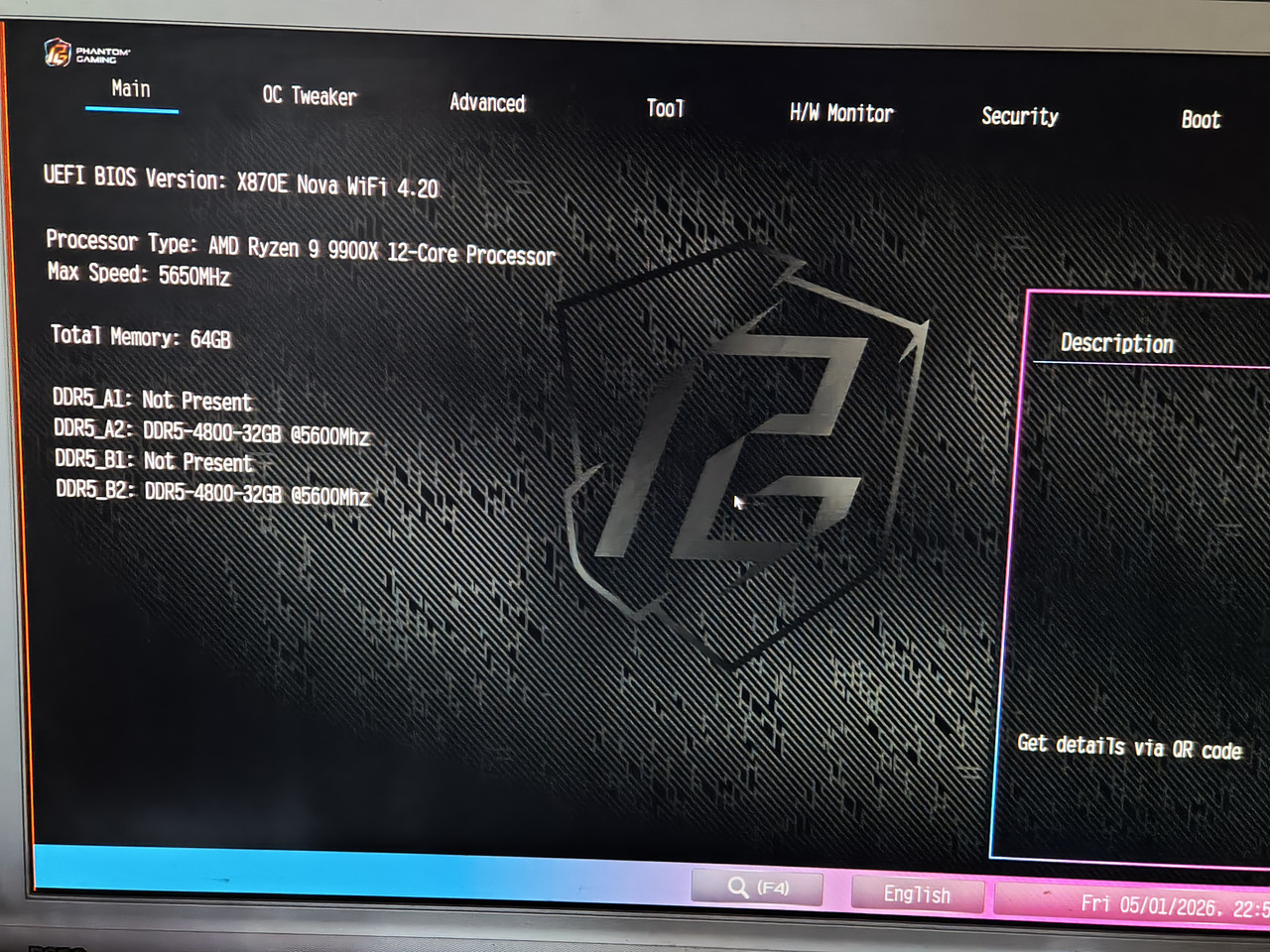 BIOS OC Tweaker page: 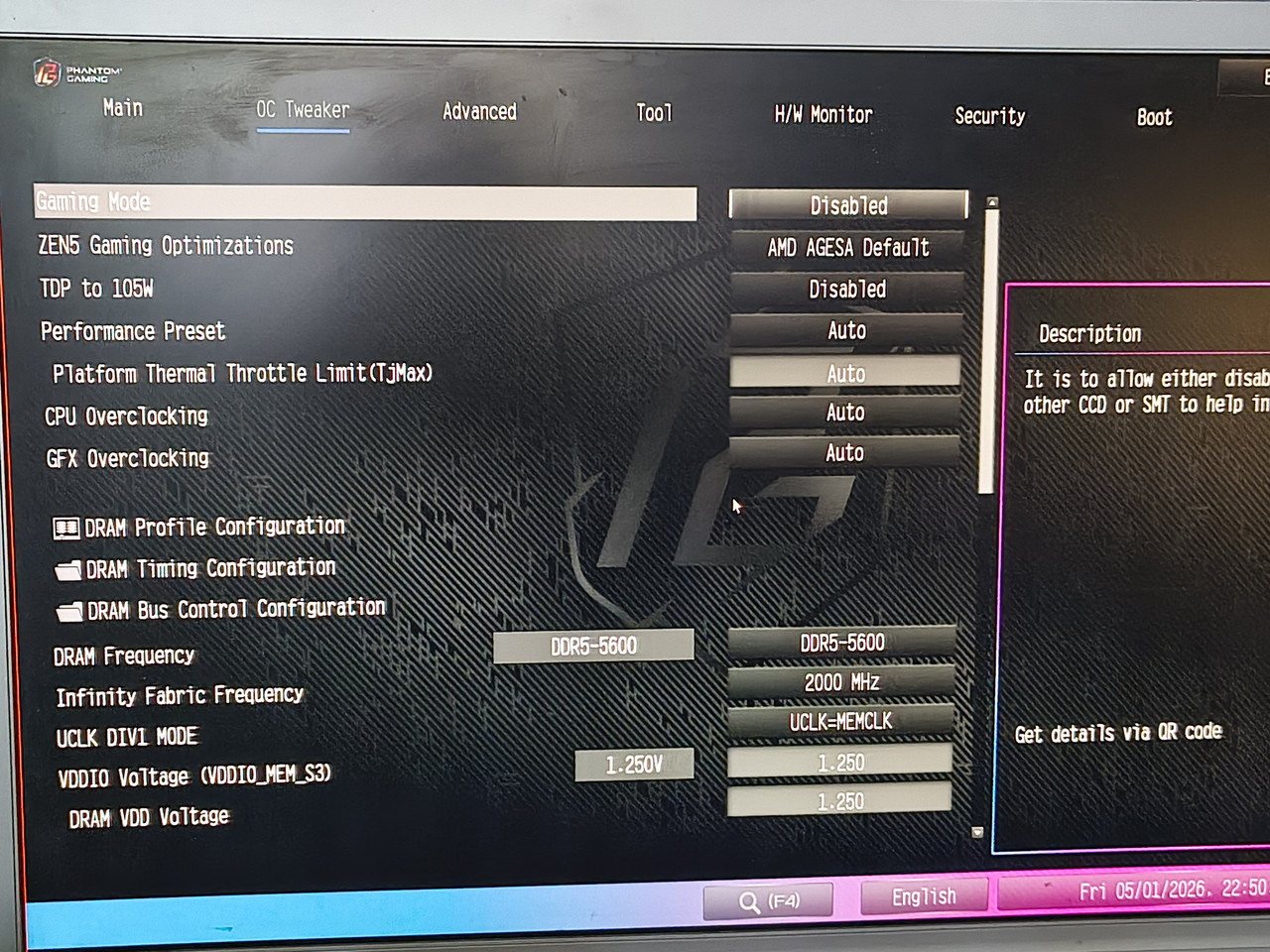 BIOS DRAM XMP-1 and Timings part1 (automatically loaded after selecting XMP1 profile) 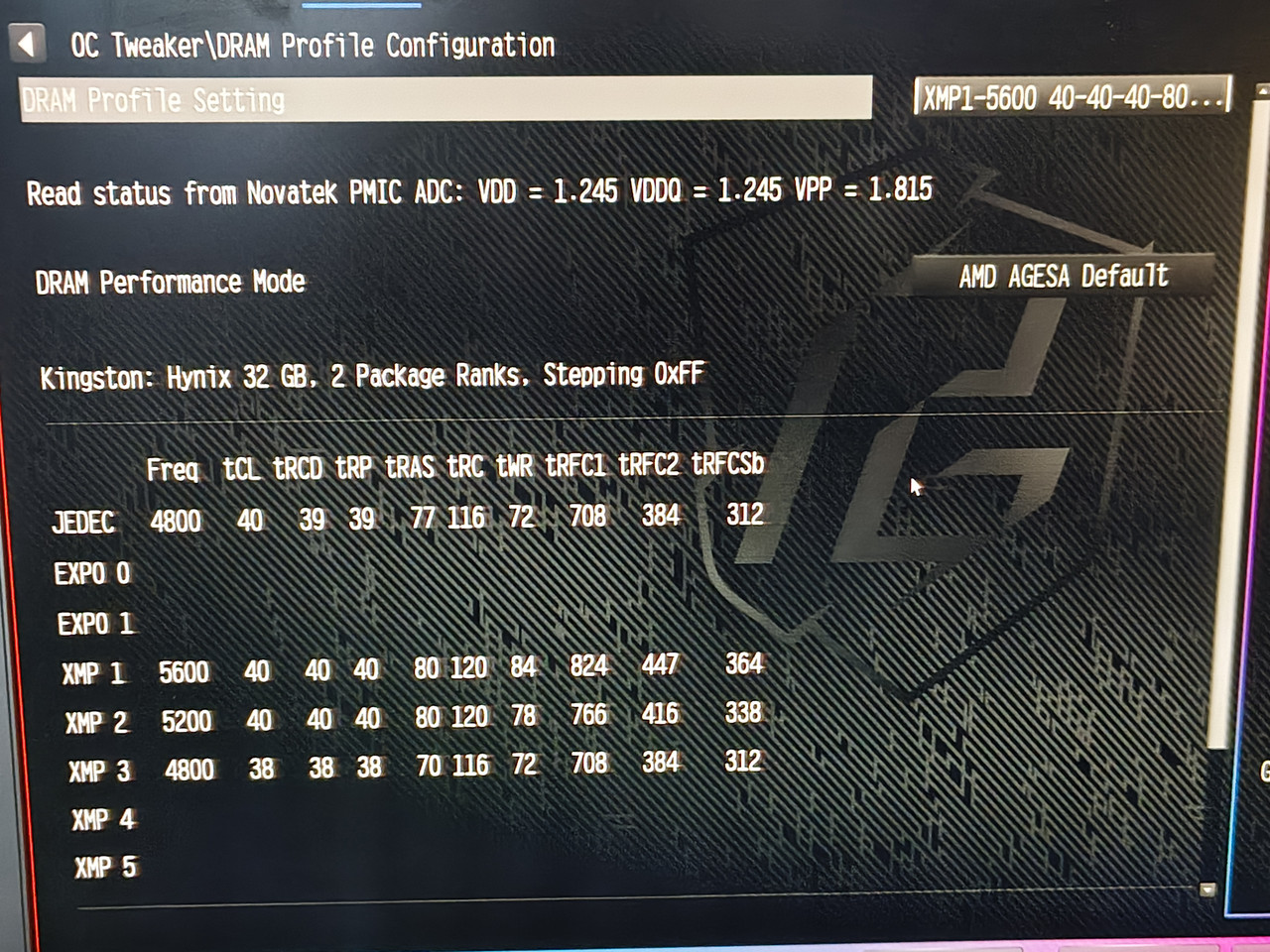 BIOS DRAM XMP-1 and Timings part2 (automatically loaded after selecting XMP1 profile) 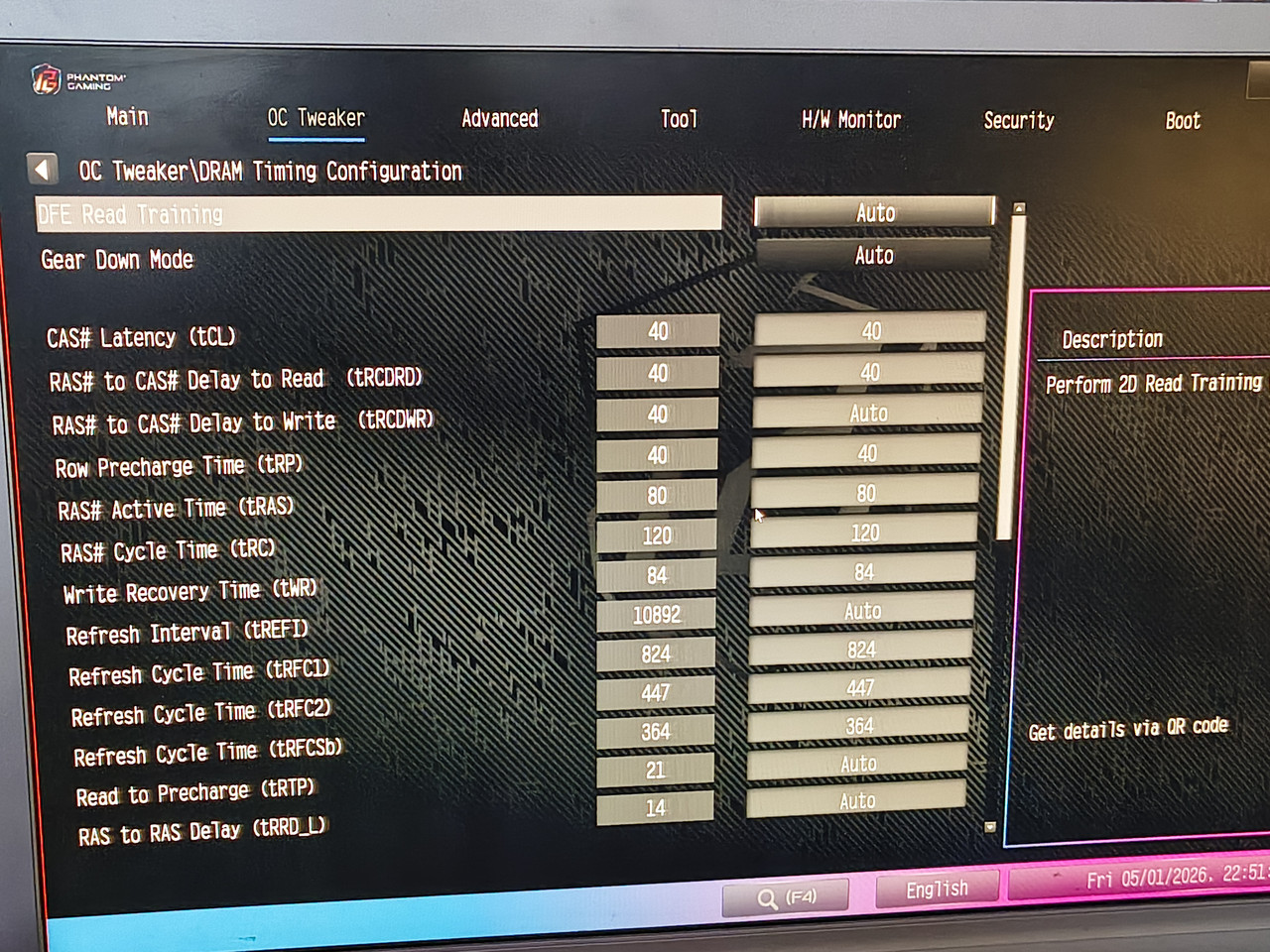 BIOS OC Tweaker DRAM Bus configuration. ONLY manually altered setting, following the selection of XMP-1 profile (BIOS changes Processor ODT Impedance to 53.3 ohm, i manually selected 43.3). 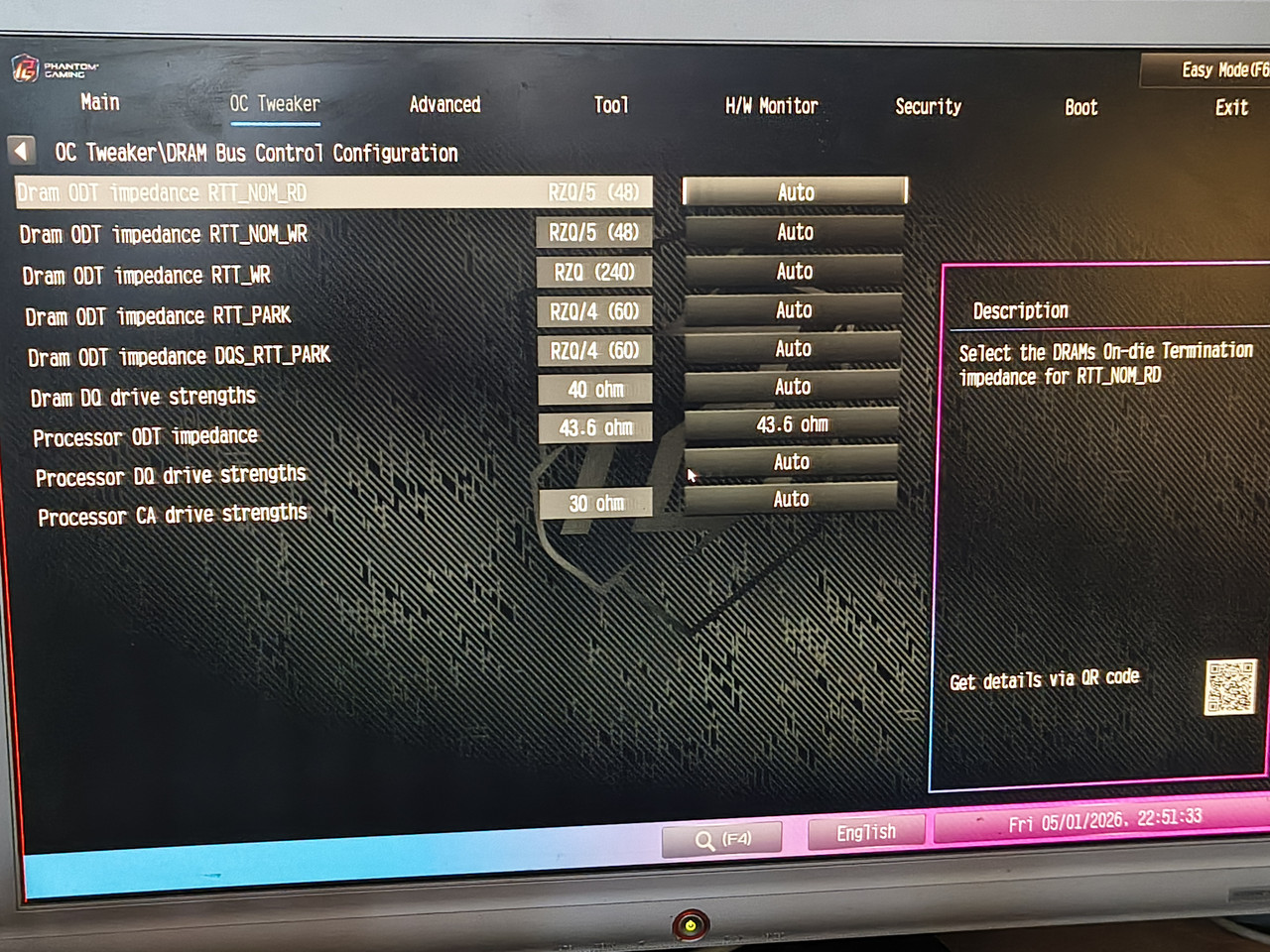 BIOS settings which differ from default - used a neat trick here - "Restore default settings, then chose "Save and exit" -> which lists all changes. (don't forget to discard if anyone uses this trick). Makes a handy list :) pt1: 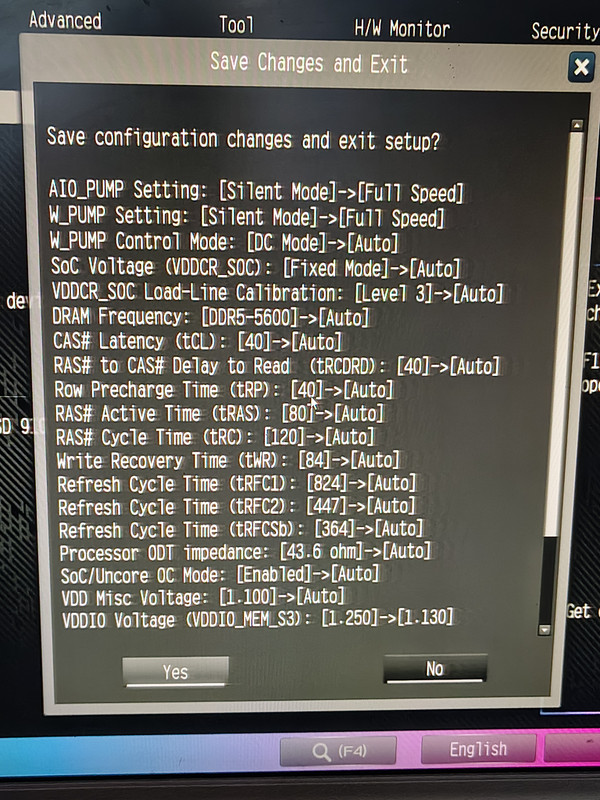 pt2: 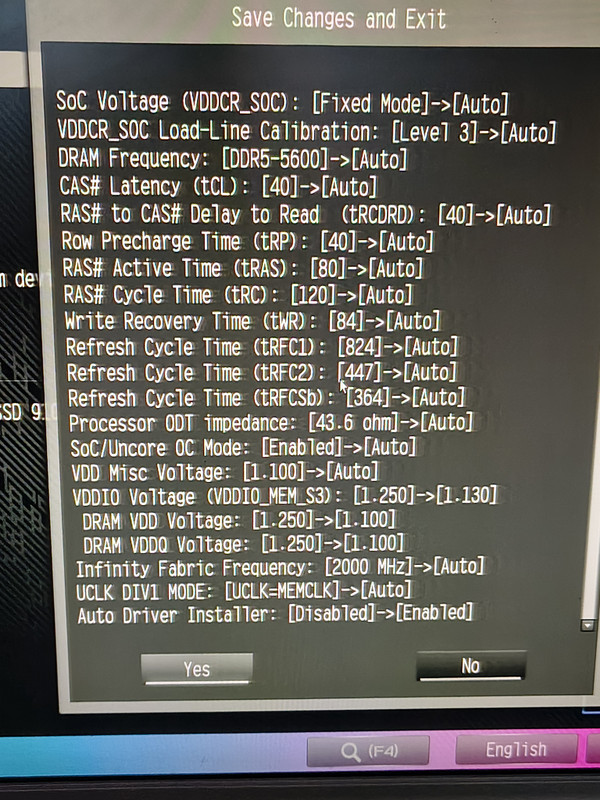 As you can see, once powered on - the system seems rock-solid. IF it passes thru dreaded memory training. Is something at fault? Maybe, but what if i happen to send any component for RMA - i'd probably get it back with a note "nothing wrong, passes all tests"... To me it seems like something in the training subroutine needs more work. BIOS v4.2 did improve on things - i will keep an eye on it and will start using this machine and see how it behaves in real-world scenario. |
Posted By: dom0xDee4
Date Posted: 02 May 2026 at 9:06pm
|
I can't edit the post, but last two shots in BIOS what is different from default: - default settings shown on the right (arrow pointing to those) - settings used in y-cruncher session on the left of arrow. |
Posted By: Xaltar
Date Posted: 02 May 2026 at 11:49pm
|
Not a bad way to go really, so long as you are still within your warranty just use it. If something dies you can get it replaced (for certain) under warranty. If the symptoms worsen just RMA the CPU and/or motherboard. Odds are pretty high that a BIOS update might resolve the issue sometime soon. Thanks again for all your detailed info. -------------
|
Posted By: dom0xDee4
Date Posted: 03 May 2026 at 4:52am
|
Yeah, all components bought in December 2025 (case is old model), Samsung NVME Gen5 bought in April 2026 - which is when i took other components out of their boxes and assembled everything - basically i'm fighting 4d ever since one of first cold boots this mobo / cpu / memory combo had in it's electronic life :) I'm just unsure, given how it goes thru stress test - that nothing really is "broken". Think i should've chose better when i ordered memory. Something i don't think i mentioned too often before: it wakes up from standby happily, not even once has that failed fwiw. But evidence on different BIOS versions behaving differently kinda defeats "defect hardware" theory - i'd bet my money it's something in memory training subroutine - stress tests so far prove once it's over that hurdle, it....runs without hiccups. Except the "hurdle" seems to be a moving target on occasion. I did have it in various ambient temps, ranges it had seen is 18°C to 25°C - it made no difference, 4d pops-up when it feels like so :D |
Posted By: dom0xDee4
Date Posted: 05 May 2026 at 6:04am
|
Hello, i have some actual news. So yesterday had a very dedicated debug session (7hr+, well into early morning hours...) Memory speed, voltages, etc perhaps play some role, but it ain't down to that. Sometime in last 3rd of that long session, i have OC'ed the memory to 6000 MT/s @1.32V - same timings as XMP-1 profile from it. (kit is rated for 5600 MT/s, 1.25V). Also, i have noticed sometime tRDWR ends up different (1 clock cycle) between A2 and B2 (not always). Memory is still @6000, currently little under one hour in y-cruncher Zen5 stress test. Most of those 7+ hours yesterday where spent doing the following: 1) restart from windows 2) restart to UEFI (from windows) using ASRock utility 3) Save and exit from UEFI (restart from UEFI after a change) 4) Shutdown from Windows (S5 state, plugged in, 5VSB) -> Power on (boot) 5) Shutdown from Windows (S5 state) -> Flip switch on PSU (G3 state) -> Toggle switch on PSU -> Power on (boot) state 6) Press RESET key whenever 4d error occurred 7) Flip switch on PSU (G3 state) whenever 4d error occurred That is what i have been testing and noting down if there is a pattern when 4d occurs. Right towards the end i realized something which i actually managed to prove, but more on that later. So: 1) restart from windows: 4d occurred 0 (ZERO) times. 2) restart to UEFI (from windows) using ASRock utility: 4d occured 0 (ZERO) times. 3) Save and exit from UEFI (restart from UEFI after a change: 4d occured 0 (ZERO) times. 4) Shutdown from Windows (S5 state, plugged in, 5VSB) -> Power on (boot)- MOST of the time unsuccessful, 4d occurred in over 80% of cycles carried. 5) Shutdown from Windows (S5 state) -> Flip switch on PSU (G3 state) -> Toggle switch on PSU -> Power on (boot) state: MOST of the time successful, 4d occurred in about 30% of these type of cycles 6) Press RESET key whenever 4d error occurred - works sometimes. 7) Flip switch on PSU (G3 state) whenever 4d error occurred: Almost total success, 4d re-appeared less then 5% of these cycles carried (these i was forced into). For all of the tests, all timings were set manually - but taking "healthy" XMP-1 or values known good training had produced (readout by ZenTimings tool). 2 3rds of the time memory was in XMP-1 mode, rest OCe'd (still running same OC - made no observable difference to 4d randomness). Final notes. While testing, i got to learn when training will fail / 4d appear - VRM and CPU fans raise their RPM (not to max, but enough to be noticable). Most important and somewhat confusing note. I re-used one of 120mm fans i had lying around. Non-PWM fan, spins very fast. I didn't measure it's current draw, but it was plugged into AIO_Pump header, set to DC mode. Once i unplugged it, 4d occurence became way less. I have measured 12V, and it's bang on startup, 12.05 rock stable (probed somewhere). Enabling Deep sleep mode also dropped occurence of 4d error a bit more so - 4d occured in about 40% of cycles carried with this ACPI setting. If i have external 3.5'' USB HDD plugged in, i see code 99 persisting for a bit longer, and 4d again trips more often. I have plugged Corsair PSU USB cable (terminated in the form of USB 2.0 header) - into USB 2.0 header of xHCI Prom #1. This seems to also decrease occurence, otherwise this Prom21 chip is in power down mode until something is plugged to it. I can't draw any conclusion, but empirically as if some power-hiccup or current limit occurs after cold-start and training, and 4d gets tripped - this really looks like it has nothing with voltages set in BIOS, speed options, timings... A question. How much does mobo rely on grounding via standoffs? Case i have was painted inside and is no longer conductive - only partially where standoffs screw in (due to threads chewing thru paint and clear coat). 3A fan header specification is per-header? Following BIOS settings were used, but for all i know - it doesn't seem like there is defacto settings that would completely remove this oddity. PS. Wheter "Fast boot=Disabled"; "DF CStates=Disabled"; "PCIE Devices Power On=Disabled" have any influence on 4d occurence - i doubt and can't tell - my test data ain't granular as much. BIOS Settings list part 1 - on the left are settings used, on the right default BIOS values. 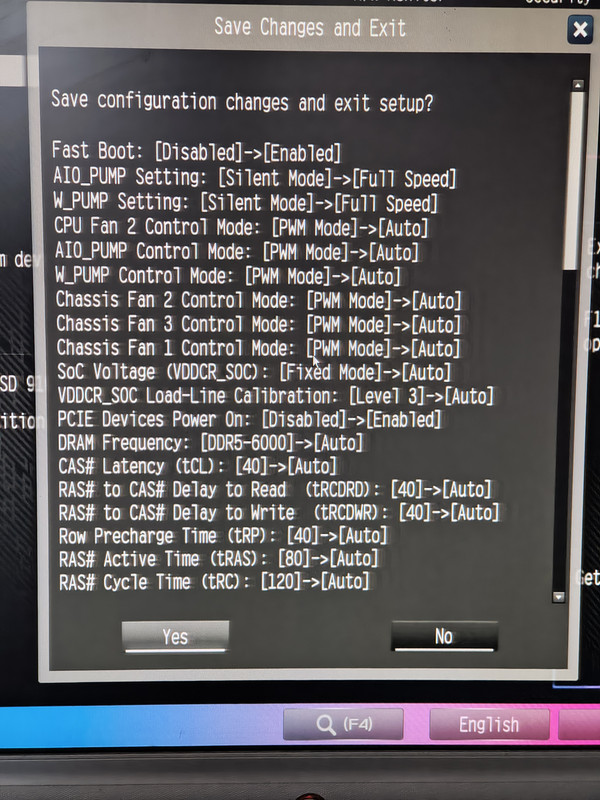 BIOS Settings list part 2 - on the left are settings used, on the right default BIOS values. 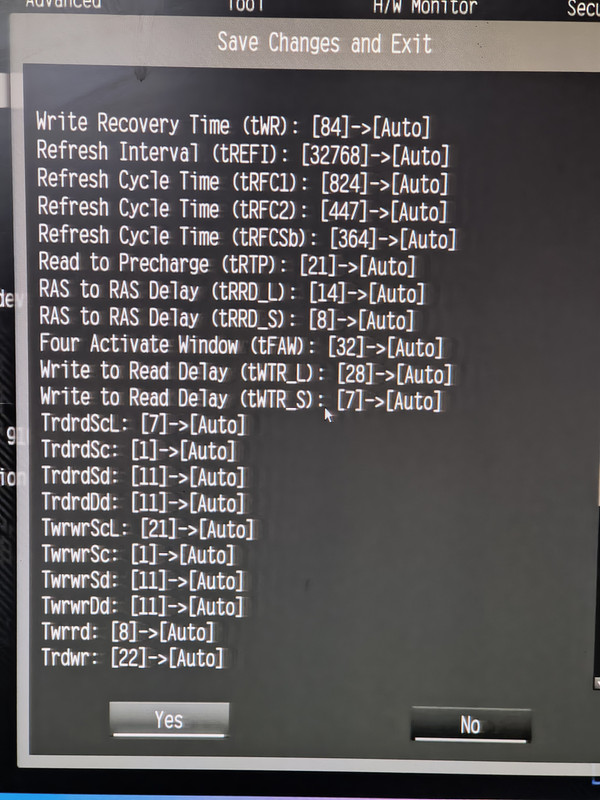 BIOS Settings list part 3 - on the left are settings used, on the right default BIOS values. (memory OC mode, Active memroy timing settings, ignore since timings used were ones from OC Tweaker) 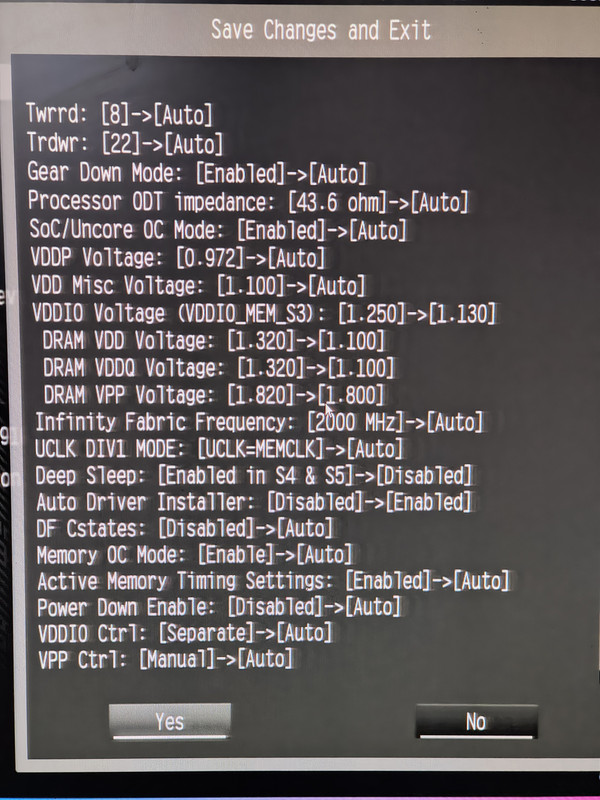 BIOS Home page..Note 6000 MT/s for this kit.. Very relaxed timings - basically whatever was in XMP-1. 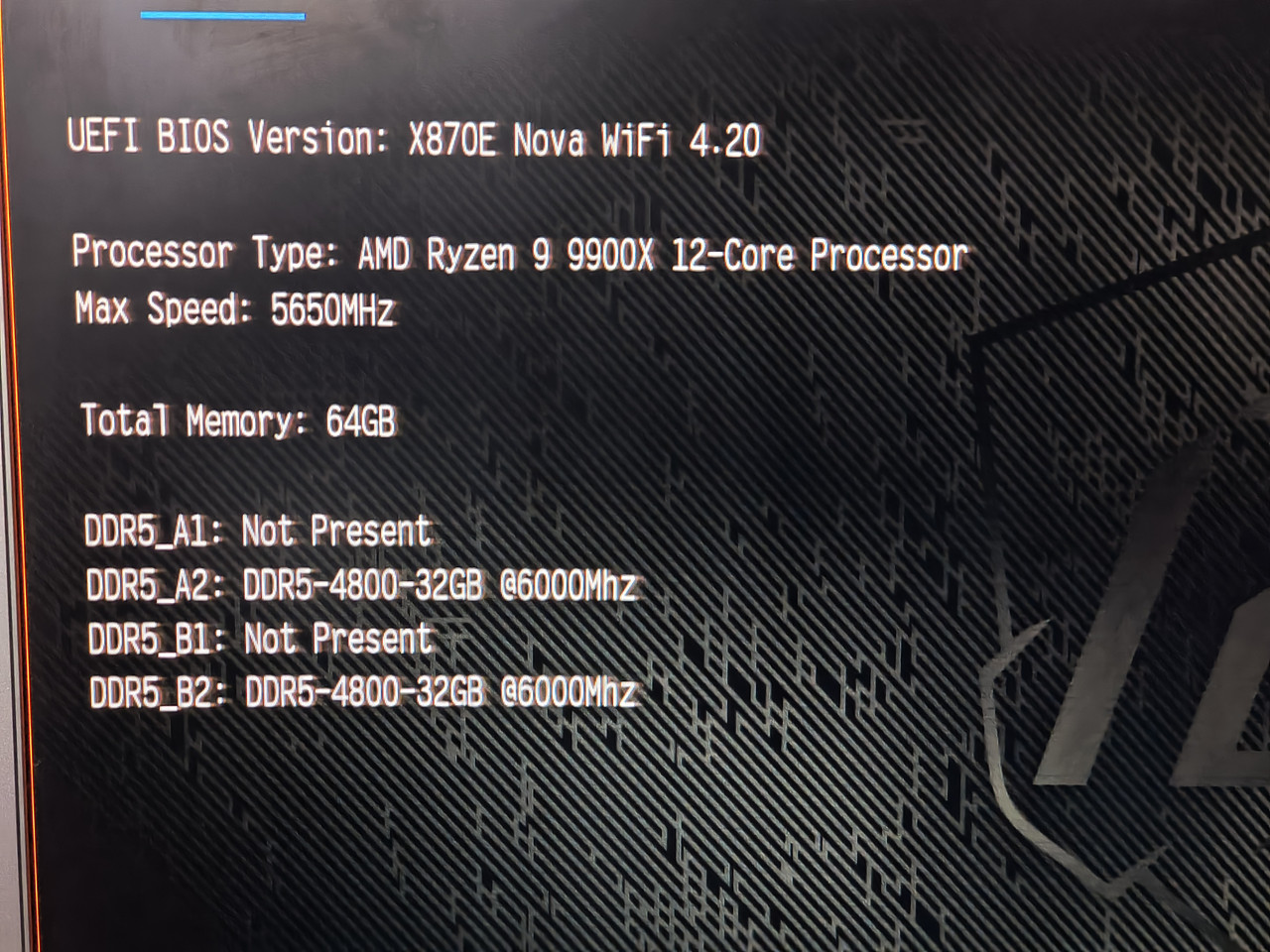 DF Cstates 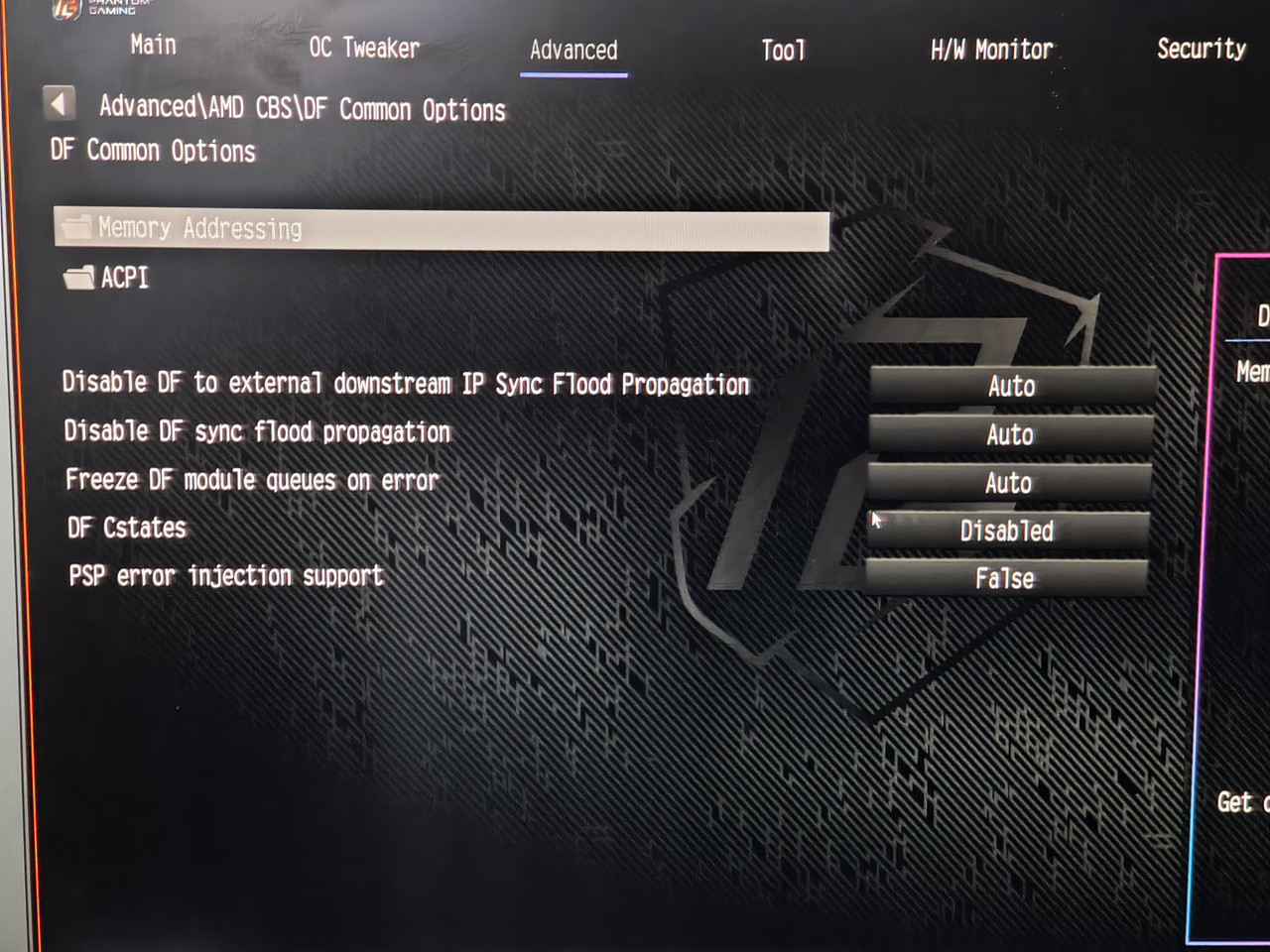 OC Tweaker 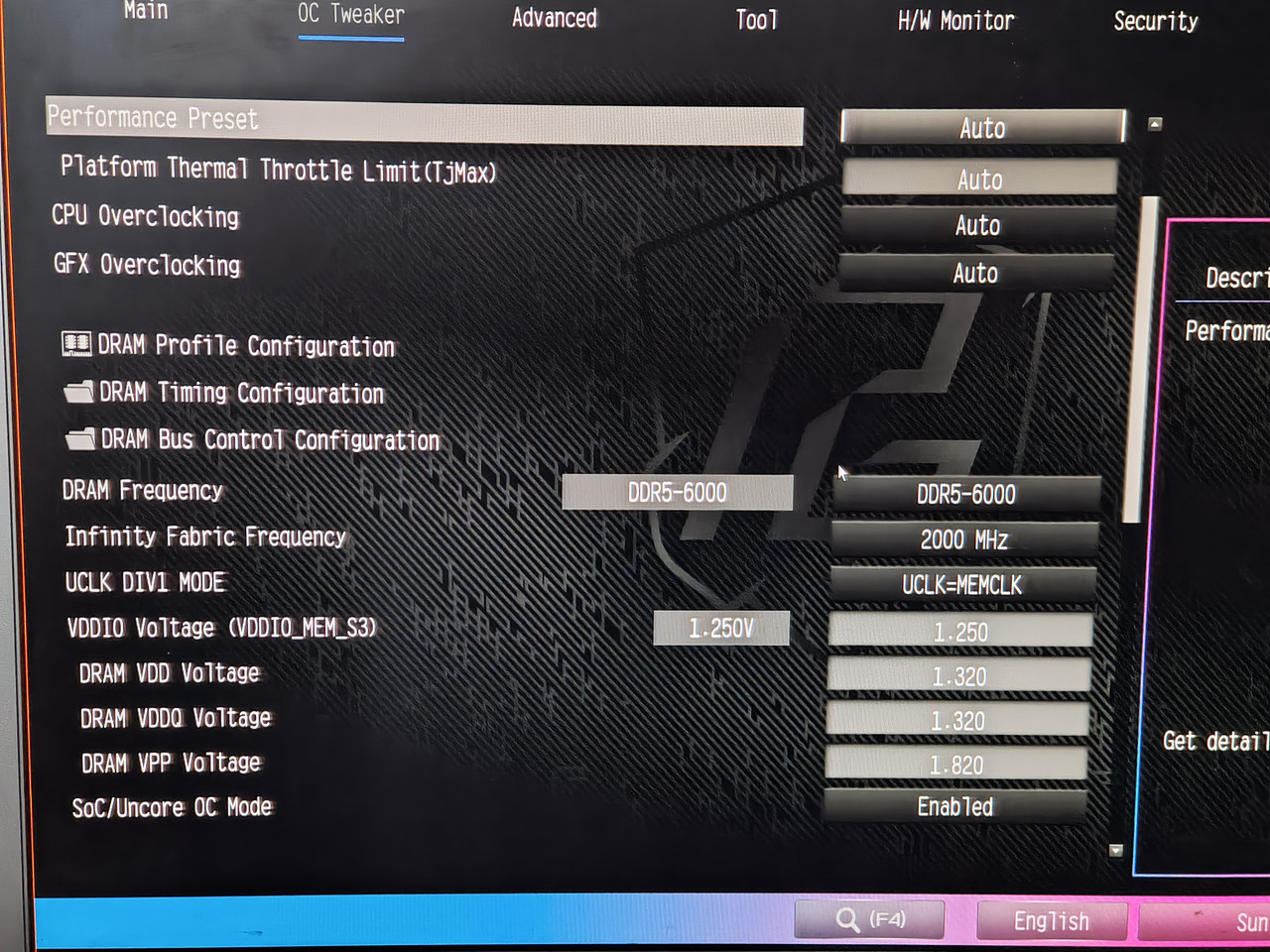 Y-Cruncher, Dimm A2 and B2 temps: [img]https://i.postimg.cc/XqSZ7SfM/09-memory-temps-ycrunch-test.png[/img Y-cruncher, CPU temps 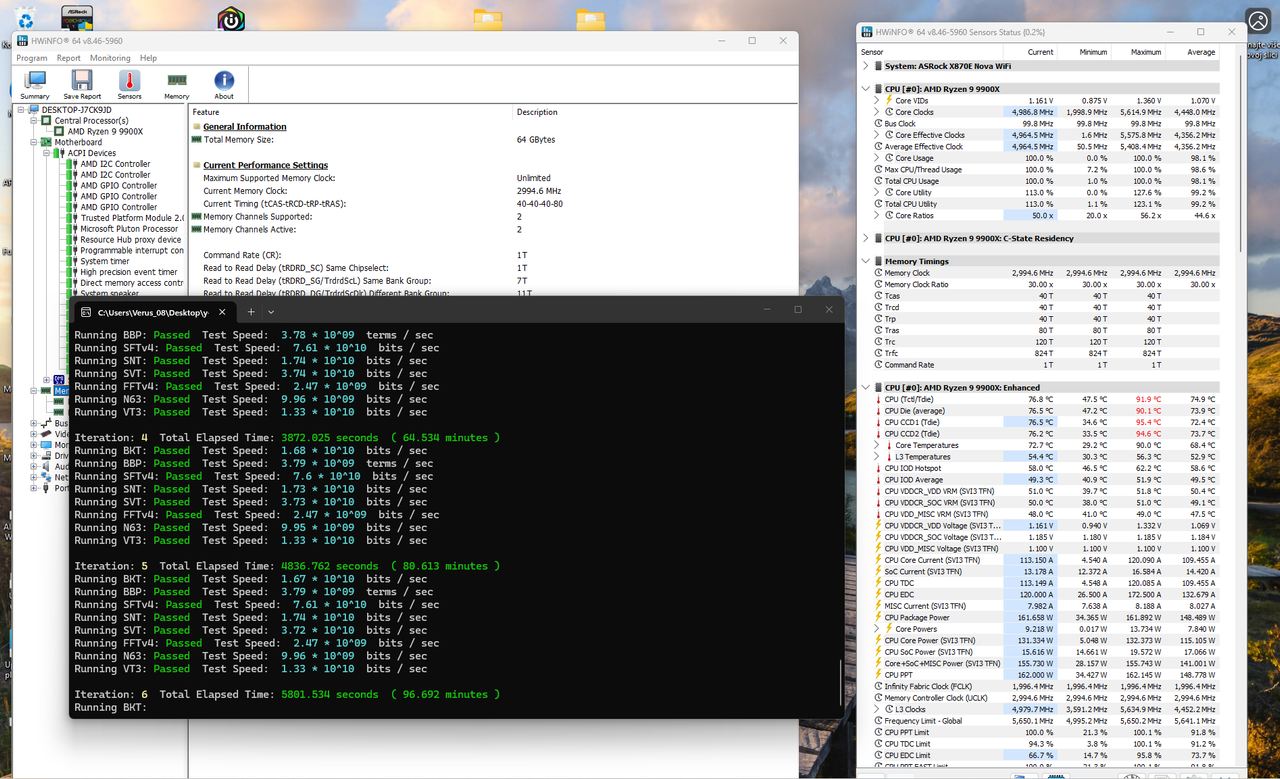 Spec from HWinfo 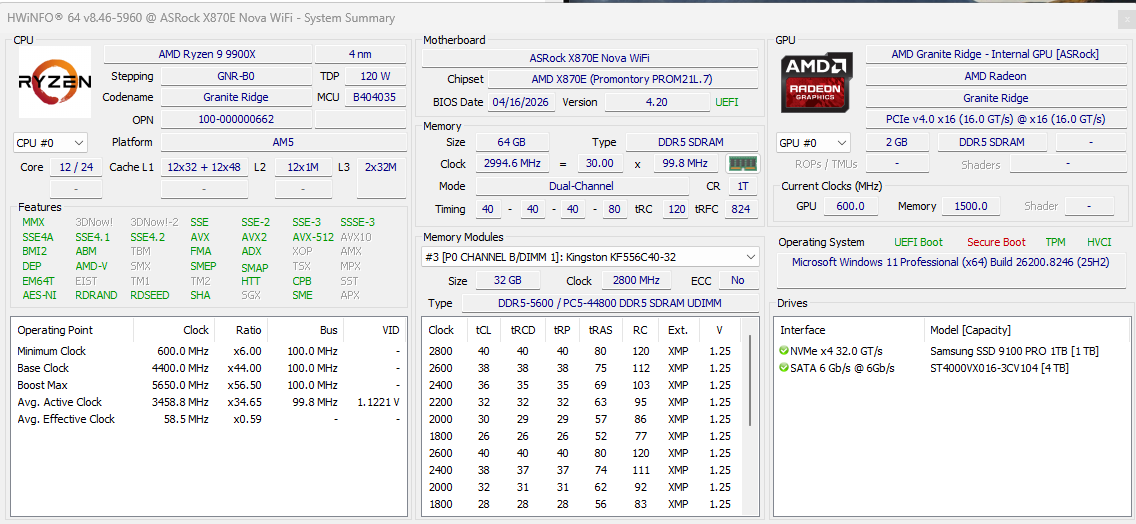 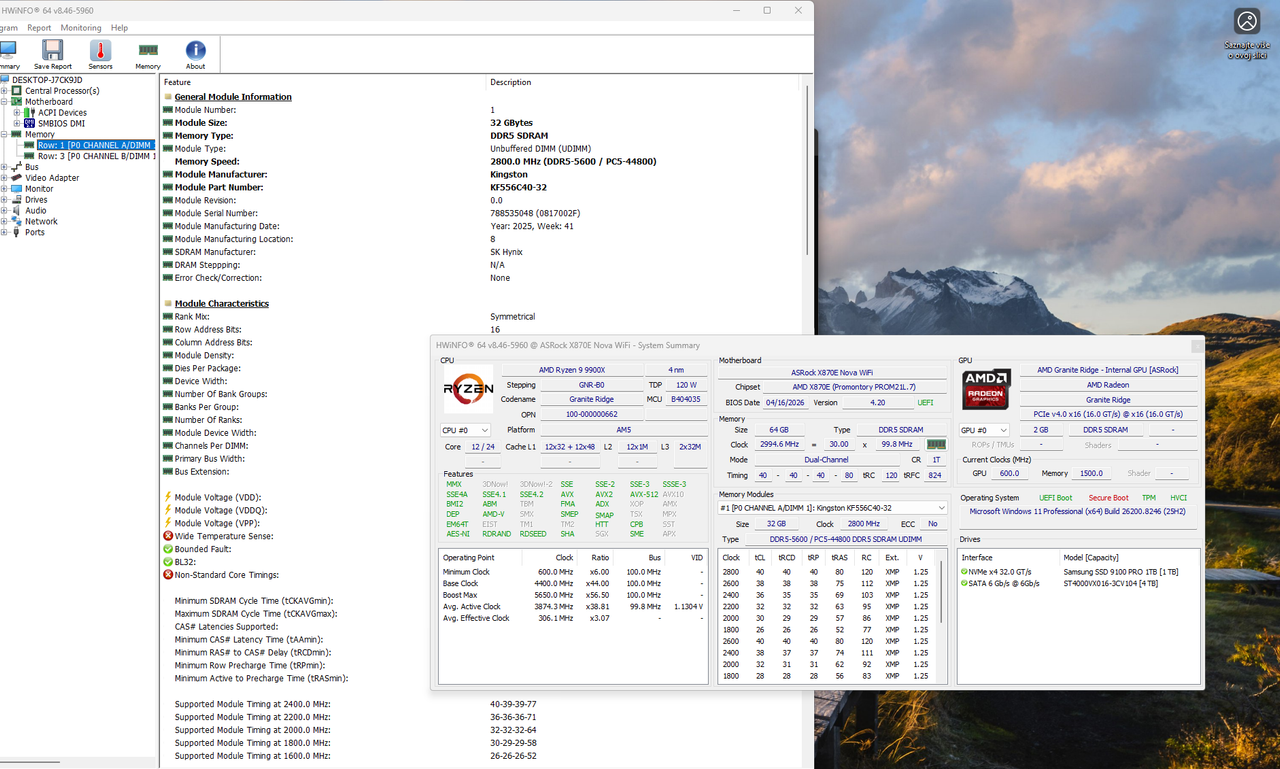
|
Posted By: dom0xDee4
Date Posted: 05 May 2026 at 6:07am
| EDIT: Forgotten one thing. I installed ASRBGLED utility (ASRock), and it updated "firmware" of something, didn't manage to capture screen of that sadly. |
Posted By: Xaltar
Date Posted: 05 May 2026 at 6:22am
|
This is brilliant info, thanks dom0xDee4. Hopefully ASRock will see this and get something useful from it. To answer your questions: Yes, 3A is per header as far as I know. Grounding isn't critical but certainly doesn't hurt, particularly if you are experiencing electrical interference for some reason. Adding a grounding wire on a spade connector between the board and the case (being careful not to short anything around the mounting hole/ground plane) might be worth giving a shot. I would also ground the PSU casing to the PC case, that one is easy and safe to do. I am not sure if it will help but given your suspicion of some kind of power issue it's worth a shot. It may also be worth trying another PSU, just incase you have some ripple happening that isn't easy to measure with a regular multimeter. You typically need an oscilloscope to measure the ripple on power rails. -------------
|
Posted By: dom0xDee4
Date Posted: 09 May 2026 at 4:50am
|
Hello there, i'm doing more testing - i'm convinced it is some sort of electrical glitch - i'll post more when i assemble the data. Just a quick one: In the meantime, i have reverted to NOT using "Deep sleep". I am using "USB Power while off" "Enabled" - this also decreased occurence alot. Corsair PSU seemed to have firmware update (when i ran iCue software, it showed it being updated, but not sure what was there previously, only could find older firmware in their changelog). I have also toggled Corsair PSU setting to "single rail OCP" instead of "Multi" - but TBH i seriously doubt that was the issue. It's a HX1200i in case i haven't mentioned before. I have also tried grounding cable, in fact it's still in there - proper, thick ground cable, no resistance and no voltage drop - i can't say there is a change in error occurence. With error generally i have found pressing RESET key will make system go past it - past few days i have never ever done hard shutdown -> power on on 4d, just "RESET". Roughly 50% of attempts it goes thru on 1st attempt, rest i need to press RESET once more. Only once it got thru only on 3rd reset. I have since tired changing RAM settings, it really makes no observable difference (still running it at 6000 MT/s, 32/38/38/38 @1.35V (this kit is rated for 5600 @ 1.25V, 40/40/40/40). Ran 5hr session of y-cruncher today. Also done PassMark memorytest the other day, pass. There are few more things for me to try: - i have never removed the main system NVME PCI-e Gen5 drive - plan is to image disk to Gen4 drive and have system boot via one of Chipset ports. - also, i will try connecting CPU1 and CPU2 fans to connectors on board bottom - repeat tests with that fast DC-fan plugged in W_PUMP header (as removing it is by the thing that had serious impact on getting rid of the error). For the end, here is a feedback that looks like a bug, or one setting in BIOS overriding the other (but is not documented in manual): Today idea came to my mind - utilizing BIOS Setup timeout, in order to see would that allow electrical shenanigans to settle down. Step1 Enter UEFI, Setup Timeout set to 15 sec. Step2 Save and exit Step3 Observe Dr.Debug codes..usual stuff..until, surprise 15 (is it memory training code??) Step4 Monitor turns on, showing grey line, then quickly after Phantom gaming full screen logo, with Function key shortcuts to enter BIOS Setup or Choose boot device. 15 code still on debug. (this same screen is what you see when you encounter 4d, but pc is not responsive at that point). Step5 Windows boots (later verified 15 sec timeout is correctly parsed. Step6 Use Restart to UEFI by AsRock. Step7 Changed Setup timeout to 120 seconds. (This value can go beyond 1000 seconds, also undocumented in BIOS guide. Step8 Save and exit Step9 Observe Dr.Debug codes..usual stuff..until, again 15 Step10 Monitor turns on, showing grey line, then quickly after Phantom gaming full screen logo, with Function key shortcuts to enter BIOS Setup or Choose boot device. 15 code still on debug - and preset for whole 120 seconds Step11 Windows boots (120 sec timeout is correctly parsed.) Step12 Restart PC from Windows OS. Step13 Windows boots very fast - setup timeout delay clearly NOT being used at all here (footnote *1) Step14 Use Restart to UEFI by AsRock. Step15 Setup Timeout set to 30 sec. Step16 Save and exit Step17 Observe Dr.Debug codes..usual stuff..until, again 15 Step18 Monitor turns on, showing grey line, then quickly after Phantom gaming full screen logo, with Function key shortcuts to enter BIOS Setup or Choose boot device. 15 code still on debug - and preset for whole 30 seconds Step19 Windows boots (30 sec timeout is correctly parsed.) Step20 Restart PC from Windows OS. Step21 Windows boots very fast - setup timeout delay clearly NOT being used at all here (footnote *1) Step22 Shutdonw PC from Windows OS. (S5 state) Step23 Power ON pc. Step24 Observe Dr.Debug codes..usual stuff..(no code 15, MCR, fast boot,training runtime reduction, robust training etc all on..) Step25 Monitor turns on, immediately Phantom gaming full screen logo, and windows starts to boot - 30 sec timeout NOT used. Step26 Windows boots (30 sec timeout delay clearly NOT being used) footnote 1* - Windows OS "Fast boot" setting is NOT active and never was. Question: is this setup timeout overriden by FastBoot setting perhaps or is it a bug in bios ignoring it / some other setting overriding it? (Will test it myself, but not ready yet - all changes have to go thru some test time). Test results of today.. RAM touched on 50°C but don't think it is settings, rather an ambient in the room was 26°C at the time of testing. 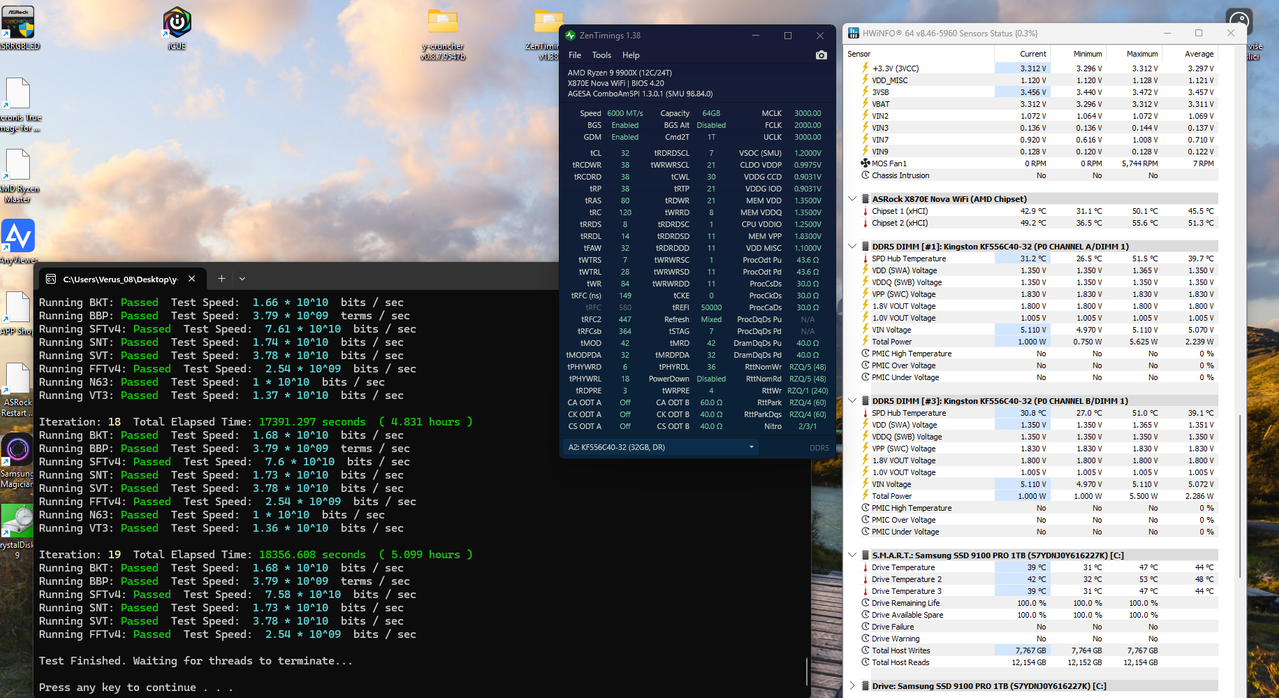
|
Posted By: dom0xDee4
Date Posted: 09 May 2026 at 7:15am
|
EDIT: That is the case - Fast Boot ignores "Setup timeout delay". Question 2. Over the interwebs, Code 15 = Memory training. Is there more to it? Since enabling the Setup timeout option and disabling FastBoot - as you've seen in previous message, code 15 is shown for as long as the delay set in BIOS. |
Posted By: dom0xDee4
Date Posted: 11 May 2026 at 4:27am
|
OK so quite promising result so far, resuming testing: - Used Setup timeout delay = 30 sec - Fastboot = disabled (since it ignores setup timeout, as described above) Since doing it, haven't had a single 4d error, in any of test cases. I will check it with that FAN that was making the situation earlier much worse. Before (can't pinpoint exactly when in past weeks) - i have also altered setup timeout from default "1s" to "0s", with / without Fastboot - for what i see now - it likely made everything worse. Also have tried Fastboot = disabled many times, but without setup delay it just doesn't work, and clearly default 1s ain't cutting it - needs more. If this proves to be water-tight theory, is there a way to reach asrock engineering team and point them to info over here, other then usual support tickets? Also, 30sec delay is small price to pay tbh. To conclude, i'll keep posting info here - few questions from above (particularly code 15) still stand. Issue to me on surface level and from programming background, almost smells like some race condition, even if i wouldn't assume this UEFI thing is running multithreaded - but something alike - perhaps various secondary Nuvoton, Dr.Mos and similar controllers sometimes don't have enough time to do "proper" init, leading to unexpected errors.. Just thinking out loud wild guess which may be off target alot :) |
Posted By: Xaltar
Date Posted: 11 May 2026 at 4:38am
|
That is interesting, so some part of the POST process is needing a bit more time. Now the question is, why? Is it training related? Voltage droop that needs the system to "warm up" a bit longer? etc. ASRock TSD has been made aware of this thread and is following along  -------------
|
Posted By: dom0xDee4
Date Posted: 14 May 2026 at 7:40pm
|
Hello, i have much more info - but without the noise - doing alot of structured testing since Monday. In the meantime, i wonder about Memory QVL list how to read it. For example, green line here shows "Dimm socket support" "2": 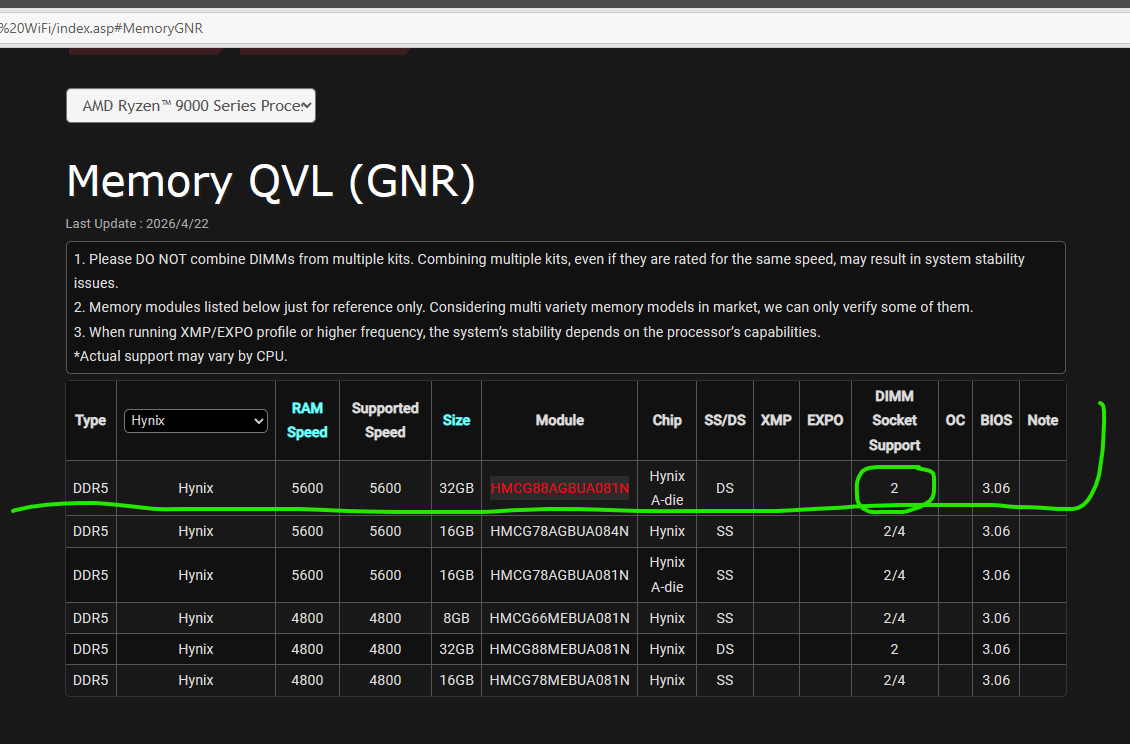 Would this mean two such modules would not work, aka one in socket 2, another in socket 4? Or is this just result of such dimm being tested only in socket 2? |
Posted By: Xaltar
Date Posted: 14 May 2026 at 8:08pm
|
It means verified with 2 modules, 2/4 means verified with 2 and 4 modules -------------
|
Posted By: dom0xDee4
Date Posted: 25 May 2026 at 7:46pm
|
Hello, i have a summary of the tests done so far, with configuration, very detailed notes on actual BIOS settings - tracked via custom bitfield - i am working on a document which sums that all up, so it's clear and relatively easy to go over - won't post another before i wrap that. In the meantime, i have to correct a mistake - Kingston kit i have is NOT on QVL list. Still, as you will see later, that didn't matter much. I have bought kit of 2 DIMM's, which i asked about in previous message. It is Sk Hynix kit "greenies" if you will - and lo and behold, Reset CMOS, unplug the thing, remove Kingston, install Hynix - all default settings - same story as with Kingston - fairly long training followed by 4D. Press Reset button - booted to Windows (just a small hint before i post complete writeup - this was always the case, Reset button to the Rescue :) ) I can't draw conclusions, but system throws intermittent 4d error - and anything i did related to power and some sort of timeout made it occur sporadically at best. When it showed up on debug screen - it would be mitigated by Reset button. Once up and running, memory speed, timing and voltage becomes irrelevant - i've ran many hours of stress tests, large file copy operations (internal drives / USB), nothing really crashed it (memory at 4800, 5600 or even 6000 fwiw...). Anyway, one more thing i have not tested is removing Gen5 (Windows boot) drive which is on CPU gen5 interface and using Chipset m2 slots, testing both with my Gen5 drive and other drive. Finally, i'll most likely get another mainboard - i have been pondering of getting another CPU, but in order to keep test conditions somewhat similar and not introduce another variable - i can't go for cheap 8xxx or lower-tier 7xxx CPU - it would have to really be 12 or 16 core, ideally Zen5 too, which is much more expensive then getting a mainboard, which i can get on much lower budget. Yes, i am mad enough to drive this all the way to finish line :D Small pic, not too relevant but for the record: Kingston kit i hold in my hand (in box, not original), SK Hynix greenies installed in background, and an ol' buddy on debug screen: 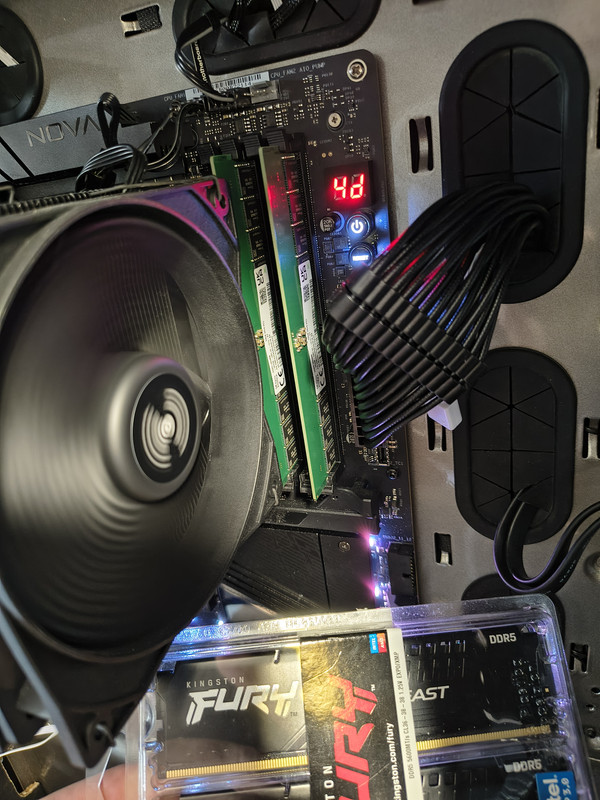
|
Posted By: Xaltar
Date Posted: 25 May 2026 at 10:59pm
|
Looking forward to reading through your findings. Thanks for taking the time to do this, it has been quite the journey -------------
|
Posted By: dom0xDee4
Date Posted: 17 Jun 2026 at 7:38pm
|
Hello, so after several weeks - i am at "boots reliably". However i can trigger 4D occasioanlly if "Fast startup" in windows is enabled. TLDR: issue on my end pretty much was due to dodgy/failing Wireless mouse USB dongle! I will still list anything i did and extensive testing coducted - i went as far as create a custom bitfield for BIOS settings / combinations for easier tracking of 4D occurence. Final realization came when i figured changing the number of USB devices influences how often error would occur, but without clear indication. So i was shuffling devices around and noticed if i plug mouse dongle in certain ports it barely can POST.
Important notes. Tested many various memory configs, i bought additional QVL kit (which is in there now, "barebones SK Hynix greenies) - generally 4D would DECREASE, in some cases ALOT with aggresive power settings - the explanation for it is likely more voltage gave it higher margin, due to faulty dongle messing various circuitry on board. Whenever i'd get 4D, i have realized all i have to do is press "Reset" button. Usually one reset would get it happily into windows, sometimes two and in very very rare cases - three resets. This made zero sense to me, but did imply something about cold boot-wakeup and power didn't roll correctly. What also made little sense, once powered on machine would run stress tests for many many hours, with zero issues. Basically only trouble was true cold boot, intermittent. I will post later all i did and settings that eventually led to lower error count. Conclusion is - if anyone happens to need such "exotic" workarounds - something is not quite right and if you are debugging it yourself - make sure to really inspect and suspect EVERY little bit. In my case, i have ruled out almost everything - PSU, CPU and dreaded USB dongle were the last ones. I almost bought another mainboard and / or CPU before realizing that small thing is burning back there. SK Hynix greenies are not bad at all (they're M-die before anyone asks) - perhaps non-QVL, XMP-only Kingston kit i replaced has tighter / better on-dimm voltage regulation - but so far that hasn't proved problematic to run SK's at "mild OC" 6000 / CL40 / 1.25V / VDDIO 1.25, VSoC 1.15. (can go much tighter timings, but needs higher voltage on VSoC, VDDIO, VDIMM, which i opted out of - gains for what i need are negligible. SK's i have equipped with passive heatsink as well). |
Posted By: Xaltar
Date Posted: 17 Jun 2026 at 11:01pm
|
Thanks for the update. It's been quite a journey. I guess it goes to show, never overlook a common component in testing. Even a keyboard or mouse can potentially be the cause of strange symptoms. It makes me wonder if others who ended up replacing components to solve issues could have fallen prey to a similar cause. I will definitely be keeping this in my back pocket from now on, trying with a different (wired) mouse and keyboard early on in troubleshooting. -------------
|