
|
X870E Nova D4 on restart/cold boot |
Post Reply 
|
Page 123 4> |
| Author | |
Xaltar 
Moderator Group 

Joined: 16 May 2015 Location: Europe Status: Online Points: 42468 |
 Post Options Post Options
 Thanks(1) Thanks(1)
 Quote Reply Quote Reply
 Topic: X870E Nova D4 on restart/cold boot Topic: X870E Nova D4 on restart/cold bootPosted: 17 Jun 2026 at 11:01pm |
|
Thanks for the update. It's been quite a journey. I guess it goes to show, never
overlook a common component in testing. Even a keyboard or mouse can potentially be the cause of strange symptoms. It makes me wonder if others who ended up replacing components to solve issues could have fallen prey to a similar cause. I will definitely be keeping this in my back pocket from now on, trying with a different (wired) mouse and keyboard early on in troubleshooting. |
|

|
|
 |
|
|
dom0xDee4
Groupie 

Joined: 23 Apr 2026 Location: Croatia Status: Offline Points: 345 |
Post Options
Thanks(1)
Quote Reply
Posted: 17 Jun 2026 at 7:38pm |
|
Hello,
so after several weeks - i am at "boots reliably". However i can trigger 4D occasioanlly if "Fast startup" in windows is enabled. TLDR: issue on my end pretty much was due to dodgy/failing Wireless mouse USB dongle! I will still list anything i did and extensive testing coducted - i went as far as create a custom bitfield for BIOS settings / combinations for easier tracking of 4D occurence. Final realization came when i figured changing the number of USB devices influences how often error would occur, but without clear indication. So i was shuffling devices around and noticed if i plug mouse dongle in certain ports it barely can POST.
Important notes. Tested many various memory configs, i bought additional QVL kit (which is in there now, "barebones SK Hynix greenies) - generally 4D would DECREASE, in some cases ALOT with aggresive power settings - the explanation for it is likely more voltage gave it higher margin, due to faulty dongle messing various circuitry on board. Whenever i'd get 4D, i have realized all i have to do is press "Reset" button. Usually one reset would get it happily into windows, sometimes two and in very very rare cases - three resets. This made zero sense to me, but did imply something about cold boot-wakeup and power didn't roll correctly. What also made little sense, once powered on machine would run stress tests for many many hours, with zero issues. Basically only trouble was true cold boot, intermittent. I will post later all i did and settings that eventually led to lower error count. Conclusion is - if anyone happens to need such "exotic" workarounds - something is not quite right and if you are debugging it yourself - make sure to really inspect and suspect EVERY little bit. In my case, i have ruled out almost everything - PSU, CPU and dreaded USB dongle were the last ones. I almost bought another mainboard and / or CPU before realizing that small thing is burning back there. SK Hynix greenies are not bad at all (they're M-die before anyone asks) - perhaps non-QVL, XMP-only Kingston kit i replaced has tighter / better on-dimm voltage regulation - but so far that hasn't proved problematic to run SK's at "mild OC" 6000 / CL40 / 1.25V / VDDIO 1.25, VSoC 1.15. (can go much tighter timings, but needs higher voltage on VSoC, VDDIO, VDIMM, which i opted out of - gains for what i need are negligible. SK's i have equipped with passive heatsink as well). |
|
|
|
|
Xaltar
Moderator Group
Joined: 16 May 2015 Location: Europe Status: Online Points: 42468 |
Post Options
Thanks(0)
Quote Reply
Posted: 25 May 2026 at 10:59pm |
|
Looking forward to reading through your findings. Thanks for taking the time to
do this, it has been quite the journey 
|
|
|
|
|
|
|
|
dom0xDee4
Groupie
Joined: 23 Apr 2026 Location: Croatia Status: Offline Points: 345 |
Post Options
Thanks(0)
Quote Reply
Posted: 25 May 2026 at 7:46pm |
|
Hello, i have a summary of the tests done so far, with configuration, very detailed notes on actual BIOS settings - tracked via custom bitfield - i am working on a document which sums that all up, so it's clear and relatively easy to go over - won't post another before i wrap that.
In the meantime, i have to correct a mistake - Kingston kit i have is NOT on QVL list. Still, as you will see later, that didn't matter much. I have bought kit of 2 DIMM's, which i asked about in previous message. It is Sk Hynix kit "greenies" if you will - and lo and behold, Reset CMOS, unplug the thing, remove Kingston, install Hynix - all default settings - same story as with Kingston - fairly long training followed by 4D. Press Reset button - booted to Windows (just a small hint before i post complete writeup - this was always the case, Reset button to the Rescue :) ) I can't draw conclusions, but system throws intermittent 4d error - and anything i did related to power and some sort of timeout made it occur sporadically at best. When it showed up on debug screen - it would be mitigated by Reset button. Once up and running, memory speed, timing and voltage becomes irrelevant - i've ran many hours of stress tests, large file copy operations (internal drives / USB), nothing really crashed it (memory at 4800, 5600 or even 6000 fwiw...). Anyway, one more thing i have not tested is removing Gen5 (Windows boot) drive which is on CPU gen5 interface and using Chipset m2 slots, testing both with my Gen5 drive and other drive. Finally, i'll most likely get another mainboard - i have been pondering of getting another CPU, but in order to keep test conditions somewhat similar and not introduce another variable - i can't go for cheap 8xxx or lower-tier 7xxx CPU - it would have to really be 12 or 16 core, ideally Zen5 too, which is much more expensive then getting a mainboard, which i can get on much lower budget. Yes, i am mad enough to drive this all the way to finish line :D Small pic, not too relevant but for the record: Kingston kit i hold in my hand (in box, not original), SK Hynix greenies installed in background, and an ol' buddy on debug screen: 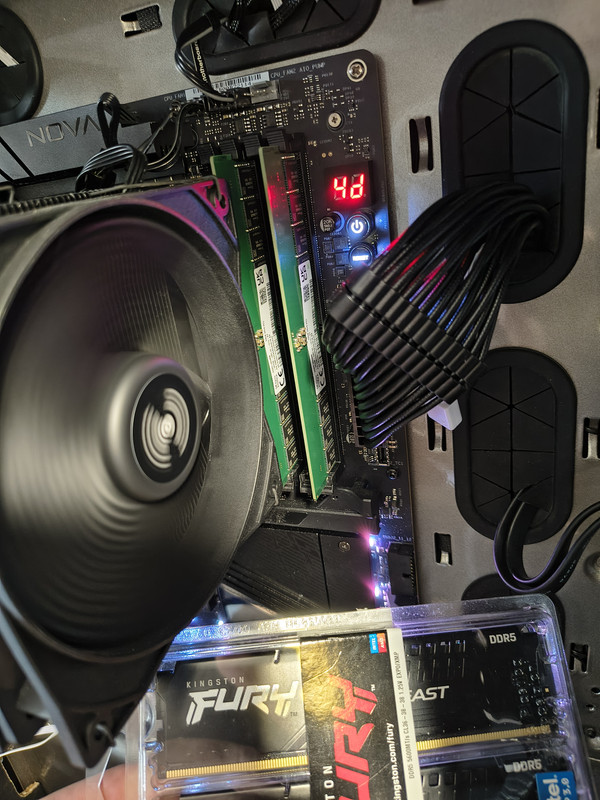
|
|
|
|
|
Xaltar
Moderator Group
Joined: 16 May 2015 Location: Europe Status: Online Points: 42468 |
Post Options
Thanks(1)
Quote Reply
Posted: 14 May 2026 at 8:08pm |
|
It means verified with 2 modules, 2/4 means verified with 2 and 4 modules
|
|
|
|
|
|
|
|
dom0xDee4
Groupie
Joined: 23 Apr 2026 Location: Croatia Status: Offline Points: 345 |
Post Options
Thanks(0)
Quote Reply
Posted: 14 May 2026 at 7:40pm |
|
Hello,
i have much more info - but without the noise - doing alot of structured testing since Monday. In the meantime, i wonder about Memory QVL list how to read it. For example, green line here shows "Dimm socket support" "2": 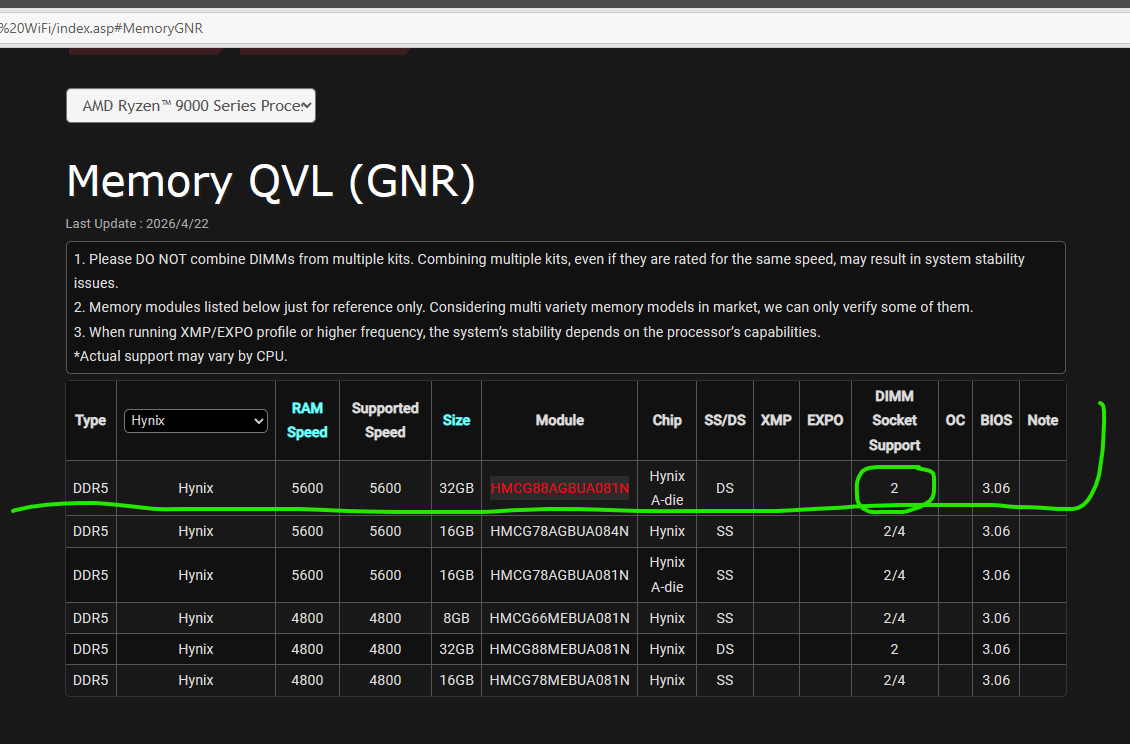 Would this mean two such modules would not work, aka one in socket 2, another in socket 4? Or is this just result of such dimm being tested only in socket 2? |
|
|
|
|
Xaltar
Moderator Group
Joined: 16 May 2015 Location: Europe Status: Online Points: 42468 |
Post Options
Thanks(1)
Quote Reply
Posted: 11 May 2026 at 4:38am |
|
That is interesting, so some part of the POST process is needing a bit more time.
Now the question is, why? Is it training related? Voltage droop that needs the system to "warm up" a bit longer? etc. ASRock TSD has been made aware of this thread and is following along 
|
|
|
|
|
|
|
|
dom0xDee4
Groupie
Joined: 23 Apr 2026 Location: Croatia Status: Offline Points: 345 |
Post Options
Thanks(0)
Quote Reply
Posted: 11 May 2026 at 4:27am |
|
OK so quite promising result so far, resuming testing:
- Used Setup timeout delay = 30 sec - Fastboot = disabled (since it ignores setup timeout, as described above) Since doing it, haven't had a single 4d error, in any of test cases. I will check it with that FAN that was making the situation earlier much worse. Before (can't pinpoint exactly when in past weeks) - i have also altered setup timeout from default "1s" to "0s", with / without Fastboot - for what i see now - it likely made everything worse. Also have tried Fastboot = disabled many times, but without setup delay it just doesn't work, and clearly default 1s ain't cutting it - needs more. If this proves to be water-tight theory, is there a way to reach asrock engineering team and point them to info over here, other then usual support tickets? Also, 30sec delay is small price to pay tbh. To conclude, i'll keep posting info here - few questions from above (particularly code 15) still stand. Issue to me on surface level and from programming background, almost smells like some race condition, even if i wouldn't assume this UEFI thing is running multithreaded - but something alike - perhaps various secondary Nuvoton, Dr.Mos and similar controllers sometimes don't have enough time to do "proper" init, leading to unexpected errors.. Just thinking out loud wild guess which may be off target alot :) |
|
|
|
|
dom0xDee4
Groupie
Joined: 23 Apr 2026 Location: Croatia Status: Offline Points: 345 |
Post Options
Thanks(0)
Quote Reply
Posted: 09 May 2026 at 7:15am |
|
EDIT: That is the case - Fast Boot ignores "Setup timeout delay".
Question 2. Over the interwebs, Code 15 = Memory training. Is there more to it? Since enabling the Setup timeout option and disabling FastBoot - as you've seen in previous message, code 15 is shown for as long as the delay set in BIOS. |
|
|
|
|
dom0xDee4
Groupie
Joined: 23 Apr 2026 Location: Croatia Status: Offline Points: 345 |
Post Options
Thanks(0)
Quote Reply
Posted: 09 May 2026 at 4:50am |
|
Hello there, i'm doing more testing - i'm convinced it is some sort of electrical glitch - i'll post more when i assemble the data.
Just a quick one: In the meantime, i have reverted to NOT using "Deep sleep". I am using "USB Power while off" "Enabled" - this also decreased occurence alot. Corsair PSU seemed to have firmware update (when i ran iCue software, it showed it being updated, but not sure what was there previously, only could find older firmware in their changelog). I have also toggled Corsair PSU setting to "single rail OCP" instead of "Multi" - but TBH i seriously doubt that was the issue. It's a HX1200i in case i haven't mentioned before. I have also tried grounding cable, in fact it's still in there - proper, thick ground cable, no resistance and no voltage drop - i can't say there is a change in error occurence. With error generally i have found pressing RESET key will make system go past it - past few days i have never ever done hard shutdown -> power on on 4d, just "RESET". Roughly 50% of attempts it goes thru on 1st attempt, rest i need to press RESET once more. Only once it got thru only on 3rd reset. I have since tired changing RAM settings, it really makes no observable difference (still running it at 6000 MT/s, 32/38/38/38 @1.35V (this kit is rated for 5600 @ 1.25V, 40/40/40/40). Ran 5hr session of y-cruncher today. Also done PassMark memorytest the other day, pass. There are few more things for me to try: - i have never removed the main system NVME PCI-e Gen5 drive - plan is to image disk to Gen4 drive and have system boot via one of Chipset ports. - also, i will try connecting CPU1 and CPU2 fans to connectors on board bottom - repeat tests with that fast DC-fan plugged in W_PUMP header (as removing it is by the thing that had serious impact on getting rid of the error). For the end, here is a feedback that looks like a bug, or one setting in BIOS overriding the other (but is not documented in manual): Today idea came to my mind - utilizing BIOS Setup timeout, in order to see would that allow electrical shenanigans to settle down. Step1 Enter UEFI, Setup Timeout set to 15 sec. Step2 Save and exit Step3 Observe Dr.Debug codes..usual stuff..until, surprise 15 (is it memory training code??) Step4 Monitor turns on, showing grey line, then quickly after Phantom gaming full screen logo, with Function key shortcuts to enter BIOS Setup or Choose boot device. 15 code still on debug. (this same screen is what you see when you encounter 4d, but pc is not responsive at that point). Step5 Windows boots (later verified 15 sec timeout is correctly parsed. Step6 Use Restart to UEFI by AsRock. Step7 Changed Setup timeout to 120 seconds. (This value can go beyond 1000 seconds, also undocumented in BIOS guide. Step8 Save and exit Step9 Observe Dr.Debug codes..usual stuff..until, again 15 Step10 Monitor turns on, showing grey line, then quickly after Phantom gaming full screen logo, with Function key shortcuts to enter BIOS Setup or Choose boot device. 15 code still on debug - and preset for whole 120 seconds Step11 Windows boots (120 sec timeout is correctly parsed.) Step12 Restart PC from Windows OS. Step13 Windows boots very fast - setup timeout delay clearly NOT being used at all here (footnote *1) Step14 Use Restart to UEFI by AsRock. Step15 Setup Timeout set to 30 sec. Step16 Save and exit Step17 Observe Dr.Debug codes..usual stuff..until, again 15 Step18 Monitor turns on, showing grey line, then quickly after Phantom gaming full screen logo, with Function key shortcuts to enter BIOS Setup or Choose boot device. 15 code still on debug - and preset for whole 30 seconds Step19 Windows boots (30 sec timeout is correctly parsed.) Step20 Restart PC from Windows OS. Step21 Windows boots very fast - setup timeout delay clearly NOT being used at all here (footnote *1) Step22 Shutdonw PC from Windows OS. (S5 state) Step23 Power ON pc. Step24 Observe Dr.Debug codes..usual stuff..(no code 15, MCR, fast boot,training runtime reduction, robust training etc all on..) Step25 Monitor turns on, immediately Phantom gaming full screen logo, and windows starts to boot - 30 sec timeout NOT used. Step26 Windows boots (30 sec timeout delay clearly NOT being used) footnote 1* - Windows OS "Fast boot" setting is NOT active and never was. Question: is this setup timeout overriden by FastBoot setting perhaps or is it a bug in bios ignoring it / some other setting overriding it? (Will test it myself, but not ready yet - all changes have to go thru some test time). Test results of today.. RAM touched on 50°C but don't think it is settings, rather an ambient in the room was 26°C at the time of testing. 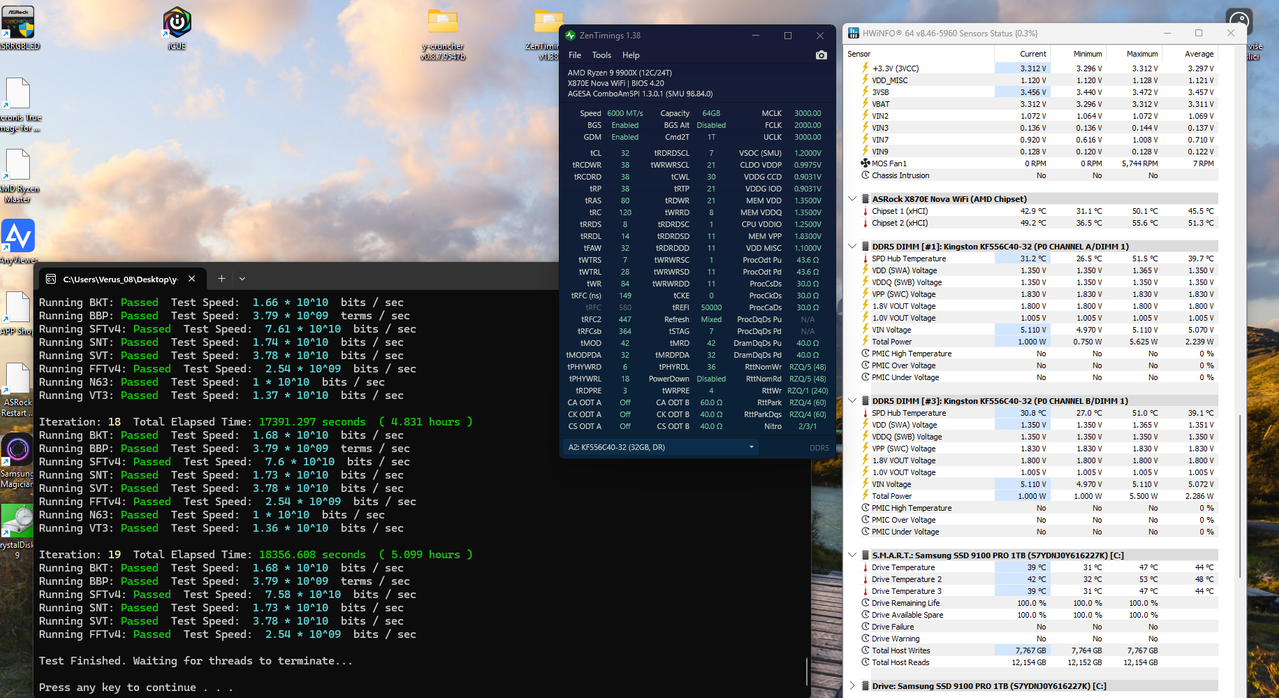
|
|
|
|
|
Post Reply
|
Page 123 4> |
 Tweet
Tweet
|
| Forum Jump | Forum Permissions You cannot post new topics in this forum You cannot reply to topics in this forum You cannot delete your posts in this forum You cannot edit your posts in this forum You cannot create polls in this forum You cannot vote in polls in this forum |


 Topic Options