
|
X870E Nova D4 on restart/cold boot |
Post Reply 
|
Page <123 |
| Author | |
dom0xDee4 
Groupie 

Joined: 23 Apr 2026 Location: Croatia Status: Offline Points: 270 |
 Post Options Post Options
 Thanks(0) Thanks(0)
 Quote Reply Quote Reply
 Posted: 02 May 2026 at 9:06pm Posted: 02 May 2026 at 9:06pm |
|
I can't edit the post, but last two shots in BIOS what is different from default:
- default settings shown on the right (arrow pointing to those) - settings used in y-cruncher session on the left of arrow. |
|
 |
|
|
Xaltar
Moderator Group 

Joined: 16 May 2015 Location: Europe Status: Offline Points: 37693 |
Post Options
Thanks(0)
Quote Reply
Posted: 02 May 2026 at 11:49pm |
|
Not a bad way to go really, so long as you are still within your warranty just
use it. If something dies you can get it replaced (for certain) under warranty. If the symptoms worsen just RMA the CPU and/or motherboard. Odds are pretty high that a BIOS update might resolve the issue sometime soon. Thanks again for all your detailed info. |
|

|
|
|
|
|
dom0xDee4
Groupie
Joined: 23 Apr 2026 Location: Croatia Status: Offline Points: 270 |
Post Options
Thanks(1)
Quote Reply
Posted: 03 May 2026 at 4:52am |
|
Yeah, all components bought in December 2025 (case is old model), Samsung NVME Gen5 bought in April 2026 - which is when i took other components out of their boxes and assembled everything - basically i'm fighting 4d ever since one of first cold boots this mobo / cpu / memory combo had in it's electronic life :)
I'm just unsure, given how it goes thru stress test - that nothing really is "broken". Think i should've chose better when i ordered memory. Something i don't think i mentioned too often before: it wakes up from standby happily, not even once has that failed fwiw. But evidence on different BIOS versions behaving differently kinda defeats "defect hardware" theory - i'd bet my money it's something in memory training subroutine - stress tests so far prove once it's over that hurdle, it....runs without hiccups. Except the "hurdle" seems to be a moving target on occasion. I did have it in various ambient temps, ranges it had seen is 18°C to 25°C - it made no difference, 4d pops-up when it feels like so :D |
|
|
|
|
dom0xDee4
Groupie
Joined: 23 Apr 2026 Location: Croatia Status: Offline Points: 270 |
Post Options
Thanks(0)
Quote Reply
Posted: 05 May 2026 at 6:04am |
|
Hello, i have some actual news.
So yesterday had a very dedicated debug session (7hr+, well into early morning hours...) Memory speed, voltages, etc perhaps play some role, but it ain't down to that. Sometime in last 3rd of that long session, i have OC'ed the memory to 6000 MT/s @1.32V - same timings as XMP-1 profile from it. (kit is rated for 5600 MT/s, 1.25V). Also, i have noticed sometime tRDWR ends up different (1 clock cycle) between A2 and B2 (not always). Memory is still @6000, currently little under one hour in y-cruncher Zen5 stress test. Most of those 7+ hours yesterday where spent doing the following: 1) restart from windows 2) restart to UEFI (from windows) using ASRock utility 3) Save and exit from UEFI (restart from UEFI after a change) 4) Shutdown from Windows (S5 state, plugged in, 5VSB) -> Power on (boot) 5) Shutdown from Windows (S5 state) -> Flip switch on PSU (G3 state) -> Toggle switch on PSU -> Power on (boot) state 6) Press RESET key whenever 4d error occurred 7) Flip switch on PSU (G3 state) whenever 4d error occurred That is what i have been testing and noting down if there is a pattern when 4d occurs. Right towards the end i realized something which i actually managed to prove, but more on that later. So: 1) restart from windows: 4d occurred 0 (ZERO) times. 2) restart to UEFI (from windows) using ASRock utility: 4d occured 0 (ZERO) times. 3) Save and exit from UEFI (restart from UEFI after a change: 4d occured 0 (ZERO) times. 4) Shutdown from Windows (S5 state, plugged in, 5VSB) -> Power on (boot)- MOST of the time unsuccessful, 4d occurred in over 80% of cycles carried. 5) Shutdown from Windows (S5 state) -> Flip switch on PSU (G3 state) -> Toggle switch on PSU -> Power on (boot) state: MOST of the time successful, 4d occurred in about 30% of these type of cycles 6) Press RESET key whenever 4d error occurred - works sometimes. 7) Flip switch on PSU (G3 state) whenever 4d error occurred: Almost total success, 4d re-appeared less then 5% of these cycles carried (these i was forced into). For all of the tests, all timings were set manually - but taking "healthy" XMP-1 or values known good training had produced (readout by ZenTimings tool). 2 3rds of the time memory was in XMP-1 mode, rest OCe'd (still running same OC - made no observable difference to 4d randomness). Final notes. While testing, i got to learn when training will fail / 4d appear - VRM and CPU fans raise their RPM (not to max, but enough to be noticable). Most important and somewhat confusing note. I re-used one of 120mm fans i had lying around. Non-PWM fan, spins very fast. I didn't measure it's current draw, but it was plugged into AIO_Pump header, set to DC mode. Once i unplugged it, 4d occurence became way less. I have measured 12V, and it's bang on startup, 12.05 rock stable (probed somewhere). Enabling Deep sleep mode also dropped occurence of 4d error a bit more so - 4d occured in about 40% of cycles carried with this ACPI setting. If i have external 3.5'' USB HDD plugged in, i see code 99 persisting for a bit longer, and 4d again trips more often. I have plugged Corsair PSU USB cable (terminated in the form of USB 2.0 header) - into USB 2.0 header of xHCI Prom #1. This seems to also decrease occurence, otherwise this Prom21 chip is in power down mode until something is plugged to it. I can't draw any conclusion, but empirically as if some power-hiccup or current limit occurs after cold-start and training, and 4d gets tripped - this really looks like it has nothing with voltages set in BIOS, speed options, timings... A question. How much does mobo rely on grounding via standoffs? Case i have was painted inside and is no longer conductive - only partially where standoffs screw in (due to threads chewing thru paint and clear coat). 3A fan header specification is per-header? Following BIOS settings were used, but for all i know - it doesn't seem like there is defacto settings that would completely remove this oddity. PS. Wheter "Fast boot=Disabled"; "DF CStates=Disabled"; "PCIE Devices Power On=Disabled" have any influence on 4d occurence - i doubt and can't tell - my test data ain't granular as much. BIOS Settings list part 1 - on the left are settings used, on the right default BIOS values. 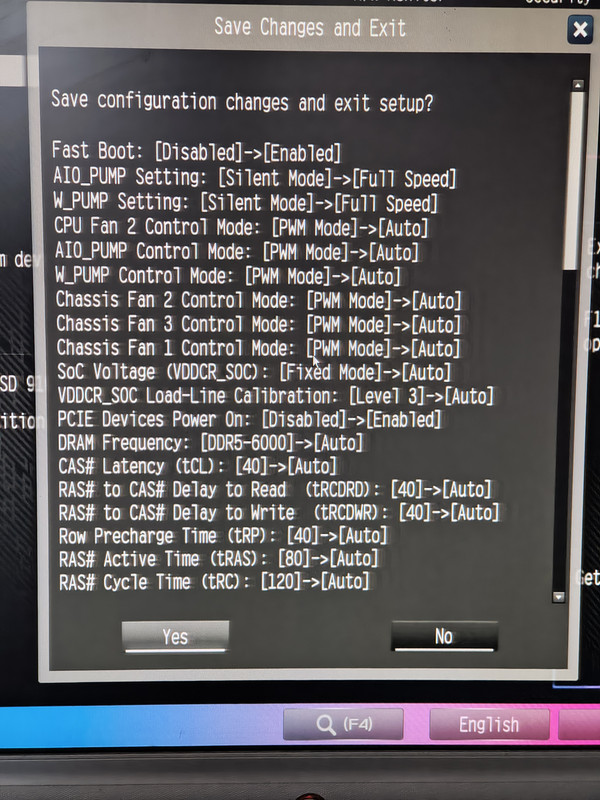 BIOS Settings list part 2 - on the left are settings used, on the right default BIOS values. 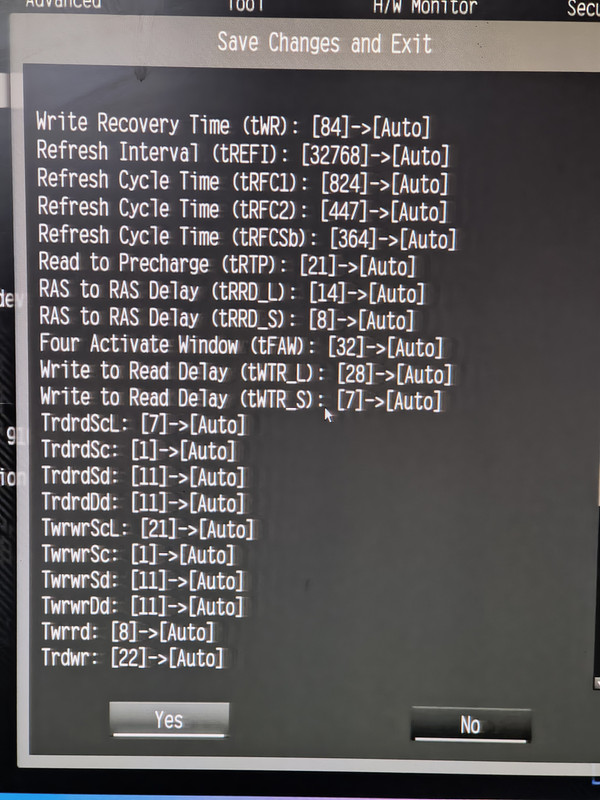 BIOS Settings list part 3 - on the left are settings used, on the right default BIOS values. (memory OC mode, Active memroy timing settings, ignore since timings used were ones from OC Tweaker) 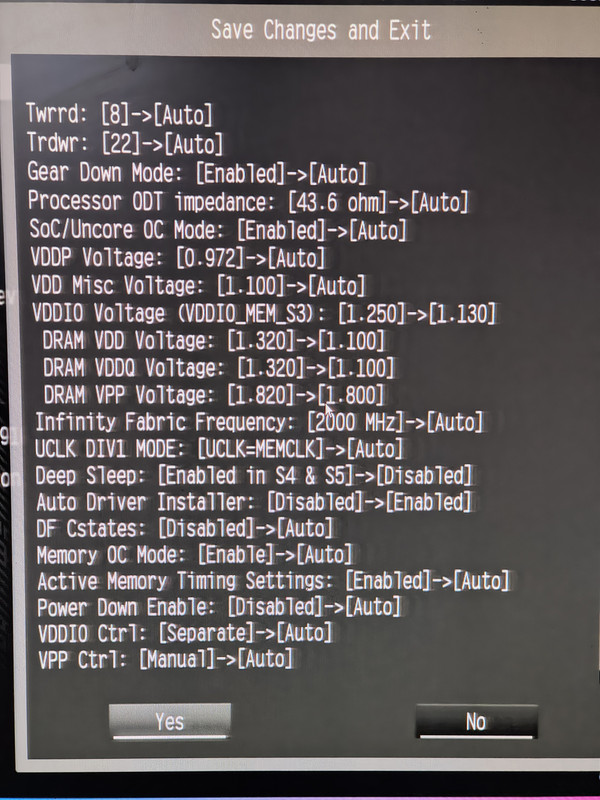 BIOS Home page..Note 6000 MT/s for this kit.. Very relaxed timings - basically whatever was in XMP-1. 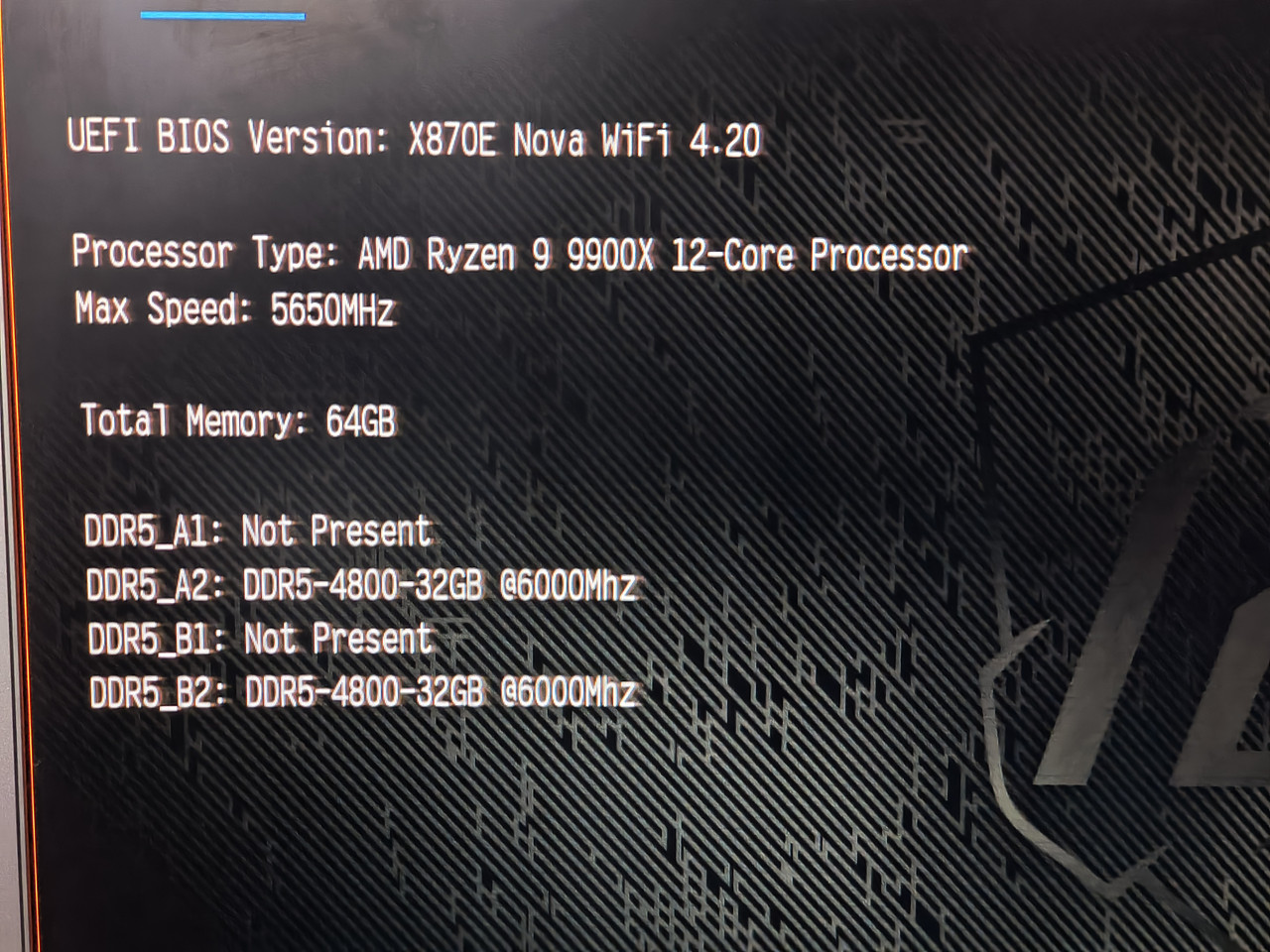 DF Cstates 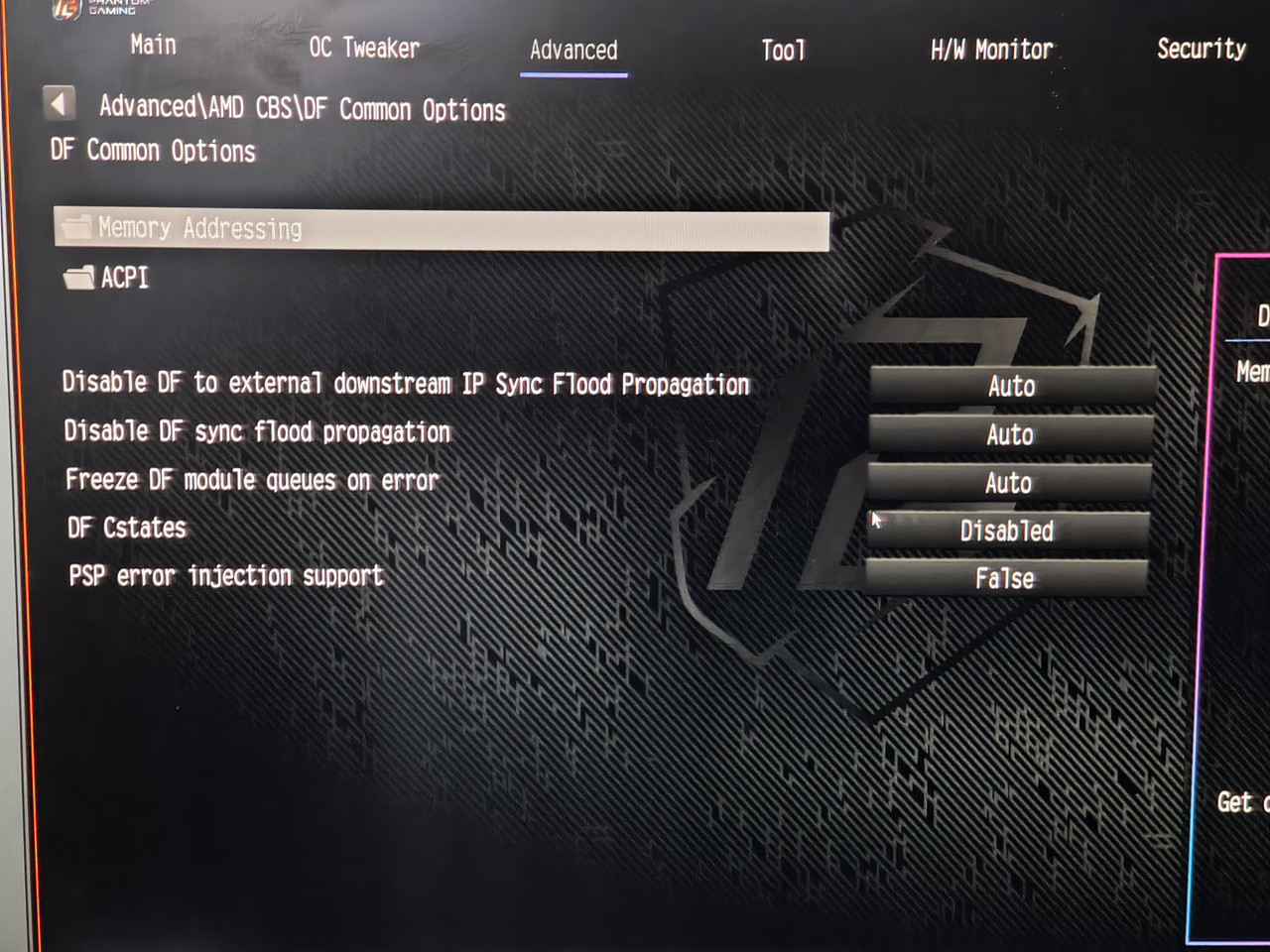 OC Tweaker 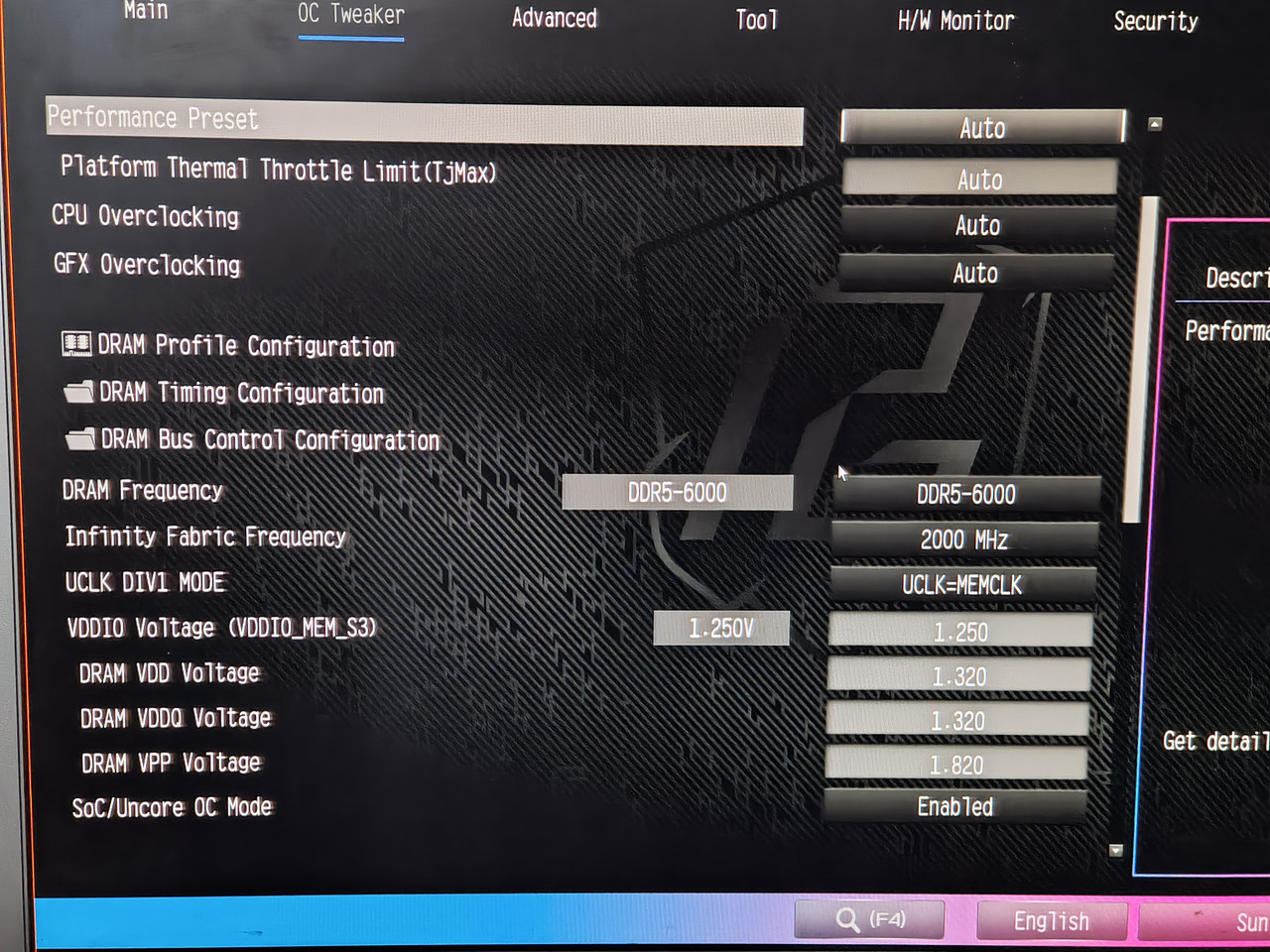 Y-Cruncher, Dimm A2 and B2 temps: [img]https://i.postimg.cc/XqSZ7SfM/09-memory-temps-ycrunch-test.png[/img Y-cruncher, CPU temps 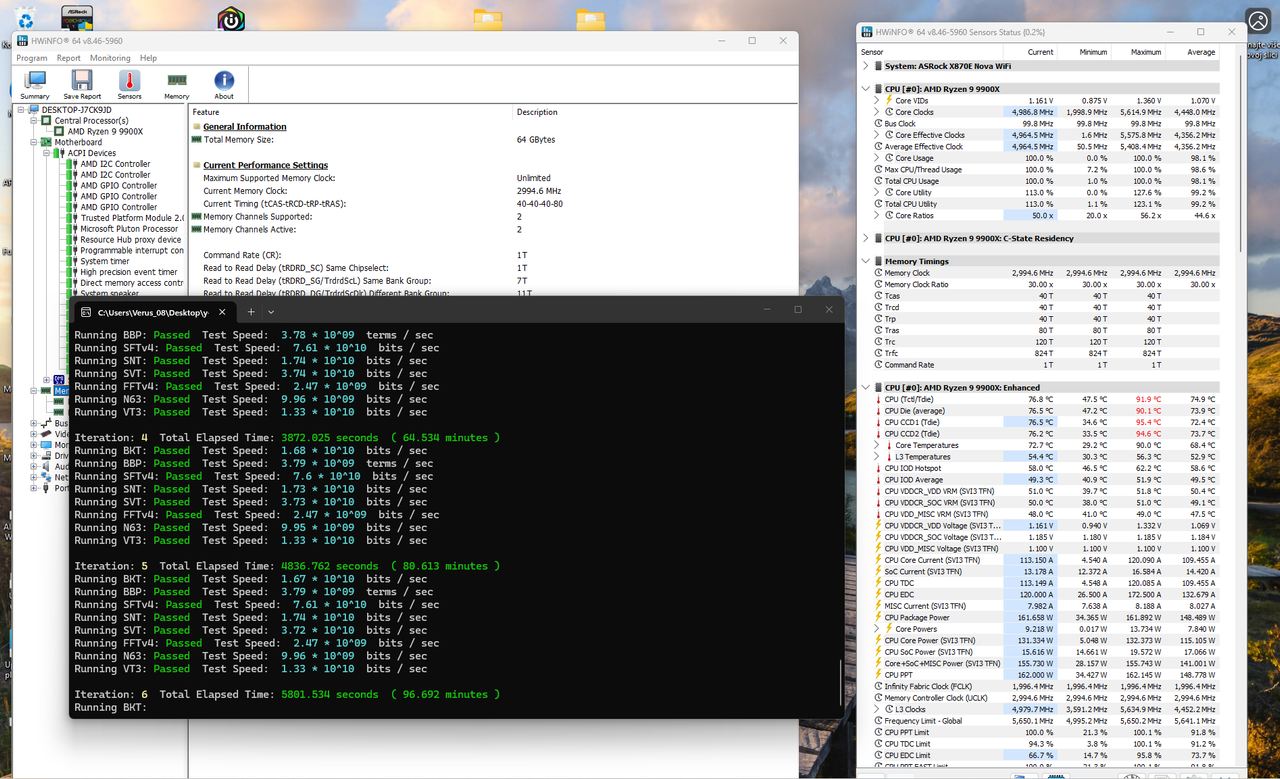 Spec from HWinfo 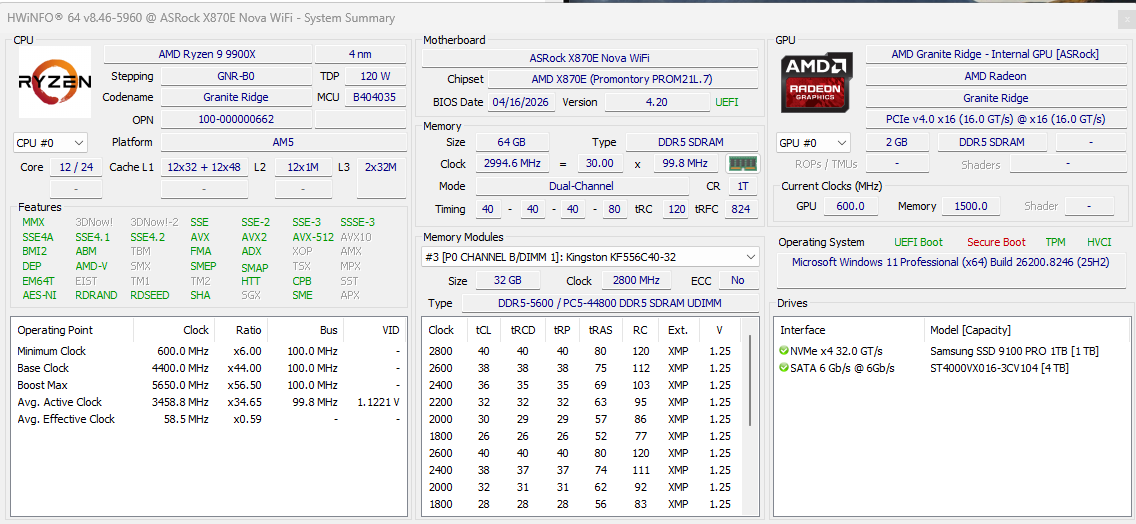 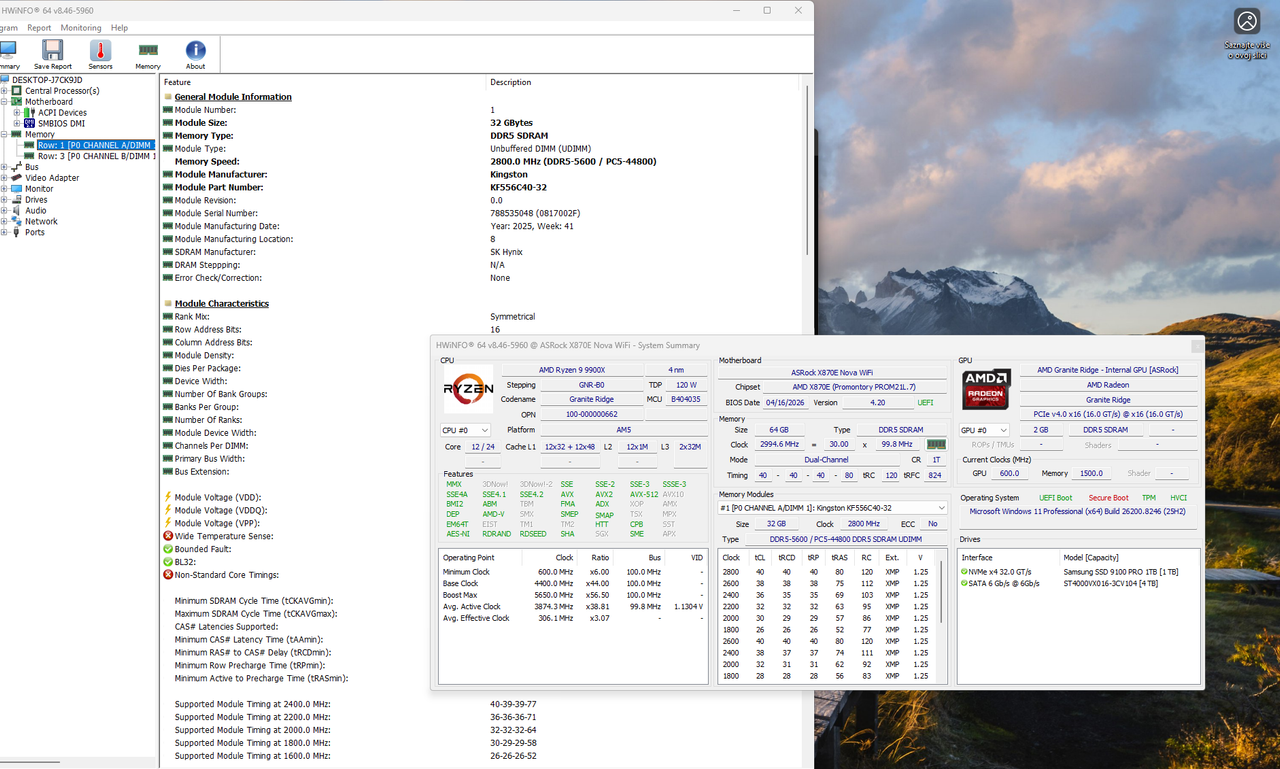
|
|
|
|
|
dom0xDee4
Groupie
Joined: 23 Apr 2026 Location: Croatia Status: Offline Points: 270 |
Post Options
Thanks(0)
Quote Reply
Posted: 05 May 2026 at 6:07am |
|
EDIT: Forgotten one thing. I installed ASRBGLED utility (ASRock), and it updated "firmware" of something, didn't manage to capture screen of that sadly.
|
|
|
|
|
Xaltar
Moderator Group
Joined: 16 May 2015 Location: Europe Status: Offline Points: 37693 |
Post Options
Thanks(0)
Quote Reply
Posted: 05 May 2026 at 6:22am |
|
This is brilliant info, thanks dom0xDee4. Hopefully ASRock will see this and get
something useful from it. To answer your questions: Yes, 3A is per header as far as I know. Grounding isn't critical but certainly doesn't hurt, particularly if you are experiencing electrical interference for some reason. Adding a grounding wire on a spade connector between the board and the case (being careful not to short anything around the mounting hole/ground plane) might be worth giving a shot. I would also ground the PSU casing to the PC case, that one is easy and safe to do. I am not sure if it will help but given your suspicion of some kind of power issue it's worth a shot. It may also be worth trying another PSU, just incase you have some ripple happening that isn't easy to measure with a regular multimeter. You typically need an oscilloscope to measure the ripple on power rails. |
|
|
|
|
|
|
|
dom0xDee4
Groupie
Joined: 23 Apr 2026 Location: Croatia Status: Offline Points: 270 |
Post Options
Thanks(0)
Quote Reply
Posted: 7 hours 19 minutes ago at 4:50am |
|
Hello there, i'm doing more testing - i'm convinced it is some sort of electrical glitch - i'll post more when i assemble the data.
Just a quick one: In the meantime, i have reverted to NOT using "Deep sleep". I am using "USB Power while off" "Enabled" - this also decreased occurence alot. Corsair PSU seemed to have firmware update (when i ran iCue software, it showed it being updated, but not sure what was there previously, only could find older firmware in their changelog). I have also toggled Corsair PSU setting to "single rail OCP" instead of "Multi" - but TBH i seriously doubt that was the issue. It's a HX1200i in case i haven't mentioned before. I have also tried grounding cable, in fact it's still in there - proper, thick ground cable, no resistance and no voltage drop - i can't say there is a change in error occurence. With error generally i have found pressing RESET key will make system go past it - past few days i have never ever done hard shutdown -> power on on 4d, just "RESET". Roughly 50% of attempts it goes thru on 1st attempt, rest i need to press RESET once more. Only once it got thru only on 3rd reset. I have since tired changing RAM settings, it really makes no observable difference (still running it at 6000 MT/s, 32/38/38/38 @1.35V (this kit is rated for 5600 @ 1.25V, 40/40/40/40). Ran 5hr session of y-cruncher today. Also done PassMark memorytest the other day, pass. There are few more things for me to try: - i have never removed the main system NVME PCI-e Gen5 drive - plan is to image disk to Gen4 drive and have system boot via one of Chipset ports. - also, i will try connecting CPU1 and CPU2 fans to connectors on board bottom - repeat tests with that fast DC-fan plugged in W_PUMP header (as removing it is by the thing that had serious impact on getting rid of the error). For the end, here is a feedback that looks like a bug, or one setting in BIOS overriding the other (but is not documented in manual): Today idea came to my mind - utilizing BIOS Setup timeout, in order to see would that allow electrical shenanigans to settle down. Step1 Enter UEFI, Setup Timeout set to 15 sec. Step2 Save and exit Step3 Observe Dr.Debug codes..usual stuff..until, surprise 15 (is it memory training code??) Step4 Monitor turns on, showing grey line, then quickly after Phantom gaming full screen logo, with Function key shortcuts to enter BIOS Setup or Choose boot device. 15 code still on debug. (this same screen is what you see when you encounter 4d, but pc is not responsive at that point). Step5 Windows boots (later verified 15 sec timeout is correctly parsed. Step6 Use Restart to UEFI by AsRock. Step7 Changed Setup timeout to 120 seconds. (This value can go beyond 1000 seconds, also undocumented in BIOS guide. Step8 Save and exit Step9 Observe Dr.Debug codes..usual stuff..until, again 15 Step10 Monitor turns on, showing grey line, then quickly after Phantom gaming full screen logo, with Function key shortcuts to enter BIOS Setup or Choose boot device. 15 code still on debug - and preset for whole 120 seconds Step11 Windows boots (120 sec timeout is correctly parsed.) Step12 Restart PC from Windows OS. Step13 Windows boots very fast - setup timeout delay clearly NOT being used at all here (footnote *1) Step14 Use Restart to UEFI by AsRock. Step15 Setup Timeout set to 30 sec. Step16 Save and exit Step17 Observe Dr.Debug codes..usual stuff..until, again 15 Step18 Monitor turns on, showing grey line, then quickly after Phantom gaming full screen logo, with Function key shortcuts to enter BIOS Setup or Choose boot device. 15 code still on debug - and preset for whole 30 seconds Step19 Windows boots (30 sec timeout is correctly parsed.) Step20 Restart PC from Windows OS. Step21 Windows boots very fast - setup timeout delay clearly NOT being used at all here (footnote *1) Step22 Shutdonw PC from Windows OS. (S5 state) Step23 Power ON pc. Step24 Observe Dr.Debug codes..usual stuff..(no code 15, MCR, fast boot,training runtime reduction, robust training etc all on..) Step25 Monitor turns on, immediately Phantom gaming full screen logo, and windows starts to boot - 30 sec timeout NOT used. Step26 Windows boots (30 sec timeout delay clearly NOT being used) footnote 1* - Windows OS "Fast boot" setting is NOT active and never was. Question: is this setup timeout overriden by FastBoot setting perhaps or is it a bug in bios ignoring it / some other setting overriding it? (Will test it myself, but not ready yet - all changes have to go thru some test time). Test results of today.. RAM touched on 50°C but don't think it is settings, rather an ambient in the room was 26°C at the time of testing. 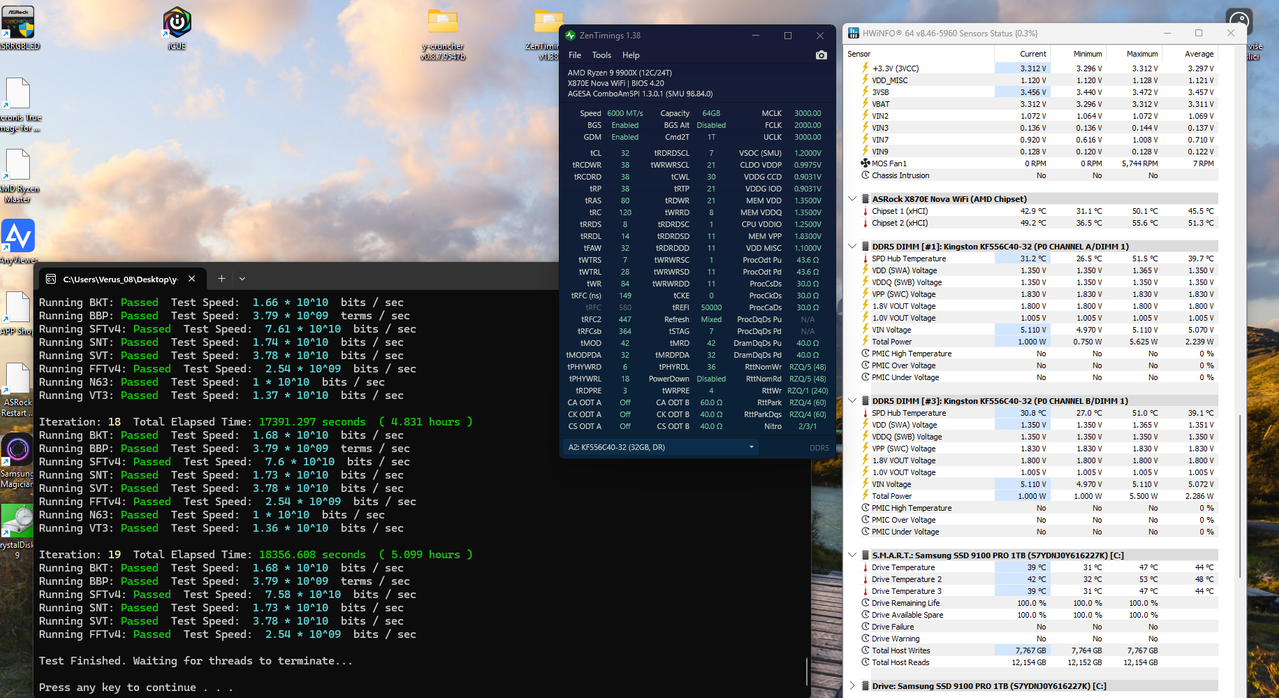
|
|
|
|
|
dom0xDee4
Groupie
Joined: 23 Apr 2026 Location: Croatia Status: Offline Points: 270 |
Post Options
Thanks(0)
Quote Reply
Posted: 4 hours 54 minutes ago at 7:15am |
|
EDIT: That is the case - Fast Boot ignores "Setup timeout delay".
Question 2. Over the interwebs, Code 15 = Memory training. Is there more to it? Since enabling the Setup timeout option and disabling FastBoot - as you've seen in previous message, code 15 is shown for as long as the delay set in BIOS. |
|
|
|
|
Post Reply
|
Page <123 |
 Tweet
Tweet
|
| Forum Jump | Forum Permissions You cannot post new topics in this forum You cannot reply to topics in this forum You cannot delete your posts in this forum You cannot edit your posts in this forum You cannot create polls in this forum You cannot vote in polls in this forum |


 Topic Options