
|
X870E Nova D4 on restart/cold boot |
Post Reply 
|
Page <1 234 |
| Author | |
dom0xDee4 
Groupie 

Joined: 23 Apr 2026 Location: Croatia Status: Offline Points: 345 |
 Post Options Post Options
 Thanks(0) Thanks(0)
 Quote Reply Quote Reply
 Posted: 14 May 2026 at 7:40pm Posted: 14 May 2026 at 7:40pm |
|
Hello,
i have much more info - but without the noise - doing alot of structured testing since Monday. In the meantime, i wonder about Memory QVL list how to read it. For example, green line here shows "Dimm socket support" "2": 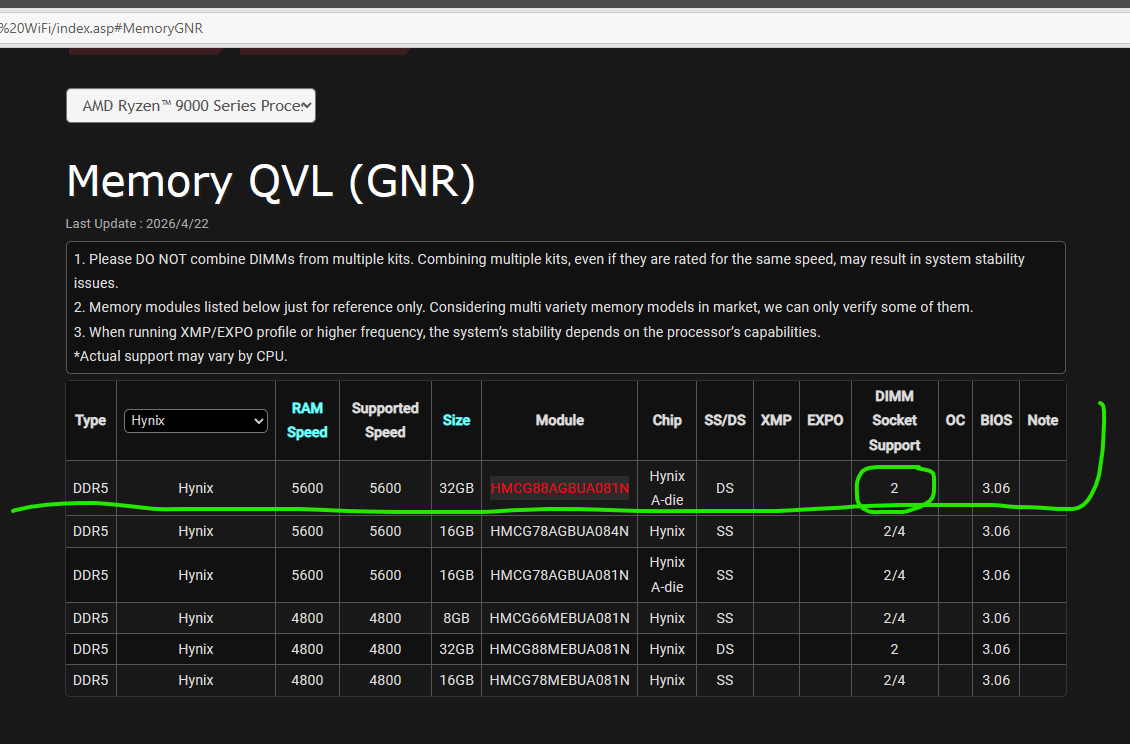 Would this mean two such modules would not work, aka one in socket 2, another in socket 4? Or is this just result of such dimm being tested only in socket 2? |
|
 |
|
|
Xaltar
Moderator Group 

Joined: 16 May 2015 Location: Europe Status: Offline Points: 39538 |
Post Options
Thanks(1)
Quote Reply
Posted: 14 May 2026 at 8:08pm |
|
It means verified with 2 modules, 2/4 means verified with 2 and 4 modules

|
|

|
|
|
|
|
dom0xDee4
Groupie
Joined: 23 Apr 2026 Location: Croatia Status: Offline Points: 345 |
Post Options
Thanks(0)
Quote Reply
Posted: 25 May 2026 at 7:46pm |
|
Hello, i have a summary of the tests done so far, with configuration, very detailed notes on actual BIOS settings - tracked via custom bitfield - i am working on a document which sums that all up, so it's clear and relatively easy to go over - won't post another before i wrap that.
In the meantime, i have to correct a mistake - Kingston kit i have is NOT on QVL list. Still, as you will see later, that didn't matter much. I have bought kit of 2 DIMM's, which i asked about in previous message. It is Sk Hynix kit "greenies" if you will - and lo and behold, Reset CMOS, unplug the thing, remove Kingston, install Hynix - all default settings - same story as with Kingston - fairly long training followed by 4D. Press Reset button - booted to Windows (just a small hint before i post complete writeup - this was always the case, Reset button to the Rescue :) ) I can't draw conclusions, but system throws intermittent 4d error - and anything i did related to power and some sort of timeout made it occur sporadically at best. When it showed up on debug screen - it would be mitigated by Reset button. Once up and running, memory speed, timing and voltage becomes irrelevant - i've ran many hours of stress tests, large file copy operations (internal drives / USB), nothing really crashed it (memory at 4800, 5600 or even 6000 fwiw...). Anyway, one more thing i have not tested is removing Gen5 (Windows boot) drive which is on CPU gen5 interface and using Chipset m2 slots, testing both with my Gen5 drive and other drive. Finally, i'll most likely get another mainboard - i have been pondering of getting another CPU, but in order to keep test conditions somewhat similar and not introduce another variable - i can't go for cheap 8xxx or lower-tier 7xxx CPU - it would have to really be 12 or 16 core, ideally Zen5 too, which is much more expensive then getting a mainboard, which i can get on much lower budget. Yes, i am mad enough to drive this all the way to finish line :D Small pic, not too relevant but for the record: Kingston kit i hold in my hand (in box, not original), SK Hynix greenies installed in background, and an ol' buddy on debug screen: 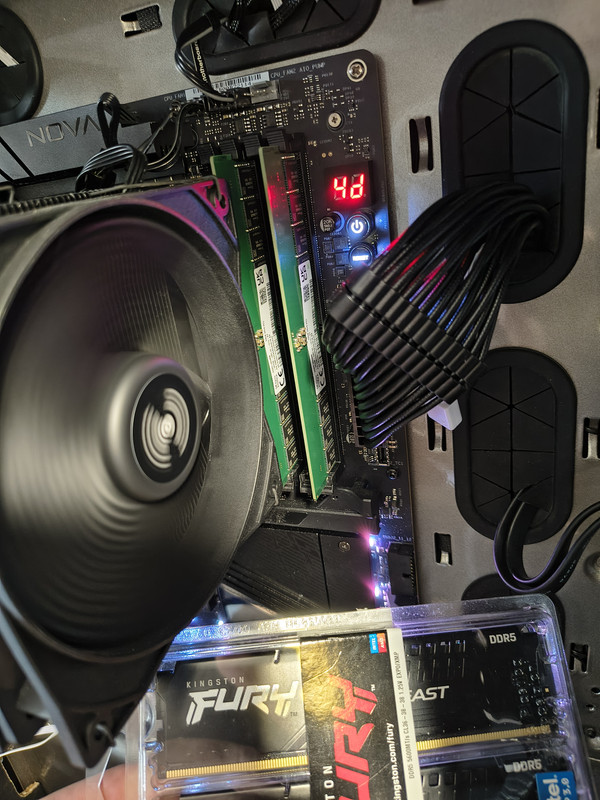
|
|
|
|
|
Xaltar
Moderator Group
Joined: 16 May 2015 Location: Europe Status: Offline Points: 39538 |
Post Options
Thanks(0)
Quote Reply
Posted: 25 May 2026 at 10:59pm |
|
Looking forward to reading through your findings. Thanks for taking the time to
do this, it has been quite the journey
|
|
|
|
|
|
|
|
dom0xDee4
Groupie
Joined: 23 Apr 2026 Location: Croatia Status: Offline Points: 345 |
Post Options
Thanks(1)
Quote Reply
Posted: 11 hours 52 minutes ago at 7:38pm |
|
Hello,
so after several weeks - i am at "boots reliably". However i can trigger 4D occasioanlly if "Fast startup" in windows is enabled. TLDR: issue on my end pretty much was due to dodgy/failing Wireless mouse USB dongle! I will still list anything i did and extensive testing coducted - i went as far as create a custom bitfield for BIOS settings / combinations for easier tracking of 4D occurence. Final realization came when i figured changing the number of USB devices influences how often error would occur, but without clear indication. So i was shuffling devices around and noticed if i plug mouse dongle in certain ports it barely can POST.
Important notes. Tested many various memory configs, i bought additional QVL kit (which is in there now, "barebones SK Hynix greenies) - generally 4D would DECREASE, in some cases ALOT with aggresive power settings - the explanation for it is likely more voltage gave it higher margin, due to faulty dongle messing various circuitry on board. Whenever i'd get 4D, i have realized all i have to do is press "Reset" button. Usually one reset would get it happily into windows, sometimes two and in very very rare cases - three resets. This made zero sense to me, but did imply something about cold boot-wakeup and power didn't roll correctly. What also made little sense, once powered on machine would run stress tests for many many hours, with zero issues. Basically only trouble was true cold boot, intermittent. I will post later all i did and settings that eventually led to lower error count. Conclusion is - if anyone happens to need such "exotic" workarounds - something is not quite right and if you are debugging it yourself - make sure to really inspect and suspect EVERY little bit. In my case, i have ruled out almost everything - PSU, CPU and dreaded USB dongle were the last ones. I almost bought another mainboard and / or CPU before realizing that small thing is burning back there. SK Hynix greenies are not bad at all (they're M-die before anyone asks) - perhaps non-QVL, XMP-only Kingston kit i replaced has tighter / better on-dimm voltage regulation - but so far that hasn't proved problematic to run SK's at "mild OC" 6000 / CL40 / 1.25V / VDDIO 1.25, VSoC 1.15. (can go much tighter timings, but needs higher voltage on VSoC, VDDIO, VDIMM, which i opted out of - gains for what i need are negligible. SK's i have equipped with passive heatsink as well). |
|
|
|
|
Xaltar
Moderator Group
Joined: 16 May 2015 Location: Europe Status: Offline Points: 39538 |
Post Options
Thanks(1)
Quote Reply
Posted: 8 hours 29 minutes ago at 11:01pm |
|
Thanks for the update. It's been quite a journey. I guess it goes to show, never
overlook a common component in testing. Even a keyboard or mouse can potentially be the cause of strange symptoms. It makes me wonder if others who ended up replacing components to solve issues could have fallen prey to a similar cause. I will definitely be keeping this in my back pocket from now on, trying with a different (wired) mouse and keyboard early on in troubleshooting. |
|
|
|
|
|
|
|
Post Reply
|
Page <1 234 |
 Tweet
Tweet
|
| Forum Jump | Forum Permissions You cannot post new topics in this forum You cannot reply to topics in this forum You cannot delete your posts in this forum You cannot edit your posts in this forum You cannot create polls in this forum You cannot vote in polls in this forum |


 Topic Options